Figma Design System
A monochrome editorial frame in figmaSans with pill CTAs, broken by lime, lavender, mint and pink panels. Figma's DESIGN.md for React and AI tools.
- Primary color
- #000000
- Typeface
- figmaSans
- Shape
- Soft
- Base radius
- 8px
- Colors
- 20
- Type tokens
- 12
- Components
- 23
- Spacing values
- 9
About Figma DESIGN.md
Curated by Dov Azencot, updated May 12, 2026. Source figma.com (opens in a new tab).
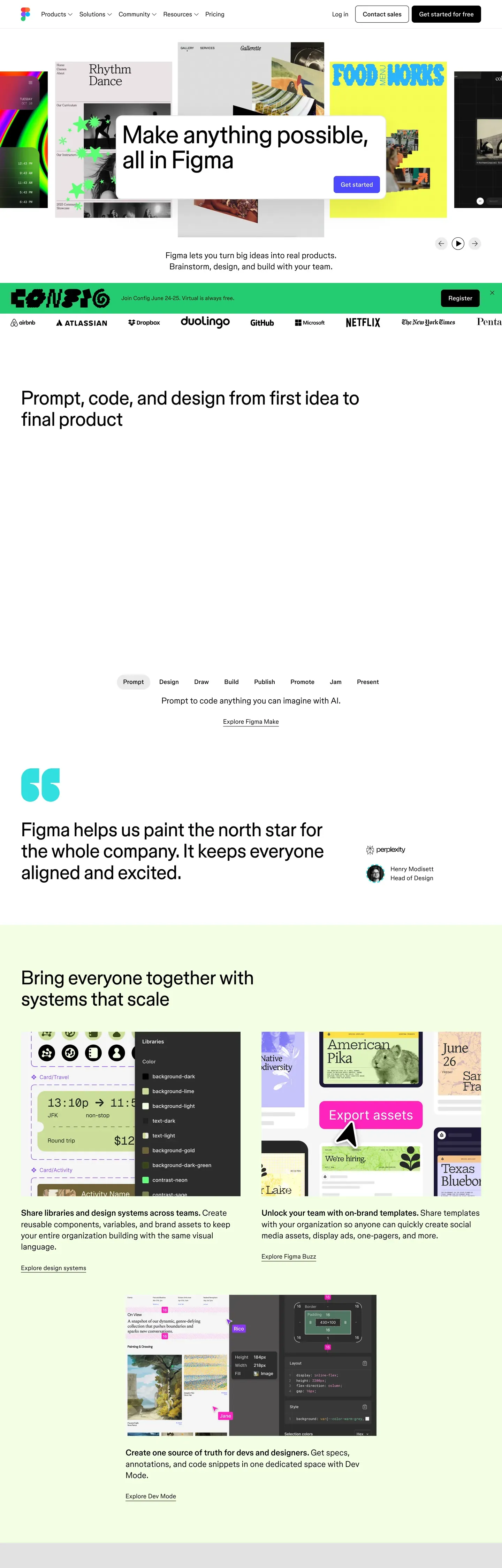
Figma's marketing site is the rare case where a design tool actually demonstrates its own design discipline. The frame is monochrome — black ink, white canvas, figmaSans variable type, pill-shaped CTAs — but every long-form page interrupts itself with oversized pastel panels that span the full content width. Lime for systems and FAQ, lilac for the /design route and FigJam highlights, cream for templates, mint and pink for FigJam pastel stories, coral for "ship products" on the home page, and a deep navy for the only inverse story block above the footer. The chrome stays editorial; the blocks do the storytelling. There is no gradient, no shadow stack, no second accent color outside a single magenta promo pill reserved for one CTA per page.
This page packages all of that into a single DESIGN.md file. Inside: 20 colors tokens grouped into brand, surface, text, and semantic roles; 13 type styles across figmaSans and figmaMono; 7 corner radius steps from 2px hairline to a 50px pill; 9 spacing tokens on an 8px base; and 23 components covering buttons, pricing tabs, color-block sections, navigation, comparison glyphs, and the dense footer link grid. The file follows Google Labs' DESIGN.md spec, so every token resolves to a concrete hex, px, or weight a build tool can read.
Feed the file to Claude, Cursor, or GitHub Copilot and the agent reproduces Figma's contrast — monochrome chrome interrupted by deliberate color-block sections — rather than a generic SaaS theme. Reference the tokens directly to wire them into Tailwind config, CSS variables, or your own component library. The system is worth studying because it solves a problem most marketing sites get wrong: how to feel both technical and joyful without leaning on bling.
What makes it distinct
5 highlights
- Monochrome chromeEvery CTA is black #000000 or white #ffffff; the system never reaches for a brand color outside the pastel blocks
- Seven oversized pastel surfacesLime, lilac, cream, mint, pink, coral, navy — span full content width with 24px corners and 48px padding
- Pill is the only button shape50px radius for text CTAs, 9999px for icon buttons, no square button anywhere
- figmaSans at unusual weight increments320, 330, 340, 480, 540, 700 — the type reads as one voice modulating, not a stepped family
- Display headlines pull -1.72px tracking at 86pxEditorial cadence without sacrificing body readability at 18px
Live at figma.com
Figma in production, as captured. Scroll the window to see the whole page.
20 colors
Figma's system runs on #000000 as its primary voltage, used in 3 of 23 components. Type is set in figmaSans across 12 tokens from 12px to 86px, weights 320–700. Shape language is soft — components average 23px corner radius, with no sharp interactive edges.
Brand & Accent
Sparing, CTA-only voltage · 2
Surface
Page and card backgrounds · 2
Text
Headlines, body, captions · 5
Borders & Hairlines
Dividers, outlines, rules · 2
Semantic
Status, errors, success, links · 1
Other
Specialty colors · 8
12 type tokens
Set in figmaSans across 12 tokens, from 12px to 86px, weights 320–700. Shown in its own stack: where the font isn't installed, the fallback the file names stands in.
- display-xl86px · weight 340 · lh 1 · tracking -1.72pxThe quick brown fox jumps over the lazy dog
- display-lg64px · weight 340 · lh 1.1 · tracking -0.96pxThe quick brown fox jumps over the lazy dog
- headline26px · weight 540 · lh 1.35 · tracking -0.26pxThe quick brown fox jumps over the lazy dog
- subhead26px · weight 340 · lh 1.35 · tracking -0.26pxThe quick brown fox jumps over the lazy dog
- card-title24px · weight 700 · lh 1.45The quick brown fox jumps over the lazy dog
- body-lg20px · weight 330 · lh 1.4 · tracking -0.14pxThe quick brown fox jumps over the lazy dog
- body18px · weight 320 · lh 1.45 · tracking -0.26pxThe quick brown fox jumps over the lazy dog
- body-sm16px · weight 330 · lh 1.45 · tracking -0.14pxThe quick brown fox jumps over the lazy dog
- link20px · weight 480 · lh 1.4 · tracking -0.10pxThe quick brown fox jumps over the lazy dog
- button20px · weight 480 · lh 1.4 · tracking -0.10pxThe quick brown fox jumps over the lazy dog
- eyebrow18px · weight 400 · lh 1.3 · tracking 0.54pxThe quick brown fox jumps over the lazy dog
- caption12px · weight 400 · lh 1 · tracking 0.60pxThe quick brown fox jumps over the lazy dog
Radii and spacing
7 corner radii and 9 spacing values. Shape language: soft, on a 8px base radius.
Radii7
- xs2px
- sm6px
- md8px
- lg24px
- xl32px
- pill50px
- full9999px
Spacing9
- hair1px
- xxs4px
- xs8px
- sm12px
- md16px
- lg24px
- xl32px
- xxl48px
- section96px
23 components
Each rendered from its tokens (color, type, radius, padding) on Figma's own canvas.
- Button PrimaryButton Primarybutton-primary
- Button Primary PressedButton Primary Pressedbutton-primary-pressed
- Button SecondaryButton Secondarybutton-secondary
- Button Tertiary TextButton Tertiary Textbutton-tertiary-text
- Button Icon Circularbutton-icon-circular
- Button Icon Circular Inversebutton-icon-circular-inverse
- Button Magenta PromoButton Magenta Promobutton-magenta-promo
- Pricing Tab DefaultPricing Tab Defaultpricing-tab-default
- Pricing Tab SelectedPricing Tab Selectedpricing-tab-selected
- Type here…Text Inputtext-input
- Type here…Text Input Focusedtext-input-focused
- Pricing CardPricing Cardpricing-card
- Pricing Card Feature RowPricing Card Feature Rowpricing-card-feature-row
- Color Block SectionColor Block Sectioncolor-block-section
- Color Block Section LilacColor Block Section Lilaccolor-block-section-lilac
- Color Block Section NavyColor Block Section Navycolor-block-section-navy
- Promo Banner LilacPromo Banner Lilacpromo-banner-lilac
- Template CardTemplate Cardtemplate-card
- Feature Illustration TileFeature Illustration Tilefeature-illustration-tile
- Top NavTop Navtop-nav
- Marquee StripMarquee Stripmarquee-strip
- Comparison CheckmarkComparison Checkmarkcomparison-checkmark
- FooterFooterfooter
The system, in use
Figma's tokens on the kind of product it builds.
Plan, build and ship in one place
Bring your team's work together, from the first idea to the final release.
Figma design system FAQ
Figma's tokens, its components and how to use this DESIGN.md in your project.
Figma's DESIGN.md has 20 color tokens: primary (#000000), on-primary (#ffffff), ink (#000000), canvas (#ffffff), inverse-canvas (#000000), inverse-ink (#ffffff) and 14 more. Every value is a quoted hex you can copy.
The color token `primary` is #000000, used by 3 components. The surface behind it is `canvas` (#ffffff).
Map the tokens to your CSS variables: `primary` (#000000) to `--primary`, `canvas` (#ffffff) to `--background`, `ink` (#000000) to `--foreground`. shadcn/ui's Tailwind setup maps them to classes such as `bg-primary` and `text-foreground`, so they then use Figma's palette.
The color blocks are full-content-width pastel panels with 24px rounded corners and 48px interior padding. The full set runs lime (#dceeb1), lilac (#c5b0f4), cream (#f4ecd6), mint (#c8e6cd), pink (#efd4d4), coral (#f3c9b6), and a deep navy (#1f1d3d). Each route uses a different rhythm — the home page rotates through the full set, FigJam leans heavily on the pastels, and the pricing page closes with a lime FAQ panel. They are the system's primary depth device, replacing the drop shadow that most SaaS sites would reach for.
The system primary is pure black (#000000). It carries every primary CTA, every headline, every body line, the marquee strip directly under the nav, and the inverse canvas of dark sections. White (#ffffff) is the canvas and the foreground of secondary pill buttons. There is no third brand color in the chrome — the only saturated accent is a single magenta (#ff3d8b) reserved for one promotional pill per page, typically inside the lilac Release Notes banner.
No — the marketing site is light-only. The closest analog is the navy color-block section (#1f1d3d) on the home page and the inverse-canvas footer that takes the same black ink role from the opposite direction. The editor itself ships dark and light themes, but those are product surfaces and aren't represented in this DESIGN.md, which captures the public marketing experience.
Figma's DESIGN.md sets its type in figmaSans and figmaMono. The first family is the one most tokens use.
12 type tokens, such as `display-xl`, from 12px to 86px, in weights 320 to 700. Each token carries its family, size, weight, line height and letter spacing.
figmaSans is Figma's main family and may be proprietary or need its own license. Keep the sizes, weights, line heights and letter spacing from the file and swap the family for an open font of similar proportions, such as a font from Google Fonts, set in `--font-sans`.
Figma runs figmaSans, a proprietary variable typeface, alongside figmaMono for eyebrows and captions. The variable weight axis is exercised at unusually fine increments — 320, 330, 340, 480, 540, 700 — so the system reads as one voice flexing rather than a stepped weight family. Display sizes pull aggressive negative tracking (-1.72px at 86px, -0.96px at 64px). Inter or Geist are the closest open-source substitutes for the sans; JetBrains Mono or Geist Mono for the mono. Adjust line-heights down by ~0.02 to compensate for Inter's slightly taller x-height.
23 components, among them `button-primary`, `button-primary-pressed`, `button-secondary`, `button-tertiary-text` and `button-icon-circular`. Each lists properties such as its background, text color, type token and corner radius as references to the other tokens.
7 corner radii: xs (2px), sm (6px), md (8px), lg (24px), xl (32px) and 2 more. 9 spacing values: hair (1px), xxs (4px), xs (8px), sm (12px), md (16px) and 4 more. The file reads as soft in shape.
Pill (50px radius) is the only button shape in the system — every text CTA, every pricing-tab toggle, every secondary action. Icon buttons take the fully-rounded 9999px circle. Form inputs and image frames use the gentler 8px radius. Square corners only appear at the 2px hairline level for sub-nav tabs. The consistency is intentional: a square CTA would read as a different brand. The pill-and-circle pairing is the brand signature.
Copy the color and radius tokens into your `globals.css`: Figma's `primary` (#000000) becomes `--primary`, and `md` (8px) becomes `--radius`. The shadcn/ui components read those variables, so they change with the file.
Download Figma's DESIGN.md (or copy it as Markdown) and put it in your project, or paste it into the chat. Then ask Claude Code, Cursor or another agent to build a page "in the style of the Figma DESIGN.md": it reads the tokens and writes matching components.
Yes. The file is free to download or copy, with no account, from the buttons at the top and bottom of this page. The raw Markdown is also at `/design/figma/raw`.
Figma's page describes the look of its public website (www.figma.com), curated from what is visible there: the colors, type and components. It is an interpretation.
No. The Figma DESIGN.md describes the look of a public website. It is not official, and Figma has not endorsed or reviewed it. The name and logo belong to Figma.
Yes — the file is designed to be fed into Claude, Cursor, or any AI tool that reads structured design tokens. The agent will reproduce Figma's contrast pattern — monochrome chrome, oversized pastel color-block sections between editorial bands — rather than a generic shadcn theme. You can also reference the tokens directly: every color, type style, radius, and spacing value in the spec is a quoted value you can paste into Tailwind config, CSS variables, or your own component library.
Related reading
Specs, directories and component libraries that pair with this design system.
- Browse all design systemsThe full directory of DESIGN.md files on shadcn.io, with live mockups for each.shadcn.io
- Figma Design product pageThe live /design/ route Figma uses to market the editor — the lilac hero is the canonical color-block reference.figma.com (opens in a new tab)
- The DESIGN.md specificationGoogle Labs' open spec for machine-readable design system files — the format this page is built on.github.com (opens in a new tab)
Use Figma in your project
One machine-readable file. Drop it into Claude Code, Cursor, VS Code or any AI tool that reads DESIGN.md.
Download the DESIGN.md
One machine-readable file: every color, type, radius, spacing, and component token of Figma.
Feed it to your AI tool
Drop it into Claude, Cursor, or GitHub Copilot. The agent writes React components and Tailwind classes that match Figma's visual language.
Reference the tokens directly
Or paste the values into your Tailwind config, CSS variables, or component library: every color, size and radius is a quoted, ready-to-copy value.
Read the full DESIGN.md overview, rationale, do’s and don’ts
Overview
Figma's marketing canvas is, at the system level, an editor-clean black-and-white frame. The chrome — top nav, body type, footer, primary CTA — is monochrome. Headlines are oversized {typography.display-xl} set in figmaSans with aggressive negative tracking, body copy hovers around weight 320–340 of the same variable family, and small mono {typography.eyebrow} and {typography.caption} labels (figmaMono, all-caps, positive tracking) act as section markers. Every CTA is a pill — {rounded.pill} — and the primary action across the entire site is the same black {components.button-primary} paired with the same white {components.button-secondary}.
What makes the design unique is what happens between those monochrome bookends: the page repeatedly drops into oversized pastel color-block sections — lime, lavender, cream, mint, pink, coral, and a deep navy — that span the full content width with {rounded.lg} corners and {spacing.xxl} interior padding. These blocks are where the storytelling lives. They aren't accents tucked into a card; they take over a whole viewport's worth of vertical space, like a designer arranging giant sticky notes on a clean wall. FigJam is the most pastel-saturated, the home page rotates through the full set, and the pricing page ends with a lime FAQ panel — same vocabulary, different rhythm per route.
This is a system built on contrast: the monochrome chrome makes the color blocks feel intentional rather than decorative, and the color blocks make the monochrome chrome feel like editorial paper rather than enterprise SaaS. Density is generous, line-heights are tight on display sizes, and the interface never reaches for shadows or gradients to do the work that color blocks and confident typography already do.
Key Characteristics:
- Monochrome system core:
{colors.primary}(black) and{colors.canvas}(white) carry every CTA, every body line, every footer link. - Oversized pastel color-block sections (
{colors.block-lime},{colors.block-lilac},{colors.block-cream},{colors.block-mint},{colors.block-pink},{colors.block-coral},{colors.block-navy}) define the narrative rhythm of every long-form page. - Pill is the only button shape —
{rounded.pill}for text CTAs,{rounded.full}for icon buttons. No square buttons anywhere. figmaSansvariable typeface used at unusually fine weight increments (320, 330, 340, 450, 480, 540) — the type system reads as a single voice that flexes rather than a multi-weight family.- Tight negative letter-spacing on display sizes (-1.72px at 86px, -0.96px at 64px) creates a confident editorial cadence.
figmaMonoreserved for category labels, eyebrows, and captions — always uppercase, positive tracking — to flag taxonomy without competing with display type.- Color-block page rhythm (home): white hero → marquee strip → white feature → lime systems block → navy ship-products block → coral developer block → white template grid → white footer.
Known Gaps
- The exact pastel hex values of
{colors.block-*}are derived from screenshot pixels; the production source likely uses named tokens that aren't exposed via CSS variables. Treat the documented hex values as faithful approximations rather than exact brand specs. - Dark mode is not documented because the marketing site does not ship a dark theme — the closest analog is the navy color-block (
color-block-section-navy) and the inverse-canvas footer. - Form-field error and validation styling is not visible on
/contact/because no error states render in the static screenshot. Inputs have hairline borders and rounded{rounded.md}corners; error treatment is not documented. - The animated marquee-strip and color-block reveal animations are not documented (per the no-interaction policy).
More systems like this
Adobe, Boursorama, Bun and 23 more in Design & Creative Tools: each brand's colors, type and components in one file your AI agent builds from.
Build it with Pro
The DESIGN.md files are free. Pro adds 6,000+ blocks, premium templates and the MCP server, so your AI editor builds in your system for you.
4.9/5 out of 5 · 150+ reviewsfrom 150+ founders and developers.
- Secure checkout via Stripe
- Code lives in your repo
- Keep what you've shipped if you cancel
- License terms
4.9 out of 5 from 150+ developers


Your system, built for you
Every block, template and icon, installed by your AI agent in your design system. The DESIGN.md files stay free.
Get Pro