Framer Design System
Framer as a working artboard: pure black, white GT Walsheim display, blue for links only and vivid gradient spotlights. Tokens for React and AI tools.
- Primary color
- #ffffff
- Typeface
- Inter Variable
- Shape
- Soft
- Base radius
- 10px
- Colors
- 17
- Type tokens
- 12
- Components
- 21
- Spacing values
- 9
About Framer DESIGN.md
Curated by Dov Azencot, updated May 12, 2026. Source framer.com (opens in a new tab).
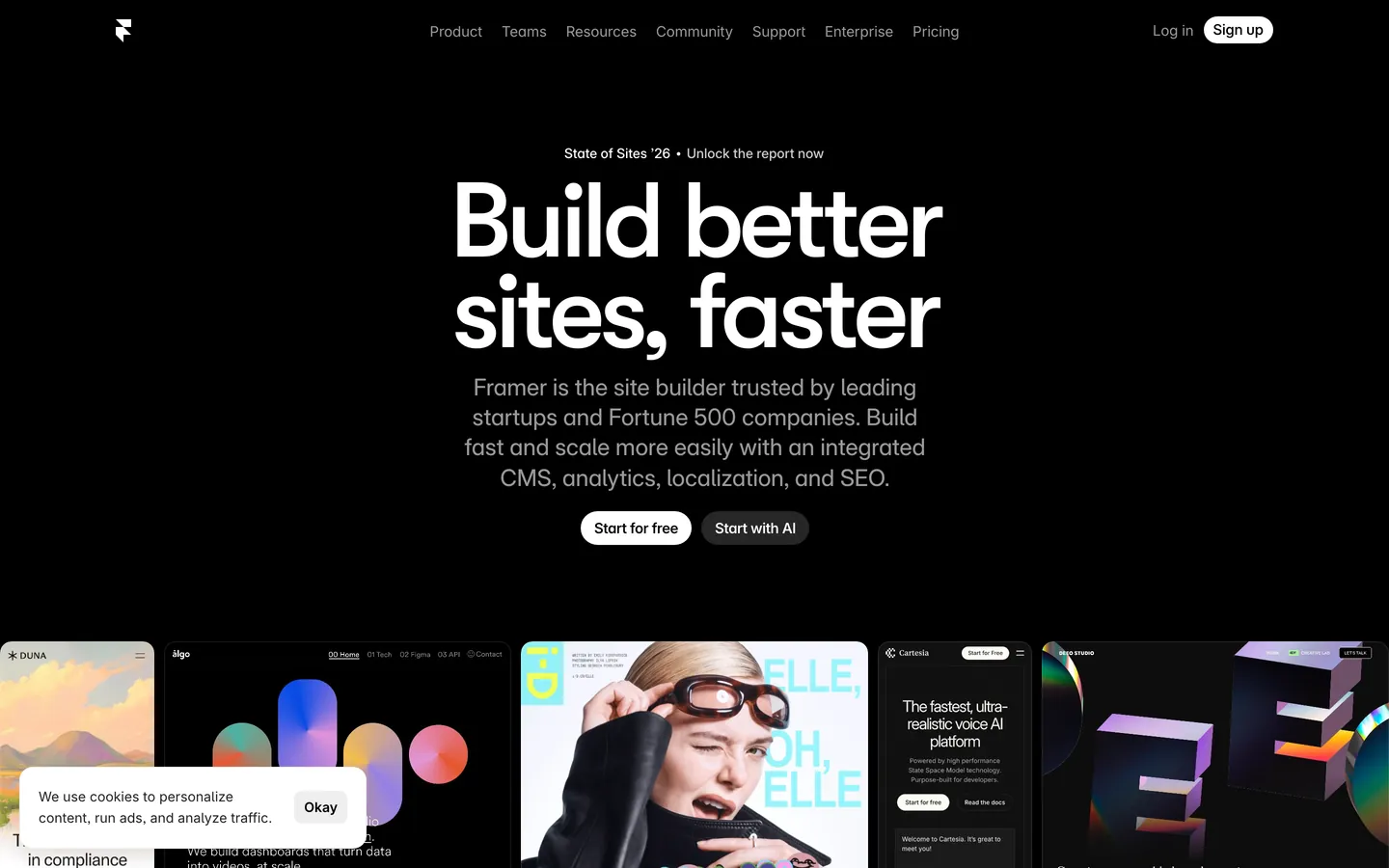
Framer's marketing canvas reads like a working artboard. The dominant surface is near-pure black with a faint warmth, and on top of it sits oversized white display type in GT Walsheim Medium with letter-spacing pulled to extreme negative values — 5.5px on the 110px hero, 4.25px on the 85px section openers. There is no light mode. Every band of the page chooses between black canvas or a charcoal lift; no white interludes break the rhythm. The single chromatic accent is a sharp signal blue (#0099ff), reserved exclusively for hyperlinks, focus rings, and selection states. What separates Framer from other dark systems is the rhythm break: oversized magenta, violet, orange and coral gradient panels drop into monochrome card grids as living atmosphere tiles, not section backgrounds.
This page packages the whole system into a single DESIGN.md file built on the Google Labs spec. Inside: 17 colors tokens grouped into brand, surface, text, semantic and signature gradient sets; 13 type styles running from a 110px display down to 12px micro; 8 corner radii from a 4px utility chip up to a 100px pill; 9 spacing increments on a non-standard 5px base; and 21 components covering pill buttons, pricing tabs, text inputs, mockup tiles, gradient spotlight cards, comparison rows, FAQ, top nav and footer. Every token is a quoted string ready to paste into Tailwind config, CSS variables, or your own component library.
Feed the file to Claude, Cursor, or GitHub Copilot and the agent reproduces Framer's discipline — the white pill CTA, the charcoal surface lift, the binary ink-to-ink-muted hierarchy, the scarce gradient spotlight — rather than a generic dark SaaS theme. The system is worth studying because it shows how far typography and surface lift can carry a brand when the palette is monochrome plus one signal color. Where lesser dark themes lean on neon or rainbow gradients, Framer leans on negative tracking and a single confident blue.
What makes it distinct
5 highlights
- Pure black canvas#090909 carries hero, pricing, FAQ and footer; no light-mode interludes anywhere on the marketing site
- Display tracking at -5.5px110px GT Walsheim Medium pulled to 5% negative letter-spacing is the brand voice, not a stylistic accident
- Single signal blue#0099ff appears only on hyperlinks, focus rings and selected states; never a button fill
- Gradient spotlight cardsMagenta, violet, orange and coral tiles drop into monochrome grids as atmosphere, not section grounds
- Inter Variable with cv01/05/09/11 and ss03/ss07OpenType character variants are the body voice, not a stylistic afterthought
Live at framer.com
Framer in production, as captured. Scroll the window to see the whole page.
17 colors
Framer's system runs on #ffffff as its primary voltage, used in 2 of 21 components. Type is set in Inter Variable across 12 tokens from 12px to 110px, weights 400–700. Shape language is soft — components average 36px corner radius, with no sharp interactive edges.
Brand & Accent
Sparing, CTA-only voltage · 2
Surface
Page and card backgrounds · 3
Text
Headlines, body, captions · 4
Borders & Hairlines
Dividers, outlines, rules · 2
Semantic
Status, errors, success, links · 1
Other
Specialty colors · 5
12 type tokens
Set in Inter Variable across 12 tokens, from 12px to 110px, weights 400–700. Shown in its own stack: where the font isn't installed, the fallback the file names stands in.
- display-xxl110px · weight 500 · lh 0.85 · tracking -5.5pxThe quick brown fox jumps over the lazy dog
- display-xl85px · weight 500 · lh 0.95 · tracking -4.25pxThe quick brown fox jumps over the lazy dog
- display-lg62px · weight 500 · lh 1 · tracking -3.1pxThe quick brown fox jumps over the lazy dog
- display-md32px · weight 500 · lh 1.13 · tracking -1.0pxThe quick brown fox jumps over the lazy dog
- headline22px · weight 700 · lh 1.2 · tracking -0.8pxThe quick brown fox jumps over the lazy dog
- subhead24px · weight 400 · lh 1.3 · tracking -0.01pxThe quick brown fox jumps over the lazy dog
- body-lg18px · weight 400 · lh 1.3 · tracking -0.18pxThe quick brown fox jumps over the lazy dog
- body15px · weight 400 · lh 1.3 · tracking -0.15pxThe quick brown fox jumps over the lazy dog
- body-sm14px · weight 500 · lh 1.4 · tracking -0.14pxThe quick brown fox jumps over the lazy dog
- caption13px · weight 500 · lh 1.2 · tracking -0.13pxThe quick brown fox jumps over the lazy dog
- micro12px · weight 400 · lh 1.2 · tracking -0.12pxThe quick brown fox jumps over the lazy dog
- button14px · weight 500 · lh 1 · tracking -0.14pxThe quick brown fox jumps over the lazy dog
Radii and spacing
8 corner radii and 9 spacing values. Shape language: soft, on a 10px base radius.
Radii8
- xs4px
- sm6px
- md10px
- lg15px
- xl20px
- xxl30px
- pill100px
- full9999px
Spacing9
- hair1px
- xxs4px
- xs8px
- sm12px
- md15px
- lg20px
- xl30px
- xxl40px
- section96px
21 components
Each rendered from its tokens (color, type, radius, padding) on Framer's own canvas.
- Button PrimaryButton Primarybutton-primary
- Button Primary PressedButton Primary Pressedbutton-primary-pressed
- Button SecondaryButton Secondarybutton-secondary
- Button TranslucentButton Translucentbutton-translucent
- Button Icon Circularbutton-icon-circular
- Pricing Tab DefaultPricing Tab Defaultpricing-tab-default
- Pricing Tab SelectedPricing Tab Selectedpricing-tab-selected
- Type here…Text Inputtext-input
- Type here…Text Input Focusedtext-input-focused
- Pricing CardPricing Cardpricing-card
- Pricing Card FeaturedPricing Card Featuredpricing-card-featured
- Template CardTemplate Cardtemplate-card
- Gradient Spotlight CardGradient Spotlight Cardgradient-spotlight-card
- Gradient Spotlight Card MagentaGradient Spotlight Card Magentagradient-spotlight-card-magenta
- Gradient Spotlight Card OrangeGradient Spotlight Card Orangegradient-spotlight-card-orange
- Product Mockup TileProduct Mockup Tileproduct-mockup-tile
- Feature RowFeature Rowfeature-row
- Comparison RowComparison Rowcomparison-row
- Top NavTop Navtop-nav
- Faq RowFaq Rowfaq-row
- FooterFooterfooter
The system, in use
Framer's tokens on the kind of product it builds.
Plan, build and ship in one place
Bring your team's work together, from the first idea to the final release.
Framer design system FAQ
Framer's tokens, its components and how to use this DESIGN.md in your project.
Framer's DESIGN.md has 17 color tokens: primary (#ffffff), on-primary (#000000), accent-blue (#0099ff), ink (#ffffff), ink-muted (#999999), canvas (#090909) and 11 more. Every value is a quoted hex you can copy.
The color token `primary` is #ffffff, used by 2 components. The surface behind it is `canvas` (#090909).
Map the tokens to your CSS variables: `primary` (#ffffff) to `--primary`, `canvas` (#090909) to `--background`, `ink` (#ffffff) to `--foreground`. shadcn/ui's Tailwind setup maps them to classes such as `bg-primary` and `text-foreground`, so they then use Framer's palette.
Framer's brand is monochrome — pure white (#ffffff) on near-black canvas (#090909). The only chromatic accent is a sharp sky blue (#0099ff), used scarcely for hyperlinks, focus rings on inputs, and selected states. It never appears as a button fill or section background. Surface lift through charcoal stops (#141414 to #1c1c1c) carries hierarchy on dark, not chromatic fills.
The gradient panels — magenta (#d44df0), violet (#6a4cf5), orange (#ff7a3d) and coral (#ff5577) — are individual oversized cards, never section backgrounds. They drop into otherwise monochrome card grids as atmosphere tiles, with 30px (rounded.xxl) corners that mark them as softer than the 20px content cards on purpose. One or two per long page is the spec; three is a moodboard. The hex values in the file are anchor colors — the production cards layer them as linear-gradient strings on individual elements.
Framer's DESIGN.md sets its type in Inter Variable, GT Walsheim Medium and GT Walsheim Framer Medium and 1 more. The first family is the one most tokens use.
12 type tokens, such as `display-xxl`, from 12px to 110px, in weights 400 to 700. Each token carries its family, size, weight, line height and letter spacing.
Inter Variable is Framer's main family and may be proprietary or need its own license. Keep the sizes, weights, line heights and letter spacing from the file and swap the family for an open font of similar proportions, such as a font from Google Fonts, set in `--font-sans`.
Framer's display typeface is GT Walsheim Medium (a commercial license), pulled to extreme negative letter-spacing — 5.5px on the 110px hero, 4.25px on the 85px section openers, 3.1px on the 62px sub-section openers. Body type is Inter Variable with character variants cv01, cv05, cv09, cv11 plus stylistic sets ss03 and ss07 enabled. Open-source substitutes include Mona Sans, Geist, or Inter at weight 600–700 with manually tightened tracking. Mona Sans's hairline weights at 100–300 are particularly close to Framer's cleaner section openers.
21 components, among them `button-primary`, `button-primary-pressed`, `button-secondary`, `button-translucent` and `button-icon-circular`. Each lists properties such as its background, text color, type token and corner radius as references to the other tokens.
8 corner radii: xs (4px), sm (6px), md (10px), lg (15px), xl (20px) and 3 more. 9 spacing values: hair (1px), xxs (4px), xs (8px), sm (12px), md (15px) and 4 more. The file reads as soft in shape.
Copy the color and radius tokens into your `globals.css`: Framer's `primary` (#ffffff) becomes `--primary`, and `md` (10px) becomes `--radius`. The shadcn/ui components read those variables, so they change with the file.
Download Framer's DESIGN.md (or copy it as Markdown) and put it in your project, or paste it into the chat. Then ask Claude Code, Cursor or another agent to build a page "in the style of the Framer DESIGN.md": it reads the tokens and writes matching components.
Yes. The file is free to download or copy, with no account, from the buttons at the top and bottom of this page. The raw Markdown is also at `/design/framer/raw`.
Framer's page describes the look of its public website (www.framer.com), curated from what is visible there: the colors, type and components. It is an interpretation.
No. The Framer DESIGN.md describes the look of a public website. It is not official, and Framer has not endorsed or reviewed it. The name and logo belong to Framer.
No. Framer's marketing site is dark-only — there is no light-mode adaptation documented because the brand IS dark. The canvas at #090909 carries hero, pricing, FAQ and footer alike. A pure white token (#ffffff) exists as the surface of light-on-dark pill CTAs and a small set of light-mode template thumbnails embedded in the showcase grid, but the page itself never inverts.
Yes — the file is designed to be fed into Claude, Cursor, or any AI tool that reads structured design tokens. The agent reproduces Framer's restraint (white pill CTAs, surface-lift hierarchy, scarce blue, gradient spotlight cards as atmosphere) rather than a generic dark SaaS theme. You can also reference the tokens directly: every color, type style, radius and spacing value is a quoted value ready to paste into Tailwind config, CSS variables, or your own component library.
The exact gradient stops for the spotlight cards are derived from screenshot pixels rather than CSS variables — treat the documented gradient-* hex values as base anchors, not exact gradient specs. Form-field validation and error styling isn't visible because no error states render in the static screenshots. Dark mode is the only mode — no light-mode adaptation is documented. The marketplace template detail page returned sparser CSS variable data than other pages; surface tokens for that page were inferred from the matching home and gallery treatment rather than extracted directly.
Related reading
Specs, directories and component libraries that pair with this design system.
- Browse all design systemsThe full directory of DESIGN.md files on shadcn.io, with live mockups for each.shadcn.io
- Framer.comThe live site this spec was extracted from — see the gradient spotlight cards and display tracking in motion.framer.com (opens in a new tab)
- The DESIGN.md specificationGoogle Labs' open spec for machine-readable design system files — the format this page is built on.github.com (opens in a new tab)
Use Framer in your project
One machine-readable file. Drop it into Claude Code, Cursor, VS Code or any AI tool that reads DESIGN.md.
Download the DESIGN.md
One machine-readable file: every color, type, radius, spacing, and component token of Framer.
Feed it to your AI tool
Drop it into Claude, Cursor, or GitHub Copilot. The agent writes React components and Tailwind classes that match Framer's visual language.
Reference the tokens directly
Or paste the values into your Tailwind config, CSS variables, or component library: every color, size and radius is a quoted, ready-to-copy value.
Read the full DESIGN.md overview, rationale, do’s and don’ts
Overview
Framer's marketing canvas is a near-pure black artboard. The dominant surface is {colors.canvas} — almost pure black with a faint warmth — and on top of it sits oversized white display type set in GT Walsheim Medium with letter-spacing pulled to extreme negative values (-5.5px on the 110px display, -4.25px on the 85px hero). The page reads like a poster: one assertive statement per band, generous breathing room above and below.
The single accent is {colors.accent-blue} — used scarcely, mostly for hyperlinks, selection halos, and a subtle blue-tinted shadow ring on focused inputs. The brand chrome itself is monochrome: white pill buttons, charcoal cards, gray secondary text. What makes Framer distinctive is the rhythm break — every few sections the page drops in a vibrant gradient atmosphere card: a magenta-violet spotlight, a sunset-orange wash, a coral-pink panel. These aren't section backgrounds; they're individual cards arranged in a card grid, each one a small living poster that shows what Framer can produce.
Body type is Inter Variable, with Framer leaning hard into Inter's character variants (cv01, cv05, cv09, cv11, ss03, ss07, dlig) — the result is a body voice that feels custom-tuned, with single-storey "a", straight-leg "l", and tabular figures. There's no light mode on the marketing site; the brand IS dark.
Key Characteristics:
- Black-canvas marketing system:
{colors.canvas}is the surface for hero, body, pricing, FAQ, and footer alike — no light interludes. - Massive negative letter-spacing on display sizes (-5.5px / -4.25px / -3.1px) creates a poster-grade headline cadence.
- White pill (
{components.button-primary}) is the only primary CTA shape across the site; secondary actions live as charcoal pills ({components.button-secondary}) or text links. - Oversized gradient spotlight cards (violet, magenta, orange, coral) act as showcase tiles inside the dark grid; they are individual cards, not section backgrounds.
- Inter Variable with bespoke OpenType character variants (
cv01/05/09/11,ss03/ss07,dlig) used everywhere body type appears — the typographic voice is unmistakable. - Border radius scale runs from 4px utility chips up to 100px pills and full circles, with 15–20px the default for cards and 30px for atmospheric gradient cards.
- A single chromatic accent
{colors.accent-blue}reserved for hyperlinks, focus, and selection — never decorative.
Colors
Source pages: framer.com (home), /ai/, /startups/, /marketplace/templates/nudge/, /gallery/a16z-speedrun-×-tonik, /pricing.
Brand & Accent
- Pure White ({colors.primary}): The brand primary surface. Every primary CTA pill, every display headline, every body line on canvas.
- Sky Blue ({colors.accent-blue}): The single chromatic accent. Hyperlinks, focused-input rings, and a few selection states. Never used for backgrounds or as a brand fill.
Surface
- Canvas ({colors.canvas}): Default page background — near-black with a faint warmth. Footer, pricing, hero, and FAQ all sit on it.
- Surface 1 ({colors.surface-1}): One step above canvas — pricing cards, secondary buttons, mockup tiles.
- Surface 2 ({colors.surface-2}): Two steps above — featured pricing card, hero pill backdrop, selected pricing tab.
- Hairline ({colors.hairline}): 1px borders on input groups, comparison-table dividers.
- Hairline Soft ({colors.hairline-soft}): Subtler dividers — between FAQ rows and footer column rules.
- Inverse Canvas ({colors.inverse-canvas}): Pure white — used as the surface of light-on-dark pill CTAs and a small set of light-mode template thumbnails embedded in the showcase grid.
Text
- Ink ({colors.ink}): All headline and emphasized body type — pure white.
- Ink Muted ({colors.ink-muted}): Secondary type — gray (#999999) used for meta info, footer columns, comparison-row labels, deselected pricing tabs. Hierarchy on the dark canvas is carried by ink → ink-muted contrast, not by weight changes.
Semantic
- Success Green ({colors.semantic-success}): Pricing comparison-table checkmarks. Glyph fill, not surface.
Brand Gradient (signature)
- Gradient Magenta ({colors.gradient-magenta}): Spotlight card variant.
- Gradient Violet ({colors.gradient-violet}): Spotlight card variant — most common.
- Gradient Orange ({colors.gradient-orange}): Spotlight card variant — sunset wash.
- Gradient Coral ({colors.gradient-coral}): Spotlight card variant — coral/pink.
These four sit as oversized atmospheric tiles inside otherwise monochrome card grids — a dark canvas with one or two glowing spotlight cards is a recurring page signature.
Typography
Font Family
- GT Walsheim Framer Medium / GT Walsheim Medium — Framer's display typeface. Geometric, slightly humanist, very confident at large sizes with extreme negative tracking. Fallbacks:
GT Walsheim Medium Placeholdersystem font. - Inter Variable — System body typeface. Used with extensive OpenType character variants:
cv01(alternate "1"),cv05(alternate "g"),cv09(alternate "i" / "l"),cv11(alternate "0"),ss03/ss07stylistic sets,dligdiscretionary ligatures, andtnumfor numerics in tabular contexts. The result is a body voice that feels bespoke without commissioning a custom face. - Inter — Used selectively for
{typography.headline}(the 22px / 20px tier). The non-variable cut catches small tracking targets that the variable file rounds.
Hierarchy
| Token | Size | Weight | Line Height | Letter Spacing | Use |
|---|---|---|---|---|---|
{typography.display-xxl} | 110px | 500 | 0.85 | -5.5px | Largest hero headline (home, AI page) |
{typography.display-xl} | 85px | 500 | 0.95 | -4.25px | Section opener headlines |
{typography.display-lg} | 62px | 500 | 1.00 | -3.1px | Sub-section openers |
{typography.display-md} | 32px | 500 | 1.13 | -1.0px | Card titles, smaller display |
{typography.headline} | 22px | 700 | 1.20 | -0.8px | Pricing tier headlines, FAQ category titles |
{typography.subhead} | 24px | 400 | 1.30 | -0.01px | Lead body next to display headlines |
{typography.body-lg} | 18px | 400 | 1.30 | -0.18px | Hero subhead, lead paragraphs |
{typography.body} | 15px | 400 | 1.30 | -0.15px | Default body, card descriptions |
{typography.body-sm} | 14px | 500 | 1.40 | -0.14px | Pricing comparison rows, dense data |
{typography.caption} | 13px | 500 | 1.20 | -0.13px | Eyebrows, footer columns, meta |
{typography.micro} | 12px | 400 | 1.20 | -0.12px | Disclaimer, footnote |
{typography.button} | 14px | 500 | 1.0 | -0.14px | Pill buttons |
Principles
- Letter-spacing scales with size, hard. Display-xxl pulls -5.5px (5% of size); body sticks to about -1% (-0.15px on 15px). The result: posters at the top, comfortable reading at body.
- OpenType character variants are the brand voice. Switching off
cv11,ss03, etc. visibly changes the body voice — the brand depends on them. - Weight stays in a narrow band. Display sits at 500, body at 400, body-sm/caption at 500. Hierarchy is carried by size + tracking, not by 700/900 ramps.
- Tight line-heights everywhere. Even body runs at 1.30 — Framer's editorial tone is denser than typical SaaS marketing.
Note on Font Substitutes
If implementing without GT Walsheim Medium, suitable open-source substitutes include Mona Sans, Geist, or Inter at weight 600–700 with manually tightened tracking. Mona Sans's hairline weights at 100–300 are particularly close to Framer's cleaner section openers. Inter Variable is open-source — keep it as-is and preserve the documented OpenType variants.
Layout
Spacing System
- Base unit: 5px (Framer uses non-standard 5/10/15/20/30 increments rather than the more common 4/8/16/24).
- Tokens (front matter):
{spacing.hair}1px ·{spacing.xxs}4px ·{spacing.xs}8px ·{spacing.sm}12px ·{spacing.md}15px ·{spacing.lg}20px ·{spacing.xl}30px ·{spacing.xxl}40px ·{spacing.section}96px. - Card interior padding:
{spacing.lg}20px on pricing cards;{spacing.xl}30px on gradient spotlight cards. - Pill button padding: 10px vertical · 15px horizontal —
{components.button-primary}. - Section padding (vertical): roughly
{spacing.section}96px on home; tighter (~64px) on pricing comparison.
Grid & Container
- Max content width sits around the 1199px breakpoint, with side gutters that scale toward
{spacing.xl}on desktop. - Card grids on the home gallery use 2-up at desktop, collapsing to 1-up below 810px.
- Pricing tier grid is 4-up across the documented breakpoints; comparison table beneath it uses fixed-width left column with horizontally scrolling tier columns at narrow widths.
Whitespace Philosophy
The dark canvas IS the whitespace. Where lighter brands lean on white air to separate sections, Framer leans on long stretches of black with a single oversized statement floating in the middle. Sections separate by mode change: a band of charcoal cards, then a band of black with a gradient spotlight, then back to charcoal — like cuts in a dark film.
Elevation & Depth
| Level | Treatment | Use |
|---|---|---|
| 0 (flat) | No shadow, no border | Default for canvas-mounted display type, FAQ rows, footer |
| 1 (charcoal) | {colors.surface-1} lift on canvas | Pricing cards, mockup tiles, secondary buttons |
| 2 (light-edge) | rgba(255,255,255,0.10) 0.5px top edge + rgba(0,0,0,0.25) 0px 10px 30px drop | Floating product cards, modal cards |
| 3 (selected) | rgba(0,153,255,0.15) 0px 0px 0px 1px ring | Focused inputs, selected option |
Four shadow signatures recur across the homepage: a 1px subtle drop, a translucent blue ring, a thick near-black 2px outline (used as the active-element marker on sub-nav), and the layered light-edge + drop-shadow used for floating cards.
Decorative Depth
- Gradient spotlight cards are the dominant depth device — color saturation against black canvas substitutes for shadow-driven elevation.
- Layered product mockups (browser frames containing live Framer-built sites) sit inside
{colors.surface-1}cards with the level-2 light-edge treatment. - Subtle blue ring (focus / selected) is the only chromatic depth signal — used to mark the active state of input groups and pricing tier toggles without changing the underlying surface.
Shapes
Border Radius Scale
Framer's extracted radius set is unusually granular (1px, 4px, 5px, 6px, 8px, 10px, 12px, 15px, 20px, 30px, 40px, 100px). The named scale below picks the levels the marketing surface actually consumes.
| Token | Value | Use |
|---|---|---|
{rounded.xs} | 4px | Small chip / utility radius |
{rounded.sm} | 6px | Inline tag, badge |
{rounded.md} | 10px | Form input, list item |
{rounded.lg} | 15px | Template card thumbnails |
{rounded.xl} | 20px | Pricing cards, mockup tiles |
{rounded.xxl} | 30px | Gradient spotlight cards, oversized panels |
{rounded.pill} | 100px | All primary text CTAs |
{rounded.full} | 9999px | Circular icon buttons, avatar circles |
Photography & Illustration Geometry
- Embedded site mockups (browser-chromed previews of Framer-built sites) sit in
{rounded.xl}20px tiles with{spacing.md}15px interior padding. - Gradient spotlight cards use
{rounded.xxl}30px corners — softer than the 20px content cards by design, to make them feel like atmospheric panels rather than tighter UI. - Icon glyphs and sub-nav glyphs render in
{rounded.full}circles at 32–40px sizes.
Components
Buttons
button-primary — White pill on dark canvas. The primary CTA across home, pricing, AI, and gallery pages.
- Background
{colors.primary}, text{colors.on-primary}, type{typography.button}, padding 10px 15px, rounded{rounded.pill}. - Pressed state lives in
button-primary-pressed(the live site uses a transform-scale shrink rather than a darkened fill).
button-secondary — Charcoal pill. Used for secondary navigation actions ("Sign in", "Talk to sales") and as the visual counterpart to the primary pill.
- Background
{colors.surface-1}, text{colors.ink}, type{typography.button}, padding 10px 15px, rounded{rounded.pill}.
button-translucent — Translucent / lifted secondary used on top of busy backgrounds (gallery hero, gradient cards).
- Background
{colors.surface-2}, text{colors.ink}, type{typography.button}, rounded{rounded.xxl}, padding 8px 14px.
button-icon-circular — 40px circle for inline icon actions (carousel arrows, social links).
- Background
{colors.surface-1}, text{colors.ink}, rounded{rounded.full}, size 40px.
Pricing Tabs
pricing-tab-default + pricing-tab-selected — The pill-toggle that switches between Basic / Pro / Business / Enterprise on /pricing.
- Default:
{colors.canvas}background,{colors.ink-muted}text, rounded{rounded.pill}. - Selected:
{colors.surface-2}background,{colors.ink}text — selected = lift, not color. Surface depth communicates "active" without needing a chromatic fill.
Inputs & Forms
text-input + text-input-focused — Form fields on /pricing (seat-count, currency switcher) and the in-product preview surfaces.
- Background
{colors.surface-1}, text{colors.ink}, type{typography.body}, rounded{rounded.md}, padding 10px 14px. - Focused state retains the same surface; the focus ring is the level-3 blue-tinted shadow
rgba(0,153,255,0.15)0 0 0 1px.
Cards & Containers
pricing-card — Each tier on /pricing.
- Background
{colors.surface-1}, text{colors.ink}, type{typography.body}, rounded{rounded.xl}, padding 24px.
pricing-card-featured — The Pro tier (visually emphasized).
- Background
{colors.surface-2}, otherwise identical structure. The lift is one surface step up — no chromatic outline.
template-card — Thumbnail tile in the home "Built with Framer" gallery and /marketplace.
- Background
{colors.surface-1}, text{colors.ink}, type{typography.body-sm}, rounded{rounded.lg}, padding 12px.
product-mockup-tile — Larger tile that frames a live product UI mock (Framer canvas, Workshop video, AI translate panel).
- Background
{colors.surface-1}, text{colors.ink}, type{typography.body-sm}, rounded{rounded.xl}, padding 16px.
Gradient Spotlight Cards (signature)
The defining decorative surface of Framer's marketing — oversized atmospheric tiles dropped into otherwise monochrome card grids. Variants:
gradient-spotlight-card — violet ground (most common).
- Background
{colors.gradient-violet}, text{colors.ink}, type{typography.subhead}, rounded{rounded.xl}, padding 32px. (The on-site card often pushes to{rounded.xxl}30px when it spans a wider tile.)
gradient-spotlight-card-magenta — magenta-pink ground.
- Background
{colors.gradient-magenta}, otherwise identical.
gradient-spotlight-card-orange — sunset-orange wash.
- Background
{colors.gradient-orange}, otherwise identical.
(Coral pink follows the same shape with {colors.gradient-coral}.)
Comparison & FAQ
feature-row + comparison-row — Single rows inside the pricing comparison table.
feature-row:{colors.canvas}background,{colors.ink}text. Header rows.comparison-row:{colors.canvas}background,{colors.ink-muted}text. Data rows with{typography.body-sm}and 1px{colors.hairline-soft}underlines.
faq-row — Each accordion line in the pricing-page FAQ.
- Background
{colors.canvas}, text{colors.ink}, type{typography.body}, rounded{rounded.md}, padding 24px.
Navigation
top-nav — Sticky bar on {colors.canvas} with the Framer wordmark left, primary nav links centered, and a button-secondary ("Sign in") + button-primary ("Get started for free") pair right.
- Background
{colors.canvas}, text{colors.ink}, type{typography.body-sm}, height 56px. - Mobile: collapses primary links into a hamburger; the two pill CTAs collapse into a single primary pill on the bar.
Footer
footer — Dense link grid on {colors.canvas} with the Framer wordmark left and 5–6 columns of caption-sized links.
- Background
{colors.canvas}, text{colors.ink-muted}, type{typography.caption}, padding 64px 32px.
Do's and Don'ts
Do
- Reserve
{colors.primary}(white) and{colors.canvas}(near-black) as the system's two anchor surfaces. Every band of the page chooses one or the other. - Push display-size letter-spacing aggressively negative —
{typography.display-xxl}at -5.5px is the brand signature, not a stylistic accident. - Use
{colors.accent-blue}only for hyperlinks, focus rings, and selected indicators. Never as a background or button fill. - Drop one or two
gradient-spotlight-cardvariants into a card grid; they are the brand's atmosphere device. Don't overdo it — three or more in the same viewport reads as a moodboard, not a system. - Compose every CTA as a pill (
{rounded.pill}); secondary actions live as charcoal pills, never as bordered ghost buttons. - Keep body type Inter Variable with character variants
cv01,cv05,cv09,cv11,ss03,ss07enabled — the brand voice depends on them. - Use surface lift (canvas → surface-1 → surface-2) to mark hierarchy on dark, not opacity changes on white type.
Don't
- Don't ship a light-mode marketing page. Framer's identity is dark.
- Don't introduce mid-tone gray text outside
{colors.ink-muted}. The hierarchy is binary:inkorink-muted. - Don't use
{colors.accent-blue}as a brand fill (e.g., a blue CTA pill). The blue is a signal color, not a surface. - Don't square off CTAs. Pill (
{rounded.pill}) or full circle is the brand vocabulary. - Don't reduce the negative letter-spacing on display sizes "for accessibility". The compression is intrinsic to the brand voice; reduce the SIZE if needed, but keep the percentage.
- Don't apply gradient backgrounds to whole sections. Gradients are CARDS, not section grounds.
- Don't combine more than one chromatic accent. The palette is monochrome plus one blue plus the gradient family — not "blue, green, and red".
Responsive Behavior
Breakpoints
| Name | Width | Key Changes |
|---|---|---|
| Desktop | 1199px | Default desktop layout |
| Tablet | 810px | Card grids collapse 4-up → 2-up; nav becomes hamburger |
| Mobile-Lg | 809px | Pricing comparison table becomes per-tier accordion |
| Mobile-XS | 98px | Smallest documented breakpoint — single-column everything |
Touch Targets
- Pill buttons (
button-primary,button-secondary) maintain a minimum 44px tap height across all viewports — combine{typography.button}14px line-height with the documented 10px vertical padding. - Circular icon buttons (
button-icon-circular) are 40px on desktop and grow to 44px on touch viewports. - Pricing-tab pills hold ≥40px tap height; below 810px they may collapse into a horizontal-scroll row instead of stacking.
Collapsing Strategy
- Nav: horizontal nav with a centered link group + right-anchored pill pair collapses to a hamburger overlay below 810px. The
button-primarystays visible on the bar. - Card grids: the gallery and template-card grids go 2-up on desktop → 1-up on mobile. Gradient spotlight cards retain
{rounded.xxl}corners at every viewport — they don't bleed. - Pricing comparison table: collapses into per-tier accordions below 810px to avoid horizontal scroll.
- Display type:
{typography.display-xxl}110px scales down toward{typography.display-lg}62px on tablet and{typography.display-md}32px on mobile, preserving the percentage-negative letter-spacing.
Image Behavior
- Embedded product mockups (browser frames containing live Framer-built sites) maintain their aspect ratio and never crop.
- Gradient spotlight cards keep their gradient orientations across breakpoints — the gradient direction is part of the brand spec.
Iteration Guide
- Focus on ONE component at a time and reference it by its
components:token name (e.g.,{components.button-primary},{components.gradient-spotlight-card}). - When introducing a new section on the dark canvas, decide first which surface lift it lives on —
{colors.canvas}for hero/FAQ,{colors.surface-1}for cards,{colors.surface-2}for featured cards. The depth choice is the most consequential decision. - Default body to
{typography.body}with all the documented OpenType variants; reach for{typography.subhead}only inside spotlight cards. - Run
npx @google/design.md lint DESIGN.mdafter edits —broken-ref,contrast-ratio, andorphaned-tokenswarnings flag issues automatically. - Add new variants as separate component entries (
-pressed,-featured,-selected) — do not bury them in prose. - Treat
{colors.accent-blue}as a single-shot signal color: hyperlinks, focus, and selection — that's it. If you find yourself reaching for a second blue, the brand is drifting. - Gradient spotlight cards are scarce by design. One or two per long page is the spec; three is a moodboard.
Known Gaps
- The exact gradient stops for the spotlight cards are derived from screenshot pixels rather than from CSS variables — the production gradients are likely defined as
linear-gradientstrings on individual elements rather than as design tokens. Treat the documented{colors.gradient-*}hex values as base anchors, not as exact gradient specs. - Form-field validation / error styling is not visible on the inspected pages because no error states render in the static screenshots.
- Dark mode is the only mode — no light-mode adaptation is documented because the marketing site does not ship one.
- The marketplace template detail page returned sparser CSS variable data than the other pages; surface tokens for that page were inferred from the matching home / gallery treatment rather than extracted directly.
More systems like this
Adobe, Boursorama, Bun and 23 more in Design & Creative Tools: each brand's colors, type and components in one file your AI agent builds from.
Build it with Pro
The DESIGN.md files are free. Pro adds 6,000+ blocks, premium templates and the MCP server, so your AI editor builds in your system for you.
4.9/5 out of 5 · 150+ reviewsfrom 150+ founders and developers.
- Secure checkout via Stripe
- Code lives in your repo
- Keep what you've shipped if you cancel
- License terms
4.9 out of 5 from 150+ developers


Your system, built for you
Every block, template and icon, installed by your AI agent in your design system. The DESIGN.md files stay free.
Get Pro