Meta Design System
Meta's hardware-store design as a DESIGN.md: cobalt #0064e0, the Optimistic VF typeface and a large component set for React and AI tools like Claude.
- Primary color
- #0064e0
- Typeface
- Optimistic VF
- Shape
- Soft
- Base radius
- 6px
- Colors
- 27
- Type tokens
- 15
- Components
- 38
- Spacing values
- 13
About Meta DESIGN.md
Curated by Dov Azencot, updated May 12, 2026. Source about.meta.com (opens in a new tab).
Meta's design system reads like a hardware merchandiser that learned restraint. Across meta.com, the Quest 3S configurator, the Ray-Ban Meta product detail page, and the prescription-lens upsell, the same playbook holds: a stark white canvas, full-bleed product photography on 32px-rounded cards, and a confident Optimistic VF wordmark anchoring every heading. The brand voice is photography-first — large images take 50 to 70 percent of the viewport height above the fold, and the type tucks underneath at modest weights rather than fighting for attention.
This DESIGN.md captures the spec across 27 colors tokens, 16 typography styles, 10 corner radii, 13 spacing values, and 38 components — every primary surface from `button-buy-cta` to `tech-specs-table`. The most distinctive token is the dual-primary system: a black pill (`#000000`) for marketing CTAs that flips to saturated cobalt (`#0064e0`) the moment the user enters the buy-now flow. The file follows the Google Labs DESIGN.md format, so every value is machine-readable and references the same token names Meta's own engineering teams would use.
Feed this file to Claude, Cursor, or GitHub Copilot and the agent produces React components that look like a Meta commerce surface rather than a generic e-commerce theme. The pill buttons stay at `rounded.full` (100px), the photographic feature cards skip the border-and-shadow chrome, and the 300-weight editorial subheads slot in between the 500-weight displays. The discipline worth studying here is the cobalt-versus-black split — Meta uses color scarcity as a navigational signal, telling the user exactly which surface they're standing on without saying a word.
What makes it distinct
5 highlights
- Two-tier primary button systemBlack ink pills on marketing, cobalt #0064e0 pills exclusively inside buy-now flows
- Optimistic VF anchors the entire scale64px hero down to 12px caption, with ss01 and ss02 stylistic sets always paired
- Pill-shaped buttons at 100px radius and 32px card rounding form the dominant geometric signature across all surfaces
- Photographic feature cards run zero chromeNo border, no shadow; the product imagery itself is the surface treatment
- Editorial subheads at 28px / 300 create a three-tier rhythm against 500-weight displays and 400-weight body copy
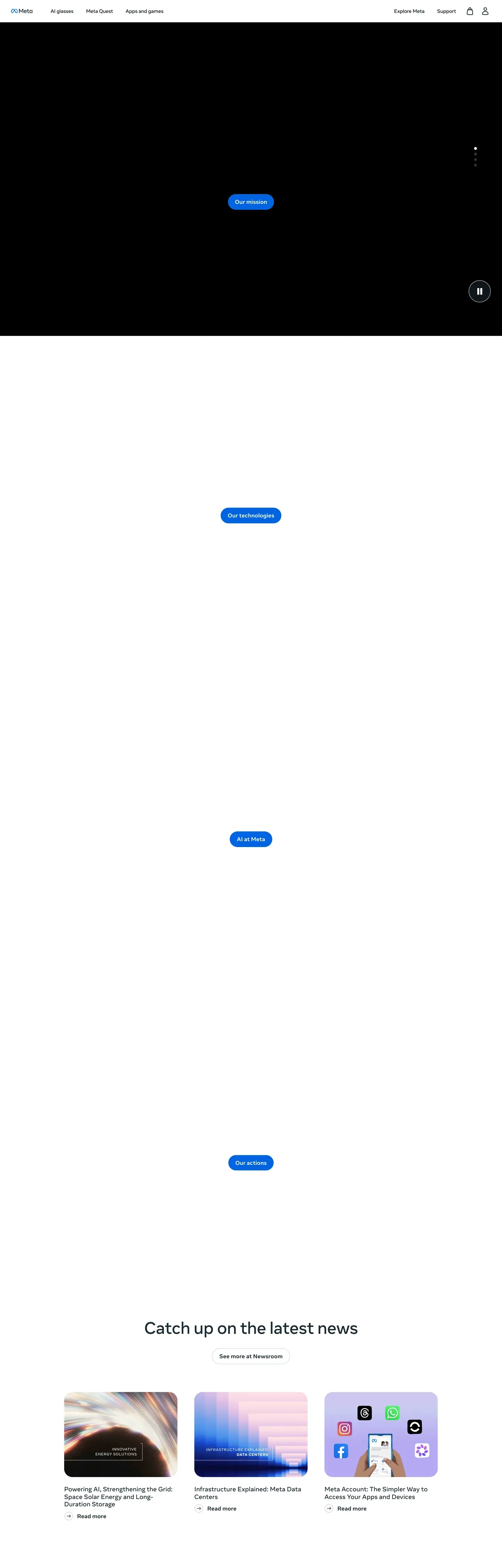
Live at about.meta.com
Meta in production, as captured. Scroll the window to see the whole page.
27 colors
Meta's system runs on #0064e0 as its primary voltage, used in 1 of 38 components. Type is set in Optimistic VF across 15 tokens from 12px to 64px, weights 300–700. Shape language is soft — components average 48px corner radius, with no sharp interactive edges.
Brand & Accent
Sparing, CTA-only voltage · 3
Surface
Page and card backgrounds · 2
Text
Headlines, body, captions · 7
Borders & Hairlines
Dividers, outlines, rules · 2
Semantic
Status, errors, success, links · 4
Other
Specialty colors · 9
15 type tokens
Set in Optimistic VF across 15 tokens, from 12px to 64px, weights 300–700. Shown in its own stack: where the font isn't installed, the fallback the file names stands in.
- hero-display64px · weight 500 · lh 1.16The quick brown fox jumps over the lazy dog
- display-lg48px · weight 500 · lh 1.17The quick brown fox jumps over the lazy dog
- heading-lg36px · weight 500 · lh 1.28The quick brown fox jumps over the lazy dog
- heading-md28px · weight 300 · lh 1.21The quick brown fox jumps over the lazy dog
- heading-sm24px · weight 500 · lh 1.25The quick brown fox jumps over the lazy dog
- subtitle-lg18px · weight 700 · lh 1.44The quick brown fox jumps over the lazy dog
- subtitle-md18px · weight 400 · lh 1.44The quick brown fox jumps over the lazy dog
- body-md-bold16px · weight 700 · lh 1.5 · tracking -0.16pxThe quick brown fox jumps over the lazy dog
- body-md16px · weight 400 · lh 1.5 · tracking -0.16pxThe quick brown fox jumps over the lazy dog
- body-sm-bold14px · weight 700 · lh 1.43 · tracking -0.14pxThe quick brown fox jumps over the lazy dog
- body-sm14px · weight 400 · lh 1.43 · tracking -0.14pxThe quick brown fox jumps over the lazy dog
- caption-bold12px · weight 700 · lh 1.33The quick brown fox jumps over the lazy dog
- caption12px · weight 400 · lh 1.33The quick brown fox jumps over the lazy dog
- button-md14px · weight 700 · lh 1.43 · tracking -0.14pxThe quick brown fox jumps over the lazy dog
- link-md16px · weight 700 · lh 1.5 · tracking -0.16pxThe quick brown fox jumps over the lazy dog
Radii and spacing
10 corner radii and 13 spacing values. Shape language: soft, on a 6px base radius.
Radii10
- xs2px
- sm4px
- md6px
- lg8px
- xl16px
- xxl24px
- xxxl32px
- feature40px
- full100px
- circle9999px
Spacing13
- xxs4px
- xs8px
- sm10px
- md12px
- base16px
- lg20px
- xl24px
- xxl32px
- xxxl40px
- section-sm48px
- section64px
- section-lg80px
- hero120px
38 components
Each rendered from its tokens (color, type, radius, padding) on Meta's own canvas.
- Button PrimaryButton Primarybutton-primary
- Button Primary PressedButton Primary Pressedbutton-primary-pressed
- Button Primary DisabledButton Primary Disabledbutton-primary-disabled
- Button Buy CtaButton Buy Ctabutton-buy-cta
- Button Buy Cta PressedButton Buy Cta Pressedbutton-buy-cta-pressed
- Button SecondaryButton Secondarybutton-secondary
- Button GhostButton Ghostbutton-ghost
- Button Pill TabButton Pill Tabbutton-pill-tab
- Button Pill Tab ActiveButton Pill Tab Activebutton-pill-tab-active
- Button Icon Circularbutton-icon-circular
- Card Product FeatureCard Product Featurecard-product-feature
- Card Feature PhotoCard Feature Photocard-feature-photo
- Card Promo StripCard Promo Stripcard-promo-strip
- Card Icon FeatureCard Icon Featurecard-icon-feature
- Card Checkout SummaryCard Checkout Summarycard-checkout-summary
- Product ThumbnailProduct Thumbnailproduct-thumbnail
- Type here…Text Inputtext-input
- Type here…Text Input Focusedtext-input-focused
- Type here…Text Input Errortext-input-error
- Search PillSearch Pillsearch-pill
- Radio OptionRadio Optionradio-option
- Radio Option SelectedRadio Option Selectedradio-option-selected
- Color Swatch CircleColor Swatch Circlecolor-swatch-circle
- Badge Promo YellowBadge Promo Yellowbadge-promo-yellow
- Badge AttentionBadge Attentionbadge-attention
- Badge SuccessBadge Successbadge-success
- Badge CriticalBadge Criticalbadge-critical
- Promo BannerPromo Bannerpromo-banner
- Faq Accordion ItemFaq Accordion Itemfaq-accordion-item
- Why Buy TileWhy Buy Tilewhy-buy-tile
- Warranty CardWarranty Cardwarranty-card
- Footer RegionFooter Regionfooter-region
- Hero Band MarketingHero Band Marketinghero-band-marketing
- Product Gallery PdpProduct Gallery Pdpproduct-gallery-pdp
- Color Sku Picker RowColor Sku Picker Rowcolor-sku-picker-row
- Feature Icon RowFeature Icon Rowfeature-icon-row
- Tech Specs TableTech Specs Tabletech-specs-table
- Testimonial Customer CardTestimonial Customer Cardtestimonial-customer-card
The system, in use
Meta's tokens on the kind of product it builds.
Powerful. Personal. Made to last.
Thoughtful design and all-day performance, with everything working together.
Meta design system FAQ
Meta's tokens, its components and how to use this DESIGN.md in your project.
What are the color tokens in the Meta DESIGN.md?
What is Meta's primary color hex code?
How do I use Meta's colors in Tailwind CSS?
What is Meta's primary brand color?
Does Meta's design system have a dark mode?
What fonts does Meta use?
What is Meta's type scale?
What can I use if I don't have Meta's font?
What typography does Meta use?
Which components does the Meta DESIGN.md define?
What corner radius and spacing does Meta use?
What's the shape language for buttons and cards in the Meta design system?
How do I apply the Meta design system to a shadcn/ui project?
How do I use the Meta DESIGN.md with Claude Code or Cursor?
Is the Meta DESIGN.md free to download?
How was the Meta DESIGN.md made?
Is the Meta DESIGN.md official?
Can I use this DESIGN.md to build a React commerce surface in the Meta design system?
What's missing from this DESIGN.md spec in the Meta design system?
Related reading
Specs, directories and component libraries that pair with this design system.
- Browse all design systemsThe full directory of DESIGN.md files on shadcn.io, with live mockups for each.shadcn.io
- Meta DesignMeta's official design portal, covering brand, product, and the Optimistic typeface.design.meta.com (opens in a new tab)
- The DESIGN.md specificationGoogle Labs' open spec for machine-readable design system files — the format this page is built on.github.com (opens in a new tab)
Use Meta in your project
One machine-readable file. Drop it into Claude Code, Cursor, VS Code or any AI tool that reads DESIGN.md.
Download the DESIGN.md
One machine-readable file: every color, type, radius, spacing, and component token of Meta.
Feed it to your AI tool
Drop it into Claude, Cursor, or GitHub Copilot. The agent writes React components and Tailwind classes that match Meta's visual language.
Reference the tokens directly
Or paste the values into your Tailwind config, CSS variables, or component library: every color, size and radius is a quoted, ready-to-copy value.
Read the full DESIGN.md overview, rationale, do’s and don’ts
Overview
Meta's commerce surfaces (homepage, Quest configurator, Ray-Ban product detail, prescription page) read as a confident hardware merchandiser. The brand voice is photography-first: large, full-bleed product imagery dominates above-the-fold real estate, with white space and tight typographic hierarchy carrying the rest. The system has a recognizable dual-CTA pattern — a black pill-shaped primary on marketing surfaces shifting to a saturated cobalt blue ("#0064e0") inside the buy-now flows, paired with an outlined ghost button for secondary navigation.
Optimistic VF — Meta's variable display face — anchors the entire system, ranging from a 64px hero display down to a 12px caption. The face's ss01 and ss02 stylistic sets are switched on across every heading role, contributing to the brand's slightly humanist, friendly geometric character. Below 768px the system collapses cleanly: hero stacks, pill nav becomes a hamburger, three-up feature grids flatten to a single column, and product configurators drop their right-rail summary into a sticky bottom bar.
Key Characteristics:
- Stark white canvas ("#ffffff") carrying full-bleed product photography with 32px corner softening on showcase tiles
- Two-tier primary button system: marketing CTAs use ink black ("#000000") pills; commerce CTAs use cobalt ("#0064e0") pills inside buy-now panels
- Optimistic VF as the universal display + body face with consistent
ss01, ss02OpenType features - Pill-shaped buttons (100px radius) and 32px / 40px cards as the dominant geometric signature
- Saturated promotional banners (yellow "#f7b928", dark "#0a1317") used sparingly above the nav for time-bound offers
- Photographic feature cards with no card chrome (no border, no shadow) — the product imagery IS the surface treatment
Known Gaps
- Selected/checked states for non-button form controls (toggle, multi-select) were not visible on the captured surfaces — implement following the cobalt-on-white pattern from
radio-option-selected. - Animation/transition timings are not extracted; recommend 150–250ms ease-out for primary surface transitions and 300ms ease-in-out for accordion expand/collapse.
- Specific dark-mode token values for canvas, surface, ink, and hairline are not defined; the brand has not surfaced a published dark-mode token set on these commerce pages.
- Pastel decorative tints inside accessory cards (soft pink, ice blue, mint) appear visually but are not formalized — treat them as photographic content, not as system colors.
More systems like this
Analogue, Apple, AT&T and 23 more in Consumer Electronics: each brand's colors, type and components in one file your AI agent builds from.
Build it with Pro
The DESIGN.md files are free. Pro adds 6,000+ blocks, premium templates and the MCP server, so your AI editor builds in your system for you.
4.9/5 out of 5 · 150+ reviewsfrom 150+ founders and developers.
Billing
Billed once a year in USD. Cancel anytime.
- How many people can use the license.
- Client work, SaaS products and anything you charge for.
- Page sections in 56 categories, from heroes and pricing tables to dashboards and settings, on every framework and UI library, in your theme.
- Complete Next.js sites for startups, SaaS, agencies and portfolios, every page designed, ready to ship.
- Your AI agent searches, previews and installs any component, block, icon or DESIGN.md from a prompt: 22 tools in Claude Code, Cursor, VS Code and 35 more clients.
- Buttons with motion and states of their own, from an arrow that slides in to a burst of confetti.
- Typewriters, scrambles, counters and more, for headlines, labels and numbers.
- Animated backgrounds for heroes, sections and cards, from a soft aurora to a flock that flees the cursor. Most are pure CSS.
- WebGPU shaders, from a slow aurora to a black hole, each drawing only while it's on screen.
- One design and one theme on all four: the components, blocks and effects are built for each framework.
- React on Base UI, Radix UI, React Aria or Ark UI: install the version for the library your project already uses. Vue, Svelte and Solid run on Ark UI.
- From a button to a date picker, a color picker or a guided tour: accessible, typed in TypeScript, each with live demos.
- Real-world patterns built from the components, in 53 galleries: forms, tables, menus, dialogs and more.
- Area, bar, line, pie, radar and radial charts on TanStack Charts, on every framework. React also gets the Recharts originals.
- Debounce, local storage, media queries and more: each hook is one typed file you own.
- From 222 libraries, Lucide, Heroicons, Tabler and Material Symbols among them, as SVG or a React component in one command.
- Stripe, Linear, Apple and 497 more: a brand's colors, typography and components in one file your AI agent builds from.
- Restyle every component and block at once: 8 styles, 7 grays, 18 colors and 5 radii, shared as a shadcn preset code.
- Priority requests are answered first.
Individual
For personal projects & open source
$32instead of $49/mo
$389 billed yearly
- Seats: 1 seat
- Commercial use: Personal & open source only
- Blocks: All 6,181 blocks
- Templates: All 14 templates
- MCP server: 38 AI clients
- Animated buttons: All 35 buttons
- Text effects: All 97 effects
- Backgrounds: All 100 backgrounds
- Shaders: All 100 shaders
- Frameworks: React, Vue, Svelte, Solid
- UI libraries: Base UI, Radix, Aria, Ark
- Components: All 174 components
- Examples: All 1,103 examples
- Charts: All 70 charts
- React hooks: All 35 hooks
- Icons: 294k+ icons
- DESIGN.md files: All 500 brands
- Theme builder: 8 styles × 18 colors
- Support: Standard
Team
Most popularFor freelancers, agencies & startups
$66instead of $99/mo
$789 billed yearly · ≈ $13/dev/mo
- Seats: Up to 5 seats
- Commercial use: Included
- Blocks: All 6,181 blocks
- Templates: All 14 templates
- MCP server: 38 AI clients
- Animated buttons: All 35 buttons
- Text effects: All 97 effects
- Backgrounds: All 100 backgrounds
- Shaders: All 100 shaders
- Frameworks: React, Vue, Svelte, Solid
- UI libraries: Base UI, Radix, Aria, Ark
- Components: All 174 components
- Examples: All 1,103 examples
- Charts: All 70 charts
- React hooks: All 35 hooks
- Icons: 294k+ icons
- DESIGN.md files: All 500 brands
- Theme builder: 8 styles × 18 colors
- Support: Priority
Organization
For companies with larger teams
$132instead of $199/mo
$1,589 billed yearly
- Seats: Unlimited seats
- Commercial use: Included
- Blocks: All 6,181 blocks
- Templates: All 14 templates
- MCP server: 38 AI clients
- Animated buttons: All 35 buttons
- Text effects: All 97 effects
- Backgrounds: All 100 backgrounds
- Shaders: All 100 shaders
- Frameworks: React, Vue, Svelte, Solid
- UI libraries: Base UI, Radix, Aria, Ark
- Components: All 174 components
- Examples: All 1,103 examples
- Charts: All 70 charts
- React hooks: All 35 hooks
- Icons: 294k+ icons
- DESIGN.md files: All 500 brands
- Theme builder: 8 styles × 18 colors
- Support: Priority
Billed once a year in USD. Cancel anytime.
Individual
For personal projects & open source
$32instead of $49/mo
$389 billed yearly
- How many people can use the license.Seats: 1 seat
- Client work, SaaS products and anything you charge for.Commercial use: Personal & open source only
- Page sections in 56 categories, from heroes and pricing tables to dashboards and settings, on every framework and UI library, in your theme.Blocks: All 6,181 blocks
- Complete Next.js sites for startups, SaaS, agencies and portfolios, every page designed, ready to ship.Templates: All 14 templates
- Your AI agent searches, previews and installs any component, block, icon or DESIGN.md from a prompt: 22 tools in Claude Code, Cursor, VS Code and 35 more clients.MCP server: 38 AI clients
- Buttons with motion and states of their own, from an arrow that slides in to a burst of confetti.Animated buttons: All 35 buttons
- Typewriters, scrambles, counters and more, for headlines, labels and numbers.Text effects: All 97 effects
- Animated backgrounds for heroes, sections and cards, from a soft aurora to a flock that flees the cursor. Most are pure CSS.Backgrounds: All 100 backgrounds
- WebGPU shaders, from a slow aurora to a black hole, each drawing only while it's on screen.Shaders: All 100 shaders
- One design and one theme on all four: the components, blocks and effects are built for each framework.Frameworks: React, Vue, Svelte, Solid
- React on Base UI, Radix UI, React Aria or Ark UI: install the version for the library your project already uses. Vue, Svelte and Solid run on Ark UI.UI libraries: Base UI, Radix, Aria, Ark
- From a button to a date picker, a color picker or a guided tour: accessible, typed in TypeScript, each with live demos.Components: All 174 components
- Real-world patterns built from the components, in 53 galleries: forms, tables, menus, dialogs and more.Examples: All 1,103 examples
- Area, bar, line, pie, radar and radial charts on TanStack Charts, on every framework. React also gets the Recharts originals.Charts: All 70 charts
- Debounce, local storage, media queries and more: each hook is one typed file you own.React hooks: All 35 hooks
- From 222 libraries, Lucide, Heroicons, Tabler and Material Symbols among them, as SVG or a React component in one command.Icons: 294k+ icons
- Stripe, Linear, Apple and 497 more: a brand's colors, typography and components in one file your AI agent builds from.DESIGN.md files: All 500 brands
- Restyle every component and block at once: 8 styles, 7 grays, 18 colors and 5 radii, shared as a shadcn preset code.Theme builder: 8 styles × 18 colors
- Priority requests are answered first.Support: Standard
Team
Most popularFor freelancers, agencies & startups
$66instead of $99/mo
$789 billed yearly · ≈ $13/dev/mo
Everything in Individual, plus
- How many people can use the license.Seats: Up to 5 seats
- Client work, SaaS products and anything you charge for.Commercial use: Included
- Priority requests are answered first.Support: Priority
Organization
For companies with larger teams
$132instead of $199/mo
$1,589 billed yearly
Everything in Team, plus
- How many people can use the license.Seats: Unlimited seats
- Secure checkout via Stripe
- Code lives in your repo
- Keep what you've shipped if you cancel
- License terms
4.9 out of 5 from 150+ developers


Your system, built for you
Every block, template and icon, installed by your AI agent in your design system. The DESIGN.md files stay free.
- Cancel anytime
- Keep what you've shipped