Nike Design System
Nike's bold storefront as a DESIGN.md: ink #111111 pill CTAs, Futura ND headlines at 96px and a full set of components for React, Next.js and AI tools.
- Primary color
- #111111
- Typeface
- Helvetica Now Text Medium
- Shape
- Pill
- Base radius
- 24px
- Colors
- 23
- Type tokens
- 13
- Components
- 24
- Spacing values
- 8
About Nike DESIGN.md
Curated by Dov Azencot, updated May 12, 2026. Source nike.com (opens in a new tab).
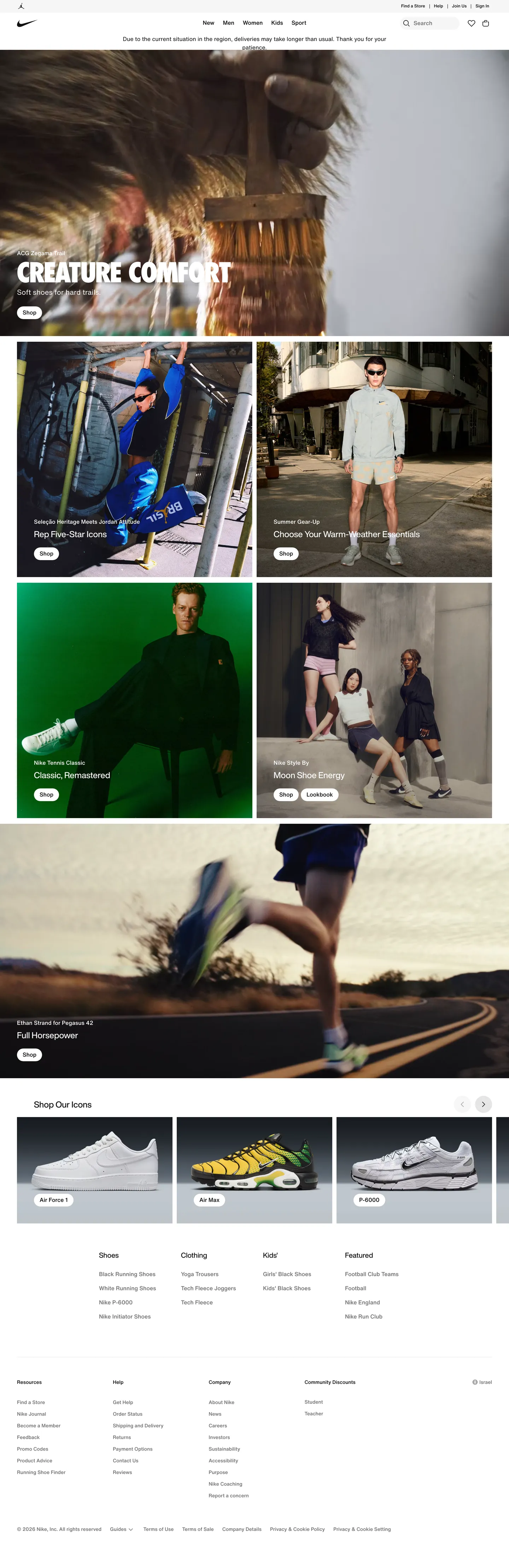
Nike's commerce system reads like a printed athletic catalog rendered for the browser. The chrome is almost violently restrained — pure ink `#111111`, pure canvas `#ffffff`, and a single soft cloud gray `#f5f5f5` carry roughly 95% of the surface area across `/men`, the PLP listings, the PDP, and `/membership`. Every chromatic moment in the page is reserved for the product photograph or a pricing signal. There is no decorative gradient, no soft shadow, no accent color used for tone. The brand's voice is loud, kinetic, and absolute, and the system earns that loudness by withholding color everywhere except where it has to scream.
This page packages Nike's commerce surface into a single DESIGN.md file built on the Google Labs spec. Inside: 23 colors tokens (one ink, one canvas, one soft cloud, five text grays, four semantic, six category accents), 13 type styles topped by a 96px Nike Futura ND campaign tier at line-height 0.9, 5 corner radii, 8 spacing values from 2px to 48px, and 24 components — pill CTAs, search pills, filter chips, swatch dots, badge promos, the campaign tile, the PDP disclosure row, the four-column footer. Every value is quoted and machine-readable.
Feed the file to Claude, Cursor, or GitHub Copilot and the agent will produce React components that look like Nike: pill-shaped `#111111` buttons, square product cards on `#f5f5f5` swatches, sale prices in `#d30005`, an 8px grid that locks PLP and PDP to the same vertical rhythm. Or read it as a discipline study — the system's strength is that almost every component reuses the same pill plus flat card plus photography-on-cloud vocabulary, which is why Nike never has to introduce a new token to ship a new page.
What makes it distinct
5 highlights
- Photography-first chrome95% of the surface is `#111111`, `#ffffff`, and `#f5f5f5`; color lives only in the imagery
- Single typographic mountain96px uppercase Futura ND at line-height 0.9, then a hard cliff to 16px Helvetica Now
- Pill geometry everywhereEvery CTA, chip, and badge uses `{rounded.lg}` 30px or `{rounded.full}`; sharp corners are reserved for cards
- Sale is the only color in chrome`#d30005` price text with strike-through original, no badge background, never elsewhere
- Zero drop shadowsDepth comes from photography and a single 1px inset hairline on sticky bars
Live at nike.com
Nike in production, as captured. Scroll the window to see the whole page.
23 colors
Nike's system anchors on #111111 (primary) as its primary color. Type is set in Helvetica Now Text Medium across 13 tokens from 9px to 96px, weights 400–500. Shape language leans on pill geometry — fully rounded surfaces dominate the component library.
Brand & Accent
Sparing, CTA-only voltage · 7
Surface
Page and card backgrounds · 1
Text
Headlines, body, captions · 2
Borders & Hairlines
Dividers, outlines, rules · 2
Semantic
Status, errors, success, links · 4
Other
Specialty colors · 7
13 type tokens
Set in Helvetica Now Text Medium across 13 tokens, from 9px to 96px, weights 400–500. Shown in its own stack: where the font isn't installed, the fallback the file names stands in.
- display-campaign96px · weight 500 · lh 0.9The quick brown fox jumps over the lazy dog
- heading-xl32px · weight 500 · lh 1.2The quick brown fox jumps over the lazy dog
- heading-lg24px · weight 500 · lh 1.2The quick brown fox jumps over the lazy dog
- heading-md16px · weight 500 · lh 1.75The quick brown fox jumps over the lazy dog
- body-md16px · weight 400 · lh 1.5The quick brown fox jumps over the lazy dog
- body-strong16px · weight 500 · lh 1.5The quick brown fox jumps over the lazy dog
- button-lg24px · weight 500 · lh 1.2The quick brown fox jumps over the lazy dog
- button-md16px · weight 500 · lh 1.5The quick brown fox jumps over the lazy dog
- button-sm14px · weight 500 · lh 1.5The quick brown fox jumps over the lazy dog
- link-md16px · weight 500 · lh 1.75The quick brown fox jumps over the lazy dog
- caption-md14px · weight 500 · lh 1.5The quick brown fox jumps over the lazy dog
- caption-sm12px · weight 500 · lh 1.5The quick brown fox jumps over the lazy dog
- utility-xs9px · weight 500 · lh 1.75The quick brown fox jumps over the lazy dog
Radii and spacing
5 corner radii and 8 spacing values. Shape language: pill, on a 24px base radius.
Radii5
- none0px
- sm18px
- md24px
- lg30px
- full9999px
Spacing8
- xxs2px
- xs4px
- sm8px
- md12px
- lg18px
- xl24px
- xxl30px
- section48px
24 components
Each rendered from its tokens (color, type, radius, padding) on Nike's own canvas.
- Button PrimaryButton Primarybutton-primary
- Button Primary ActiveButton Primary Activebutton-primary-active
- Button SecondaryButton Secondarybutton-secondary
- Button Outline On ImageButton Outline On Imagebutton-outline-on-image
- Button Icon Circularbutton-icon-circular
- Search PillSearch Pillsearch-pill
- Search Pill FocusedSearch Pill Focusedsearch-pill-focused
- Filter ChipFilter Chipfilter-chip
- Filter Chip ActiveFilter Chip Activefilter-chip-active
- Badge PromoBadge Promobadge-promo
- Badge Sale TextBadge Sale Textbadge-sale-text
- Product CardProduct Cardproduct-card
- Product Card ImageProduct Card Imageproduct-card-image
- Swatch DotSwatch Dotswatch-dot
- Swatch Dot ActiveSwatch Dot Activeswatch-dot-active
- Campaign TileCampaign Tilecampaign-tile
- Category Icon CardCategory Icon Cardcategory-icon-card
- Member Benefit CardMember Benefit Cardmember-benefit-card
- Faq RowFaq Rowfaq-row
- Pdp Disclosure RowPdp Disclosure Rowpdp-disclosure-row
- Utility BarUtility Barutility-bar
- Primary NavPrimary Navprimary-nav
- Filter SidebarFilter Sidebarfilter-sidebar
- FooterFooterfooter
The system, in use
Nike's tokens on the kind of product it builds.
New season, new essentials
The latest arrivals, made to wear every day. Free shipping and returns on every order.
Nike design system FAQ
Nike's tokens, its components and how to use this DESIGN.md in your project.
Nike's DESIGN.md has 23 color tokens: primary (#111111), on-primary (#ffffff), canvas (#ffffff), soft-cloud (#f5f5f5), ink (#111111), charcoal (#39393b) and 17 more. Every value is a quoted hex you can copy.
The color token `primary` is #111111. The surface behind it is `canvas` (#ffffff).
Map the tokens to your CSS variables: `primary` (#111111) to `--primary`, `canvas` (#ffffff) to `--background`, `ink` (#111111) to `--foreground`. shadcn/ui's Tailwind setup maps them to classes such as `bg-primary` and `text-foreground`, so they then use Nike's palette.
Nike's only chrome color is ink `#111111` — a true near-black used for primary CTAs, swatch dots, active filter chips, headlines, and body text. Pure white `#ffffff` is its equal partner for canvas, on-image CTAs, and inverse text. The system has no secondary brand color. Every other chromatic moment is either a product photograph or a semantic signal (sale `#d30005`, success `#007d48`), and the six category accents like `#ed1aa0` or `#0a7281` are reserved for swatch dots and editorial tiles, never primary chrome.
No — the spec captures Nike's public commerce surfaces (`/men`, PLPs, PDP, `/membership`, Jordan Golf), and those run on canvas `#ffffff` with ink `#111111`. The campaign tile component does use `#111111` as a full-bleed background with inverse white type, but that is an editorial moment inside a light-canvas page, not a system-wide dark theme. The token `accent-pink-deep` `#4c012d` is also a deep editorial overlay, not a dark surface.
Nike's DESIGN.md sets its type in Helvetica Now Text Medium, Helvetica Now Display Medium and Helvetica Now Text and 2 more. The first family is the one most tokens use.
13 type tokens, such as `display-campaign`, from 9px to 96px, in weights 400 to 500. Each token carries its family, size, weight, line height and letter spacing.
Helvetica Now Text Medium is Nike's main family and may be proprietary or need its own license. Keep the sizes, weights, line heights and letter spacing from the file and swap the family for an open font of similar proportions, such as a font from Google Fonts, set in `--font-sans`.
Nike runs a proprietary Nike Futura ND for the 96px uppercase campaign headlines burned into hero photography, with Helvetica Now Display Medium covering 16–32px section titles, Helvetica Now Text Medium handling 12–16px UI and buttons, and Helvetica Now Text carrying body and links. The closest open-source path is Bebas Neue or Anton at 96px / 0.9 / uppercase for the campaign tier, paired with Inter at weights 400 and 500 for everything else. Tighten letter-spacing roughly -0.5% on the substitute to approximate Futura ND's optical weight.
24 components, among them `button-primary`, `button-primary-active`, `button-secondary`, `button-outline-on-image` and `button-icon-circular`. Each lists properties such as its background, text color, type token and corner radius as references to the other tokens.
5 corner radii: none (0px), sm (18px), md (24px), lg (30px) and full (9999px). 8 spacing values: xxs (2px), xs (4px), sm (8px), md (12px), lg (18px) and 3 more. The file reads as pill in shape.
Nike has exactly two button shapes — the 30px pill (`{rounded.lg}`) for every CTA, filter chip, and badge, and the full circle (`{rounded.full}`) for swatch dots and icon buttons. Product cards, campaign tiles, and the footer carry `{rounded.none}` 0px because Nike wants the photograph to be the card. Soft corners would compete with the product silhouette; pills carry every interactive surface, sharp edges carry every container. There is no third button shape anywhere in the system.
Copy the color and radius tokens into your `globals.css`: Nike's `primary` (#111111) becomes `--primary`, and `md` (24px) becomes `--radius`. The shadcn/ui components read those variables, so they change with the file.
Download Nike's DESIGN.md (or copy it as Markdown) and put it in your project, or paste it into the chat. Then ask Claude Code, Cursor or another agent to build a page "in the style of the Nike DESIGN.md": it reads the tokens and writes matching components.
Yes. The file is free to download or copy, with no account, from the buttons at the top and bottom of this page. The raw Markdown is also at `/design/nike/raw`.
Nike's page describes the look of its public website (www.nike.com), curated from what is visible there: the colors, type and components. It is an interpretation.
No. The Nike DESIGN.md describes the look of a public website. It is not official, and Nike has not endorsed or reviewed it. The name and logo belong to Nike.
Yes — the file is structured to feed Claude, Cursor, or any AI tool that reads design tokens. The agent will reproduce Nike's restraint (one accent, pill CTAs, square cards on `#f5f5f5`, sale red `#d30005` only on prices) rather than a generic e-commerce theme. Every color, type style, radius, and spacing value is a quoted token you can paste directly into Tailwind config, CSS variables, or your own component library. Reference `{component.button-primary}`, `{component.product-card}`, and `{component.campaign-tile}` in your prompts and the output stays disciplined.
Five things, documented in the Known Gaps section: mobile screenshots were not captured (responsive behavior is synthesized from desktop evidence and breakpoint tokens), hover states are not documented by global policy, modal and dialog styling beyond the geo-selector is not present, full form field styling for checkout and sign-up is not captured (only the search pill is), and bag plus wishlist filled-count badges are not visible in the captured pages. The spec covers roughly the commerce surface front-of-funnel — listing, detail, and membership.
Related reading
Specs, directories and component libraries that pair with this design system.
Use Nike in your project
One machine-readable file. Drop it into Claude Code, Cursor, VS Code or any AI tool that reads DESIGN.md.
Download the DESIGN.md
One machine-readable file: every color, type, radius, spacing, and component token of Nike.
Feed it to your AI tool
Drop it into Claude, Cursor, or GitHub Copilot. The agent writes React components and Tailwind classes that match Nike's visual language.
Reference the tokens directly
Or paste the values into your Tailwind config, CSS variables, or component library: every color, size and radius is a quoted, ready-to-copy value.
Read the full DESIGN.md overview, rationale, do’s and don’ts
Overview
Nike's commerce system is built on a single, almost violently simple idea: photography speaks, the chrome doesn't. Every page reads as an athletic editorial — towering uppercase Futura display lockups ({typography.display-campaign}) burned into full-bleed campaign imagery, with everything else (nav, filters, buttons, cards, footer) reduced to neutral typography and pill geometry on {colors.canvas} and {colors.soft-cloud}. There is no decorative gradient, no soft shadow nostalgia, no accent color used for "tone" — the system saves all chromatic energy for product photography and the small handful of moments that actually need to signal (sale price {colors.sale}, success {colors.success}, swatch dots).
The result is a layout that feels physical — campaign hero, product grid, sport tile, footer — stacked like a printed catalog rather than animated like a typical SaaS landing page. Density is high but never crowded, because the system relies on three relentless devices: square or near-square 1:1 product imagery on {colors.soft-cloud}, pill-shaped black CTAs ({rounded.full}) anchoring every actionable surface, and a tight 8px-base spacing scale that keeps cards and filters mathematically aligned across PLP, PDP, and editorial pages.
Across /men, the trail-running listing, the Zegama PDP, /membership, and Jordan Golf, the same chrome appears in identical proportions — only the photography and copy change. That is the system's signature: maximum editorial expression in the imagery, maximum mechanical restraint everywhere else.
Known Gaps
- Mobile screenshots not captured — responsive behavior described above synthesizes Nike's known mobile pattern (hamburger drawer, 1-up grid, headline downscale) from desktop evidence and the breakpoint list extracted from tokens.
- Hover states not documented by system policy — Nike's CSS uses
--pds-color-element-hoverand--pds-color-text-hovertokens but these are not included here. - Dialog / modal styling beyond the geo-selector and the country-confirmation pill pair could not be confirmed from the captured surfaces; bag, wishlist, and login overlays are not documented.
- Form field styling for checkout, sign-up, and address forms is not present in the captured surfaces — only the search pill is documented.
- Bag and wishlist icon-state variants (filled count badges) not visible in the captured pages.
More systems like this
adidas, Alo Yoga, Arc'teryx and 83 more in E-commerce & Retail: each brand's colors, type and components in one file your AI agent builds from.
Build it with Pro
The DESIGN.md files are free. Pro adds 6,000+ blocks, premium templates and the MCP server, so your AI editor builds in your system for you.
4.9/5 out of 5 · 150+ reviewsfrom 150+ founders and developers.
- Secure checkout via Stripe
- Code lives in your repo
- Keep what you've shipped if you cancel
- License terms
4.9 out of 5 from 150+ developers


Your system, built for you
Every block, template and icon, installed by your AI agent in your design system. The DESIGN.md files stay free.
Get Pro