PlayStation Design System
PlayStation blue #0070d1 and the SST typeface at weight 300 as a DESIGN.md file, with colors and components for React, Next.js and AI coding tools.
- Primary color
- #0070d1
- Typeface
- PlayStation SST
- Shape
- Pill
- Base radius
- 8px
- Colors
- 36
- Type tokens
- 14
- Components
- 29
- Spacing values
- 8
About PlayStation DESIGN.md
Curated by Dov Azencot, updated May 12, 2026. Source playstation.com (opens in a new tab).
PlayStation's marketing system reads like a console launch trailer broken into chapters. Each section is a full-bleed band in one of three canvases — pure black "#000000", true white "#ffffff", or PlayStation Blue "#0070d1" — and the band's surface color is the only divider between chapters. No mesh, no gradient transition, no decorative rule. The signature move is typographic: PlayStation SST renders display headlines at weight 300 (light), an editorial choice for a brand that could easily reach for heavy geometric display faces. Headline sizes step in tight increments at 54px, 44px, 35px, 28px, and 22px, all on a 1.25 line-height ladder, while body settles at 18px with 1.5 line-height for long-form readability on support and game pages.
This file packages the entire system as a single Google Labs DESIGN.md spec. Inside: 36 colors tokens covering brand, surface, ink, hairline, and semantic roles; 15 typography styles all set in PlayStation SST with substitution notes for Roboto Light and Inter; 8 spacing tokens stepping from 4px to a 96px section rhythm; a five-step radius scale where every CTA pill renders at 9999px and every product card at 8px; and 29 components recipes covering primary and commerce buttons, filter pills, game tiles, three hero band variants, the PS Plus gold banner, nav, footer, and the support search field.
Feed this file to Claude, Cursor, or GitHub Copilot and the AI will generate React components that match PlayStation's actual restraint — flat-on-canvas cards, pill CTAs at "#0070d1", commerce orange at "#d53b00" used only for store actions, and SST display copy at weight 300. Or reference the tokens directly when building marketing pages, console product pages, or game detail surfaces. The system's value as a study is that it proves a gaming brand can win without bold display weights, gradient chrome, or atmospheric backgrounds — imagery does the heavy lifting and the typography stays quiet.
What makes it distinct
5 highlights
- Three-canvas chapter rhythmPure black #000000, true white #ffffff, and PlayStation Blue #0070d1 alternate edge-to-edge with no decorative dividers
- Display headlines render at weight 300Unusual for a gaming brand, giving the chrome an airy editorial voice over typographic muscle
- Two-color CTA grammarPlayStation Blue #0070d1 for marketing pills, Commerce Orange #d53b00 reserved exclusively for store actions
- Single permitted gradientThe PS Plus gold three-stop #ffce21 to #ee8e00, never reused on other chrome surfaces
- Imagery occupies 60-90% of every bandConsole renders, game key art, and tier illustrations carry the storytelling, copy is compressed
Live at playstation.com
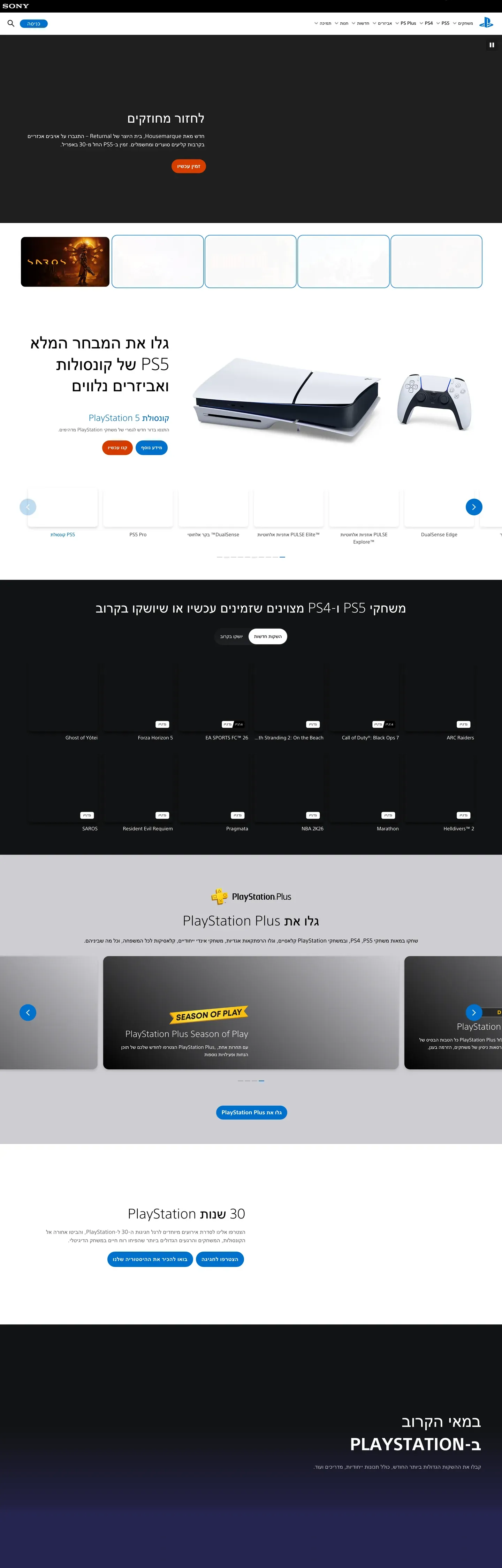
PlayStation in production, as captured. Scroll the window to see the whole page.
36 colors
PlayStation's system runs on #0070d1 as its primary voltage, used in 4 of 29 components. Type is set in PlayStation SST across 14 tokens from 12px to 54px, weights 300–700. Shape language leans on pill geometry — fully rounded surfaces dominate the component library.
Brand & Accent
Sparing, CTA-only voltage · 3
Surface
Page and card backgrounds · 7
Text
Headlines, body, captions · 13
Borders & Hairlines
Dividers, outlines, rules · 2
Semantic
Status, errors, success, links · 2
Other
Specialty colors · 9
14 type tokens
Set in PlayStation SST across 14 tokens, from 12px to 54px, weights 300–700. Shown in its own stack: where the font isn't installed, the fallback the file names stands in.
- display-xl54px · weight 300 · lh 1.25 · tracking -0.1pxThe quick brown fox jumps over the lazy dog
- display-lg44px · weight 300 · lh 1.25 · tracking 0.1pxThe quick brown fox jumps over the lazy dog
- display-md35px · weight 300 · lh 1.25The quick brown fox jumps over the lazy dog
- heading-xl28px · weight 300 · lh 1.25 · tracking 0.1pxThe quick brown fox jumps over the lazy dog
- heading-lg22px · weight 300 · lh 1.25 · tracking 0.1pxThe quick brown fox jumps over the lazy dog
- heading-md18px · weight 600 · lh 1The quick brown fox jumps over the lazy dog
- body-md18px · weight 400 · lh 1.5 · tracking 0.1pxThe quick brown fox jumps over the lazy dog
- body-strong18px · weight 500 · lh 1.25 · tracking 0.4pxThe quick brown fox jumps over the lazy dog
- body-sm16px · weight 400 · lh 1.5The quick brown fox jumps over the lazy dog
- caption-md14px · weight 400 · lh 1.5The quick brown fox jumps over the lazy dog
- caption-sm12px · weight 500 · lh 1.5The quick brown fox jumps over the lazy dog
- link-md18px · weight 400 · lh 1.5The quick brown fox jumps over the lazy dog
- button-lg18px · weight 700 · lh 1.25 · tracking 0.45pxThe quick brown fox jumps over the lazy dog
- button-md14px · weight 700 · lh 1.25 · tracking 0.324pxThe quick brown fox jumps over the lazy dog
Radii and spacing
5 corner radii and 8 spacing values. Shape language: pill, on a 8px base radius.
Radii5
- none0px
- sm4px
- md8px
- lg16px
- full9999px
Spacing8
- xxs4px
- xs8px
- sm12px
- md16px
- lg24px
- xl32px
- xxl48px
- section96px
29 components
Each rendered from its tokens (color, type, radius, padding) on PlayStation's own canvas.
- Button PrimaryButton Primarybutton-primary
- Button Primary PressedButton Primary Pressedbutton-primary-pressed
- Button CommerceButton Commercebutton-commerce
- Button Commerce PressedButton Commerce Pressedbutton-commerce-pressed
- Button Secondary LightButton Secondary Lightbutton-secondary-light
- Button Secondary DarkButton Secondary Darkbutton-secondary-dark
- Button DisabledButton Disabledbutton-disabled
- Type here…Text Inputtext-input
- Type here…Text Input Focusedtext-input-focused
- Filter PillFilter Pillfilter-pill
- Filter Pill ActiveFilter Pill Activefilter-pill-active
- Product CardProduct Cardproduct-card
- Product Card DarkProduct Card Darkproduct-card-dark
- Game TileGame Tilegame-tile
- Feature CardFeature Cardfeature-card
- Hero Band BlueHero Band Bluehero-band-blue
- Hero Band DarkHero Band Darkhero-band-dark
- Hero Band LightHero Band Lighthero-band-light
- Ps Plus BannerPs Plus Bannerps-plus-banner
- Carousel PaddleCarousel Paddlecarousel-paddle
- Pagination DotPagination Dotpagination-dot
- Pagination Dot ActivePagination Dot Activepagination-dot-active
- Badge InfoBadge Infobadge-info
- Primary NavPrimary Navprimary-nav
- Sub NavSub Navsub-nav
- Footer SectionFooter Sectionfooter-section
- Support Search BarSupport Search Barsupport-search-bar
- Support RowSupport Rowsupport-row
- Link InlineLink Inlinelink-inline
The system, in use
PlayStation's tokens on the kind of product it builds.
Play together, wherever you are
Jump into new worlds, team up with friends and pick up where you left off.
PlayStation design system FAQ
PlayStation's tokens, its components and how to use this DESIGN.md in your project.
What are the color tokens in the PlayStation DESIGN.md?
What is PlayStation's primary color hex code?
How do I use PlayStation's colors in Tailwind CSS?
What is PlayStation's primary brand color?
Does PlayStation use dark mode?
What fonts does PlayStation use?
What is PlayStation's type scale?
What can I use if I don't have PlayStation's font?
What typography does PlayStation use, and what should I substitute?
Which components does the PlayStation DESIGN.md define?
What corner radius and spacing does PlayStation use?
What does PlayStation's shape vocabulary look like?
How do I apply the PlayStation design system to a shadcn/ui project?
How do I use the PlayStation DESIGN.md with Claude Code or Cursor?
Is the PlayStation DESIGN.md free to download?
How was the PlayStation DESIGN.md made?
Is the PlayStation DESIGN.md official?
Can I use this DESIGN.md to build a PlayStation-style React project?
What's missing from this DESIGN.md spec in the PlayStation design system?
Related reading
Specs, directories and component libraries that pair with this design system.
Use PlayStation in your project
One machine-readable file. Drop it into Claude Code, Cursor, VS Code or any AI tool that reads DESIGN.md.
Download the DESIGN.md
One machine-readable file: every color, type, radius, spacing, and component token of PlayStation.
Feed it to your AI tool
Drop it into Claude, Cursor, or GitHub Copilot. The agent writes React components and Tailwind classes that match PlayStation's visual language.
Reference the tokens directly
Or paste the values into your Tailwind config, CSS variables, or component library: every color, size and radius is a quoted, ready-to-copy value.
Read the full DESIGN.md overview, rationale, do’s and don’ts
Overview
PlayStation's marketing system reads like a console launch trailer scrolling past the viewer in chapters. Each section is a full-bleed band — pure black {colors.canvas-dark} ("#000000"), true white {colors.canvas-light} ("#ffffff"), or PlayStation Blue {colors.primary} ("#0070d1") — and each chapter owns one editorial moment: hero console photography, a games-coming-soon strip, the PlayStation Plus tier banner, the "30 Years of PlayStation" anniversary band, the news strip from the PlayStation Blog. There is no decorative chrome between chapters; the section background change IS the divider. Sections stack at {spacing.section} (96px) rhythm with the next band's color taking over the page edge-to-edge.
The system has two distinct surface modes that alternate down the page: a dark canvas mode for editorial product moments (hero, "ON PLAYSTATION" band, marathon game pages) and a light canvas mode for utility surfaces (PS5 games listing, support pages, news index). Both modes use the same chrome vocabulary — fully-rounded {rounded.full} pill buttons, 8px-radius {rounded.md} cards, the proprietary PlayStation SST face — only the surface and on-surface colors change. The third surface mode is the PlayStation Blue band ({colors.primary} — "#0070d1") reserved for the highest-priority moments: the Marathon launch CTA strip, the footer, and any "Action Required" banner.
The typography is the system's most distinctive choice. PlayStation SST renders display headlines at weight 300 (light) — unusual for a gaming brand that could easily reach for bold geometric display faces. The light weight gives the chrome an airy, almost editorial quality that lets the imagery speak; copy is information rather than decoration. Heading sizes drop in tight increments (54 → 44 → 35 → 28 → 22 → 18) and body settles at 18px with 1.5 line-height for comfortable long-form reading on support and games pages.
Key Characteristics:
- Three-canvas chapter system:
{colors.canvas-dark}("#000000"),{colors.canvas-light}("#ffffff"),{colors.primary}("#0070d1") alternating down the page - PlayStation Blue (
{colors.primary}— "#0070d1") is the universal primary CTA — fully-rounded pill at{rounded.full}(9999px) - Commerce orange (
{colors.commerce}— "#d53b00") is the secondary CTA reserved for "Buy now" / "Pre-order" / store actions - PlayStation SST display tier renders at weight 300 with -0.1px to +0.4px tracking — the brand's signature airy editorial voice
- 8px-radius (
{rounded.md}) for product cards and feature panels; 4px-radius ({rounded.sm}) for inputs; pills ({rounded.full}) for every CTA - Game tiles, console renders, and PS Plus tier illustrations occupy 60-90% of each section — imagery does the storytelling
- Color-block page rhythm (one observed band sequence): dark hero → light console showcase → dark "Great PS4 & PS5 games" rail → light "Discover PlayStation Plus" tier band → light "30 years of PlayStation" callout → dark "ON PLAYSTATION" band → light news strip → blue footer
Known Gaps
- Mobile screenshots not captured — responsive behavior synthesizes PlayStation's known mobile pattern (hamburger drawer, single-column band reflow, hero downscale) from desktop evidence and the breakpoint stack.
- Hover states not documented by system policy.
- Sign-in / authentication chrome (login modal, account dashboard, profile pages) not in the captured pages.
- PlayStation Store in-store browsing surfaces (PDP / cart / checkout) are not in the captured set — those use a more dense data-table layout that this document does not describe.
- Game-page-specific theming — the
/marathon/page uses{colors.marathon-yellow}("#deff20") as a chapter accent. Other game pages may pull in their own per-title brand colors that vary outside the documented system. - Form validation states (success / error inline messages) not present in the captured surfaces beyond the
{colors.warning}("#c81b3a") color token.
More systems like this
Analogue, Crunchyroll, Epic Games Store and 11 more in Gaming & Entertainment: each brand's colors, type and components in one file your AI agent builds from.
Build it with Pro
The DESIGN.md files are free. Pro adds 6,000+ blocks, premium templates and the MCP server, so your AI editor builds in your system for you.
4.9/5 out of 5 · 150+ reviewsfrom 150+ founders and developers.
Billing
Billed once a year in USD. Cancel anytime.
- How many people can use the license.
- Client work, SaaS products and anything you charge for.
- Page sections in 56 categories, from heroes and pricing tables to dashboards and settings, on every framework and UI library, in your theme.
- Complete Next.js sites for startups, SaaS, agencies and portfolios, every page designed, ready to ship.
- Your AI agent searches, previews and installs any component, block, icon or DESIGN.md from a prompt: 22 tools in Claude Code, Cursor, VS Code and 35 more clients.
- Buttons with motion and states of their own, from an arrow that slides in to a burst of confetti.
- Typewriters, scrambles, counters and more, for headlines, labels and numbers.
- Animated backgrounds for heroes, sections and cards, from a soft aurora to a flock that flees the cursor. Most are pure CSS.
- WebGPU shaders, from a slow aurora to a black hole, each drawing only while it's on screen.
- One design and one theme on all four: the components, blocks and effects are built for each framework.
- React on Base UI, Radix UI, React Aria or Ark UI: install the version for the library your project already uses. Vue, Svelte and Solid run on Ark UI.
- From a button to a date picker, a color picker or a guided tour: accessible, typed in TypeScript, each with live demos.
- Real-world patterns built from the components, in 53 galleries: forms, tables, menus, dialogs and more.
- Area, bar, line, pie, radar and radial charts on TanStack Charts, on every framework. React also gets the Recharts originals.
- Debounce, local storage, media queries and more: each hook is one typed file you own.
- From 222 libraries, Lucide, Heroicons, Tabler and Material Symbols among them, as SVG or a React component in one command.
- Stripe, Linear, Apple and 497 more: a brand's colors, typography and components in one file your AI agent builds from.
- Restyle every component and block at once: 8 styles, 7 grays, 18 colors and 5 radii, shared as a shadcn preset code.
- Priority requests are answered first.
Individual
For personal projects & open source
$32instead of $49/mo
$389 billed yearly
- Seats: 1 seat
- Commercial use: Personal & open source only
- Blocks: All 6,181 blocks
- Templates: All 14 templates
- MCP server: 38 AI clients
- Animated buttons: All 35 buttons
- Text effects: All 97 effects
- Backgrounds: All 100 backgrounds
- Shaders: All 100 shaders
- Frameworks: React, Vue, Svelte, Solid
- UI libraries: Base UI, Radix, Aria, Ark
- Components: All 174 components
- Examples: All 1,103 examples
- Charts: All 70 charts
- React hooks: All 35 hooks
- Icons: 294k+ icons
- DESIGN.md files: All 500 brands
- Theme builder: 8 styles × 18 colors
- Support: Standard
Team
Most popularFor freelancers, agencies & startups
$66instead of $99/mo
$789 billed yearly · ≈ $13/dev/mo
- Seats: Up to 5 seats
- Commercial use: Included
- Blocks: All 6,181 blocks
- Templates: All 14 templates
- MCP server: 38 AI clients
- Animated buttons: All 35 buttons
- Text effects: All 97 effects
- Backgrounds: All 100 backgrounds
- Shaders: All 100 shaders
- Frameworks: React, Vue, Svelte, Solid
- UI libraries: Base UI, Radix, Aria, Ark
- Components: All 174 components
- Examples: All 1,103 examples
- Charts: All 70 charts
- React hooks: All 35 hooks
- Icons: 294k+ icons
- DESIGN.md files: All 500 brands
- Theme builder: 8 styles × 18 colors
- Support: Priority
Organization
For companies with larger teams
$132instead of $199/mo
$1,589 billed yearly
- Seats: Unlimited seats
- Commercial use: Included
- Blocks: All 6,181 blocks
- Templates: All 14 templates
- MCP server: 38 AI clients
- Animated buttons: All 35 buttons
- Text effects: All 97 effects
- Backgrounds: All 100 backgrounds
- Shaders: All 100 shaders
- Frameworks: React, Vue, Svelte, Solid
- UI libraries: Base UI, Radix, Aria, Ark
- Components: All 174 components
- Examples: All 1,103 examples
- Charts: All 70 charts
- React hooks: All 35 hooks
- Icons: 294k+ icons
- DESIGN.md files: All 500 brands
- Theme builder: 8 styles × 18 colors
- Support: Priority
Billed once a year in USD. Cancel anytime.
Individual
For personal projects & open source
$32instead of $49/mo
$389 billed yearly
- How many people can use the license.Seats: 1 seat
- Client work, SaaS products and anything you charge for.Commercial use: Personal & open source only
- Page sections in 56 categories, from heroes and pricing tables to dashboards and settings, on every framework and UI library, in your theme.Blocks: All 6,181 blocks
- Complete Next.js sites for startups, SaaS, agencies and portfolios, every page designed, ready to ship.Templates: All 14 templates
- Your AI agent searches, previews and installs any component, block, icon or DESIGN.md from a prompt: 22 tools in Claude Code, Cursor, VS Code and 35 more clients.MCP server: 38 AI clients
- Buttons with motion and states of their own, from an arrow that slides in to a burst of confetti.Animated buttons: All 35 buttons
- Typewriters, scrambles, counters and more, for headlines, labels and numbers.Text effects: All 97 effects
- Animated backgrounds for heroes, sections and cards, from a soft aurora to a flock that flees the cursor. Most are pure CSS.Backgrounds: All 100 backgrounds
- WebGPU shaders, from a slow aurora to a black hole, each drawing only while it's on screen.Shaders: All 100 shaders
- One design and one theme on all four: the components, blocks and effects are built for each framework.Frameworks: React, Vue, Svelte, Solid
- React on Base UI, Radix UI, React Aria or Ark UI: install the version for the library your project already uses. Vue, Svelte and Solid run on Ark UI.UI libraries: Base UI, Radix, Aria, Ark
- From a button to a date picker, a color picker or a guided tour: accessible, typed in TypeScript, each with live demos.Components: All 174 components
- Real-world patterns built from the components, in 53 galleries: forms, tables, menus, dialogs and more.Examples: All 1,103 examples
- Area, bar, line, pie, radar and radial charts on TanStack Charts, on every framework. React also gets the Recharts originals.Charts: All 70 charts
- Debounce, local storage, media queries and more: each hook is one typed file you own.React hooks: All 35 hooks
- From 222 libraries, Lucide, Heroicons, Tabler and Material Symbols among them, as SVG or a React component in one command.Icons: 294k+ icons
- Stripe, Linear, Apple and 497 more: a brand's colors, typography and components in one file your AI agent builds from.DESIGN.md files: All 500 brands
- Restyle every component and block at once: 8 styles, 7 grays, 18 colors and 5 radii, shared as a shadcn preset code.Theme builder: 8 styles × 18 colors
- Priority requests are answered first.Support: Standard
Team
Most popularFor freelancers, agencies & startups
$66instead of $99/mo
$789 billed yearly · ≈ $13/dev/mo
Everything in Individual, plus
- How many people can use the license.Seats: Up to 5 seats
- Client work, SaaS products and anything you charge for.Commercial use: Included
- Priority requests are answered first.Support: Priority
Organization
For companies with larger teams
$132instead of $199/mo
$1,589 billed yearly
Everything in Team, plus
- How many people can use the license.Seats: Unlimited seats
- Secure checkout via Stripe
- Code lives in your repo
- Keep what you've shipped if you cancel
- License terms
4.9 out of 5 from 150+ developers


Your system, built for you
Every block, template and icon, installed by your AI agent in your design system. The DESIGN.md files stay free.
- Cancel anytime
- Keep what you've shipped