shadcn.io is an independent project built on shadcn/ui
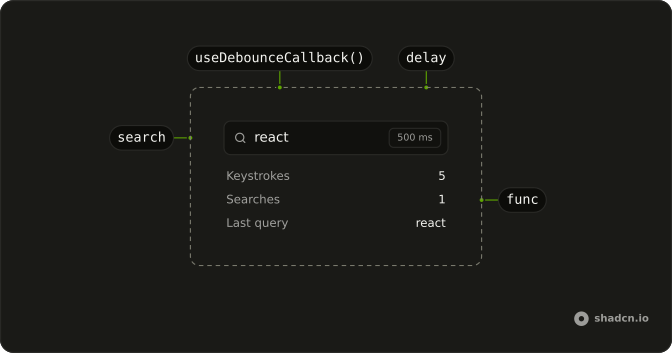
useDebounceCallback waits until a burst of calls goes quiet, then runs your function once.
The second argument is the delay in milliseconds, and it defaults to 500. When you want the delayed value itself, use useDebounceValue. In React the function you get also has cancel and flush.
Installation
Anatomy
Usage
import { useDebounceCallback } from "@/hooks/use-debounce-callback";const debounced = useDebounceCallback((value: string) => {
save(value);
}, 500);
debounced.cancel();
debounced.flush();FAQ
When should I use useDebounceCallback instead of useDebounceValue?
useDebounceCallback delays a function call. useDebounceValue delays a value and returns that settled value. Use the callback when the work itself should wait, such as a search request. Use the value when the screen should keep typing immediately and read a quieter string later. Both forward leading, trailing, and maxWait to lodash debounce.
What do cancel and flush do?
cancel drops a call that is still waiting, so your function does not run. flush runs that waiting call now and returns whatever your function returns. If nothing is waiting, flush returns the last result, or undefined if your function has not run. Unmount does not cancel the function returned to you. Call cancel in your own cleanup when a late run should not happen.
How do leading, trailing, and maxWait work?
Those fields are passed through to lodash. leading true runs on the first call of a burst. trailing defaults to true inside lodash, so the function also runs after the delay with the latest arguments. maxWait is the longest lodash will postpone the call while new calls keep arriving. Pass one stable options object, because a new object on each render rebuilds the debounce.
Does the debounced call see the latest function?
No. The wrapper is rebuilt only when func, delay, or options changes, and the call uses the func from that rebuild. It does not read a ref of a newer function. Pass a stable func, such as one from useCallback, if the wait should survive later renders. An inline function is a new func every render, so the previous schedule is left behind without cancel.
What does isPending report?
isPending does not ask lodash whether a timer is active. It returns true once an effect has stored a second debounced function on a ref, which is after the first paint, and false before that effect. It then stays true even when no call is waiting. That second function is not the one returned to you. Use cancel to drop a waiting call.
Is a waiting call canceled when the component unmounts?
Not the one you call. The delay defaults to 500 when you omit it. On unmount, cleanup calls cancel on a ref that holds a different debounced function, created in another effect and never invoked. A call already scheduled on the returned function can still run after unmount. Keep the returned function and call its cancel from your own cleanup if that matters.
API Reference
Parameters
funcT
The function to debounce.
delay?number
Milliseconds to wait after the last call.
- Default
500
options?DebounceOptions
Whether it also calls at the start, at the end, and how long it may wait.
options.leading?boolean
Also calls at the start of a burst, not only once it settles.
- Default
false
options.maxWait?number
The longest it may wait, in milliseconds, before calling anyway.
options.trailing?boolean
Calls once the burst settles, with the last arguments.
- Default
true
Returns
(…args)(...args: Parameters<T>) => ReturnType<T> | undefined
Calls func with these arguments once calls stop for delay milliseconds. Returns the last call's result, undefined before one.
- Type
(...args: Parameters<T>) => ReturnType<T> | undefined
cancel() => void
Drops the call that's waiting.
- Type
() => void
flush() => void
Runs the call that's waiting now, instead of after the delay.
- Type
() => void
isPending() => boolean
true once the debounced function is set up (from the first render on): it doesn't track whether a call is waiting.
- Type
() => boolean