shadcn.io is an independent project built on shadcn/ui
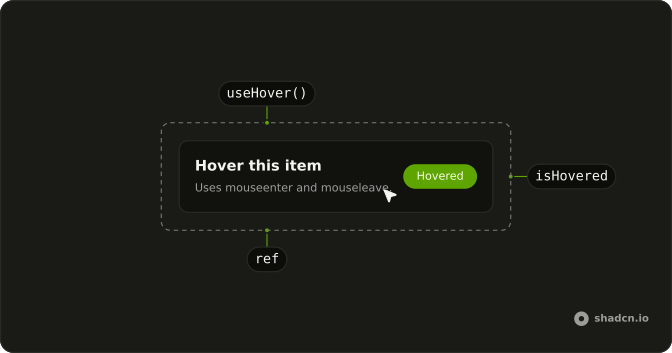
useHover returns true while the pointer is over the element, and false the rest of the time.
It uses mouseenter and mouseleave, then removes both listeners on unmount. The value starts as false. For a different DOM event, use useEventListener. In React you pass a ref from useRef and read the boolean during render.
Installation
Anatomy
Usage
import { useRef } from "react";
import { useHover } from "@/hooks/use-hover";
const ref = useRef<HTMLDivElement>(null);
const hovered = useHover(ref);FAQ
Which events does useHover listen for?
It listens for mouseenter and mouseleave on the element from the ref. It does not register mouseover, mouseout, mousemove, or pointer events. mouseenter sets the boolean to true and mouseleave sets it to false. Both listeners are removed when the effect cleans up. The value starts as false and stays false until mouseenter runs on that element.
What if the ref is empty when the effect runs?
The effect returns without listeners, and the boolean stays false. The dependency is the ref object, not its current node, so setting current later does not subscribe. Put the ref on an element that renders with the hook. React fills current before useEffect, so that element is ready on the first client commit. A missing node never flips the boolean on its own.
Can I track hover on more than one element?
Yes. Each call has its own state and its own effect. Use two refs and two calls for two elements. One hook does not watch a list of nodes. The boolean you get belongs only to the ref you passed. Moving the pointer from one element to the other updates each hook from its own mouseenter and mouseleave.
Does useHover work without a mouse?
Only when the browser fires mouseenter and mouseleave. The hook does not subscribe to touch or pointer events. A device that never fires those mouse events leaves the boolean false. A tap that does fire mouseenter can set it true, and the hook will not invent a mouseleave if the browser does not emit one. There is no separate touch path.
Is the first render safe on the server?
Yes. useState starts at false on the server and on the client, so the first markup matches. Listeners are added in useEffect, which does not run on the server and does not read window during render. After hydration, the effect attaches mouseenter and mouseleave when the element is there. The boolean stays false until one of those events runs.
Can I delay the hover state?
Not inside this hook. It has no delay argument. It sets true from mouseenter and false from mouseleave as those events arrive. To wait before showing something, react to the boolean yourself. Start a timer while it is true and clear that timer when it becomes false. You can also pass the boolean through useDebounceValue if you want the settled value after a pause.
API Reference
Parameters
elementRefReact.RefObject<HTMLElement | null>
A ref to the element to watch.
- Type
React.RefObject<HTMLElement | null>
Returns
returnsboolean
true while the pointer is over the element.