shadcn.io is an independent project built on shadcn/ui
The panel sits next to the button that opened it. You can still use the page around it.
Use it for a small edit or a short explanation. A task that should block the page until it is finished is a Dialog. In React, Base UI moves focus into the panel and returns it on Escape.
Installation
Anatomy
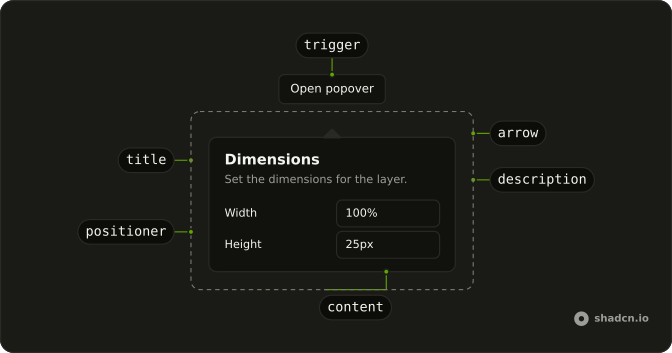
PopoverArrow
└── PopoverArrowTip
PopoverAnchor
PopoverTrigger
PopoverIndicator
PopoverPositioner
PopoverContent
PopoverTitle
PopoverDescription
PopoverClose
Usage
import { Button } from "@/components/ui/button";
import {
  Popover, PopoverContent, PopoverDescription, PopoverHeader,
  PopoverTitle, PopoverTrigger,
} from "@/components/ui/popover";
import { Field, FieldGroup, FieldLabel } from "@/components/ui/field";
import { Input } from "@/components/ui/input";
const PopoverDemo = () => (
<Popover>
<PopoverTrigger render={<Button variant="outline" />}>
Open popover
</PopoverTrigger>
<PopoverContent className="w-64 max-w-full">
<PopoverHeader>
<PopoverTitle>Dimensions</PopoverTitle>
<PopoverDescription>
Set the dimensions for the layer.
</PopoverDescription>
</PopoverHeader>
<FieldGroup className="min-w-0 gap-3">
<Field className="min-w-0" orientation="horizontal">
<FieldLabel className="w-1/2">Width</FieldLabel>
<Input className="min-w-0" defaultValue="100%" />
</Field>
<Field className="min-w-0" orientation="horizontal">
<FieldLabel className="w-1/2">Height</FieldLabel>
<Input className="min-w-0" defaultValue="25px" />
</Field>
</FieldGroup>
</PopoverContent>
</Popover>
);Accessibility
- Space
- Opens/closes the popover.
- Enter
- Opens/closes the popover.
- Tab
- Moves focus to the next focusable element within the content. Note: If there are no focusable elements, focus is moved to the next focusable element after the trigger.
- Shift+Tab
- Moves focus to the previous focusable element within the content. Note: If there are no focusable elements, focus is moved to the trigger.
- Escape
- Closes the popover and moves focus to the trigger.
Demos
Basic
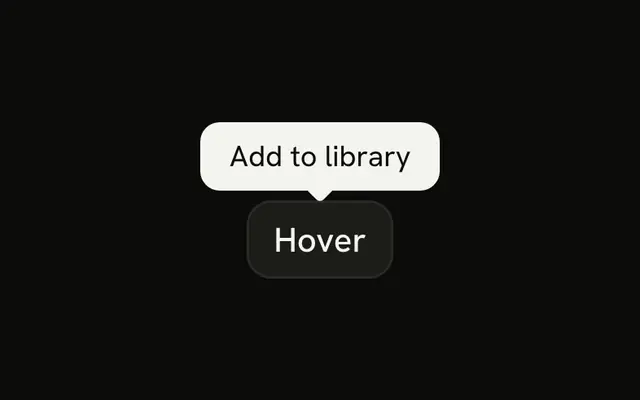
A title and one sentence, with no inputs. The panel lines up with the start of the button rather than its center, so it reads as a note attached to that control. Use this for a definition that should stay open while someone reads it. A Tooltip is the lighter choice when a single line on hover or focus is enough and does not need a dismiss.
Alignments
Three triggers place the panel at the start, the center, or the end of the button. Prefer start or end near a corner, and keep one alignment on a toolbar so the panels do not jump. Ark-based stacks use positioning.placement on Popover, Base UI and Radix use align on PopoverContent, and React Aria uses placement with a space, as in bottom start.
Form
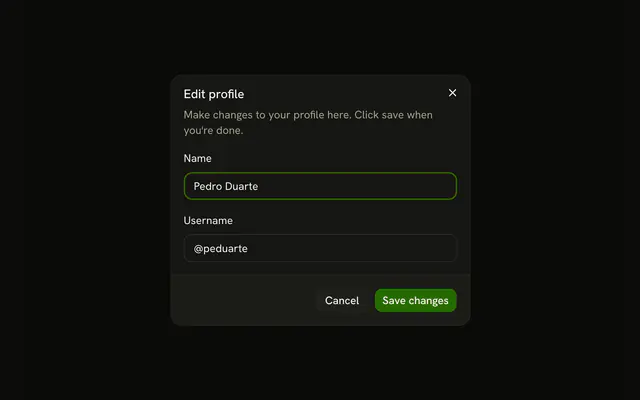
Width and height live in the panel, under a title that says what you are editing. Focus moves into the fields when it opens, and Escape or a click outside closes it. Use this for a small edit that should stay next to its button. More than a couple of fields, or a page that must wait, belongs in a Dialog.
Rtl
The row sets dir to rtl, and each button opens the panel toward a physical side: left, top, bottom, or right. Those edges do not mirror just because the language does. The trigger text is Arabic so it runs with the page. If the panel should swap sides with the writing direction, use a logical placement instead of left or right.
FAQ
How do I open the Popover from code in React?
Pass open and onOpenChange on Popover; the callback gets the next open state first.
It still needs its trigger, or an anchor, to know where to sit.
How do I align the Base UI Popover to the start or end of its trigger?
Pass align on PopoverContent: start, center (the default) or end. side and sideOffset move it around the trigger.
The Alignments demo above shows all three.
How do I position the Popover next to another element?
It positions against the trigger; to use another element, pass it as anchor to the positioner in components/ui/popover.tsx.
How do I make the Popover as wide as its trigger?
Give PopoverContent a width from the CSS variable the positioner sets:
w-(--anchor-width).
It updates as the trigger resizes, which suits pickers and menus under a field.
How do I put a form inside a Popover?
Put the fields in PopoverContent, as in the Form demo: focus moves into the panel when it opens, and Escape or a click outside closes it. To close it after saving, control its open state and set it to closed in your submit handler.
When should I use a Popover instead of a Dialog, a Tooltip or a Hover Card?
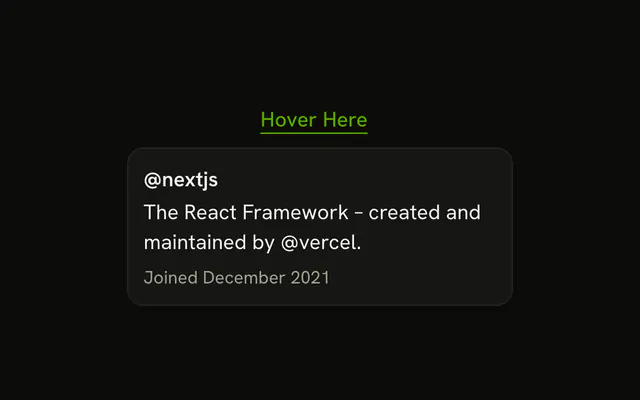
Use a Popover for a short form or extra controls next to what opened it, while the rest of the page stays usable. A Dialog blocks the page for a task that needs full attention, a Tooltip gives a one-line hint on hover or focus, and a Hover Card previews content while the pointer rests on a link.
API Reference
Popover
data-slot="popover"
open?boolean
Whether the popover is currently open.
defaultOpen?boolean
Whether the popover is initially open.
To render a controlled popover, use the open prop instead.
- Default
false
onOpenChange?(open: boolean, eventDetails: PopoverRoot.ChangeEventDetails) → void
Event handler called when the popover is opened or closed.
- Type
(open: boolean, eventDetails: PopoverRoot.ChangeEventDetails) → void- Parameters
open– booleaneventDetails– PopoverRoot.ChangeEventDetails- Returns
void
actionsRef?React.RefObject<PopoverRoot.Actions | null>
A ref to imperative actions.
- unmount: Ends the closing phase of the popover after an externally controlled closing animation finishes.
Call preventUnmountOnClose() in onOpenChange first, otherwise the popover completes closing on its own.
Whether it leaves the DOM is decided by keepMounted on the portal.
- close: Closes the popover imperatively when called.
- Type
React.RefObject<PopoverRoot.Actions | null>
children?React.ReactNode | PayloadChildRenderFunction<Payload>
The content of the popover.
This can be a regular React node or a render function that receives the payload of the active trigger.
- Type
React.ReactNode | PayloadChildRenderFunction<Payload>
defaultTriggerId?string | null
ID of the trigger that the popover is associated with.
This is useful in conjunction with the defaultOpen prop to create an initially open popover.
- Type
string | null
handle?PopoverHandle<Payload>
A handle to associate the popover with a trigger. If specified, allows external triggers to control the popover's open state.
- Type
PopoverHandle<Payload>
modal?boolean | "trap-focus"
Determines if the popover enters a modal state when open.
- true: user interaction is limited to the popover: document page scroll is locked, and pointer interactions on outside elements are disabled.
- false: user interaction with the rest of the document is allowed.
- trap-focus: focus is trapped inside the popover, but document page scroll is not locked and pointer interactions outside of it remain enabled.
On touch devices, a true modal blocks outside taps but leaves the page scrollable unless the popup spans nearly the full viewport width, matching native iOS behavior.
When modal is true, focus trapping is enabled only if <Popover.Close> is rendered
inside <Popover.Popup>. It can be visually hidden with your own CSS if needed, such as
Tailwind's sr-only utility.
When modal is trap-focus, render <Popover.Close> inside <Popover.Popup> so touch
screen readers can escape the popup.
- Type
boolean | "trap-focus"- Default
false
onOpenChangeComplete?(open: boolean) → void
Event handler called after any animations complete when the popover is opened or closed.
- Parameters
open– boolean- Returns
void
triggerId?string | null
ID of the trigger that the popover is associated with.
This is useful in conjunction with the open prop to create a controlled popover.
There's no need to specify this prop when the popover is uncontrolled (that is, when the open prop is not set).
- Type
string | null
PopoverTrigger
<button> data-slot="popover-trigger"
closeDelay?number
How long to wait before closing the popover that was opened on hover.
Specified in milliseconds.
Requires the openOnHover prop.
- Default
0
delay?number
How long to wait before the popover may be opened on hover. Specified in milliseconds.
Requires the openOnHover prop.
- Default
300
handle?PopoverHandle<Payload>
A handle to associate the trigger with a popover.
- Type
PopoverHandle<Payload>
id?string
ID of the trigger. In addition to being forwarded to the rendered element,
it is also used to specify the active trigger for the popover in controlled mode (with the PopoverRoot triggerId prop).
nativeButton?boolean
Whether the component renders a native <button> element when replacing it
via the render prop.
Set to false if the rendered element is not a button (e.g. <div>).
- Default
true
openOnHover?boolean
Whether the popover should also open when the trigger is hovered.
- Default
false
payload?Payload
A payload to pass to the popover when it is opened.
render?ReactElement | ((props: object, state: object) => ReactElement)
Replace the host element or compose it with another component.
- Type
ReactElement | ((props: object, state: object) => ReactElement)
PopoverPositioner
<div>
align?"start" | "center" | "end"
How to align the popup relative to the specified side.
- Type
"start" | "center" | "end"- Default
"center"
alignOffset?number | OffsetFunction
Additional offset along the alignment axis in pixels.
Also accepts a function that returns the offset to read the dimensions of the anchor
and positioner elements, along with its side and alignment.
The function takes a data object parameter with the following properties:
- data.anchor: the dimensions of the anchor element with properties width and height.
- data.positioner: the dimensions of the positioner element with properties width and height.
- data.side: which side of the anchor element the positioner is aligned against.
- data.align: how the positioner is aligned relative to the specified side.
``jsx
<Positioner
alignOffset={({ side, align, anchor, positioner }) => {
return side === top || side === bottom
      ? anchor.width
      : anchor.height;
  }}
/>
``
- Type
number | OffsetFunction- Default
0
anchor?Element | null | VirtualElement | React.RefObject<Element | null> | (() → Element | VirtualElement | null)
An element to position the popup against. By default, the popup will be positioned against the trigger.
- Type
Element | null | VirtualElement | React.RefObject<Element | null> | (() → Element | VirtualElement | null)
arrowPadding?number
Minimum distance to maintain between the arrow and the edges of the popup. Use it to prevent the arrow element from hanging out of the rounded corners of a popup.
- Default
5
collisionAvoidance?SideFlipMode | SideShiftMode
Determines how to handle collisions when positioning the popup.
side controls overflow on the preferred placement axis (top/bottom or left/right):
- flip: keep the requested side when it fits; otherwise try the opposite side
(top and bottom, or left and right).
- shift: never change side; keep the requested side and move the popup within
the clipping boundary so it stays visible.
- none: do not correct side-axis overflow.
align controls overflow on the alignment axis (start/center/end):
- flip: keep side, but swap start and end when the requested alignment overflows.
- shift: keep side and requested alignment, then nudge the popup along the
alignment axis to fit.
- none: do not correct alignment-axis overflow.
fallbackAxisSide controls fallback behavior on the perpendicular axis when the
preferred axis cannot fit:
- start: allow perpendicular fallback and try the logical start side first
(top before bottom, or left before right in LTR).
- end: allow perpendicular fallback and try the logical end side first
(bottom before top, or right before left in LTR).
- none: do not fallback to the perpendicular axis.
When side is shift, explicitly setting align only supports shift or none.
If align is omitted, it defaults to flip.
``jsx
<Positioner
collisionAvoidance={{
side: shift,
align: shift,
fallbackAxisSide: none,
}}
/>
``
- Type
SideFlipMode | SideShiftMode
collisionBoundary?"clipping-ancestors" | Element | Element[] | Rect
An element or a rectangle that delimits the area that the popup is confined to.
- Type
"clipping-ancestors" | Element | Element[] | Rect- Default
"clipping-ancestors"
collisionPadding?Padding
Additional space to maintain from the edge of the collision boundary.
- Default
5
disableAnchorTracking?boolean
Whether to disable the popup from tracking any layout shift of its positioning anchor.
- Default
false
positionMethod?"absolute" | "fixed"
Determines which CSS position property to use.
- Type
"absolute" | "fixed"- Default
"absolute"
side?"top" | "bottom" | "left" | "right" | "inline-end" | "inline-start"
Which side of the anchor element to align the popup against. May automatically change to avoid collisions.
- Type
"top" | "bottom" | "left" | "right" | "inline-end" | "inline-start"- Default
"bottom"
sideOffset?number | OffsetFunction
Distance between the anchor and the popup in pixels.
Also accepts a function that returns the distance to read the dimensions of the anchor
and positioner elements, along with its side and alignment.
The function takes a data object parameter with the following properties:
- data.anchor: the dimensions of the anchor element with properties width and height.
- data.positioner: the dimensions of the positioner element with properties width and height.
- data.side: which side of the anchor element the positioner is aligned against.
- data.align: how the positioner is aligned relative to the specified side.
``jsx
<Positioner
sideOffset={({ side, align, anchor, positioner }) => {
return side === top || side === bottom
      ? anchor.height
      : anchor.width;
  }}
/>
``
- Type
number | OffsetFunction- Default
0
sticky?boolean
Whether to maintain the popup in the viewport after the anchor element was scrolled out of view.
- Default
false
--transform-originstring
Where the content scales from, on its trigger's side.
PopoverTitle
<h1> data-slot="popover-title"
render?ReactElement | ((props: object, state: object) => ReactElement)
Replace the host element or compose it with another component.
- Type
ReactElement | ((props: object, state: object) => ReactElement)
className?string
Merged with the part's classes.
PopoverDescription
<p> data-slot="popover-description"
render?ReactElement | ((props: object, state: object) => ReactElement)
Replace the host element or compose it with another component.
- Type
ReactElement | ((props: object, state: object) => ReactElement)
className?string
Merged with the part's classes.
PopoverContent
<div> data-slot="popover-content"
finalFocus?boolean | React.RefObject<HTMLElement | null> | ((closeType: InteractionType) → void | boolean | HTMLElement | null)
Determines the element to focus when the popover is closed.
- false: Do not move focus.
- true: Move focus based on the default behavior (trigger or previously focused element).
- RefObject: Move focus to the ref element.
- function: Called with the interaction type (mouse, touch, pen, or keyboard).
Return an element to focus, true to use the default behavior, null to fall back to the default behavior, or false/undefined to do nothing.
- Type
boolean | React.RefObject<HTMLElement | null> | ((closeType: InteractionType) → void | boolean | HTMLElement | null)
initialFocus?boolean | React.RefObject<HTMLElement | null> | ((openType: InteractionType) → void | boolean | HTMLElement | null)
Determines the element to focus when the popover is opened.
By default, focus moves to the first tabbable element inside the popup, except when the popover
is opened by touch — then the popup itself is focused to avoid opening the virtual keyboard.
- false: Do not move focus.
- true: Move focus based on the default behavior (first tabbable element or popup).
- RefObject: Move focus to the ref element.
- function: Called with the interaction type (mouse, touch, pen, or keyboard).
Return an element to focus, true to use the default behavior, null to fall back to the default behavior, or false/undefined to do nothing.
- Type
boolean | React.RefObject<HTMLElement | null> | ((openType: InteractionType) → void | boolean | HTMLElement | null)
render?ReactElement | ((props: object, state: object) => ReactElement)
Replace the host element or compose it with another component.
- Type
ReactElement | ((props: object, state: object) => ReactElement)
className?string
Merged with the part's classes.
--transform-originstring
Where the content scales from, on its trigger's side.
PopoverHeader
<div> data-slot="popover-header"
className?string
Merged with the part's classes.