shadcn.io is an independent project built on shadcn/ui
Flip a setting on or off. The change applies without a save button under the row.
Use it for a preference that should take effect immediately, like airplane mode. A Checkbox fits a choice you submit with a form, or several options that can all be true. In React, Base UI still submits a named switch, so keep a label next to the thumb.
Installation
Anatomy
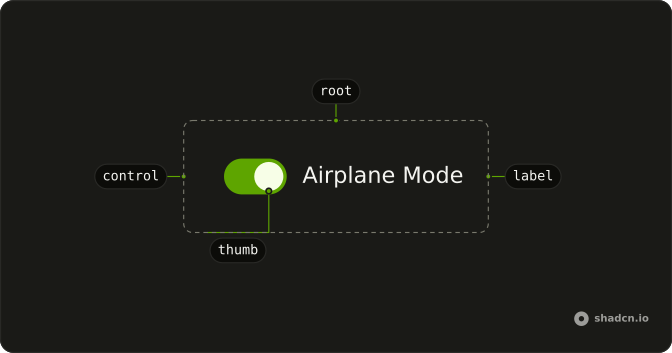
Switch
├── SwitchLabel
├── SwitchControl
└── SwitchThumb
Usage
import { Field, FieldLabel } from "@/components/ui/field";
import { Switch } from "@/components/ui/switch";<Field className="w-fit" orientation="horizontal">
<Switch />
<FieldLabel>Airplane Mode</FieldLabel>
</Field>Accessibility
- Space
- Toggle the switch.
- Enter
- Toggle the switch.
Demos
Description
A horizontal field puts the label and a FieldDescription in FieldContent, with the switch on the other side. The description carries the consequence: sharing follows you across devices and turns off when you leave. Add that line when the label is too short to be safe, and skip it when the label is already a full sentence.
Choice Card
FieldLabel wraps the whole field, so the title, the description, and the switch are one hit target. Sharing sits next to notifications, which starts checked. Use the card when a setting needs more than one line and the empty space should toggle it. Use a plain row when a stack of cards would waste the page.
Disabled
disabled on both the Field and the Switch grays the row and blocks the toggle. Set both, because the field covers the label and the switch covers the control. Use it when the plan or role cannot change the setting, and say why nearby. Off is a chosen value, while disabled means the person cannot choose.
Invalid
invalid on the Field and aria-invalid on the Switch turn the control to the destructive color. The description says the terms have to be accepted before continuing. Use that pair for a required agreement or a setting that blocks the next step, not for a preference that is merely unset. The color does not announce itself, so the text under the label has to say what is wrong.
Sizes
size accepts sm or default. Small fits a tight settings row or secondary type, and default matches body text, which is also what you get when the prop is omitted. There is no larger step. Edit the switch styles rather than scaling the control, or the thumb blurs and the hit area drifts.
Rtl
dir set to rtl on the field and the switch, with an Arabic label and description. The text leads from the right, and the thumb moves with the writing direction instead of a left-to-right slide. Set dir on the switch when a parent direction will not reach it. Logical alignment keeps the control at the end of the row without physical margins.
FAQ
How do I control a Switch in React?
Keep the on or off state in state and pass it back to the Switch. Use the default prop instead when you only need the starting state.
Pass checked; onCheckedChange receives the new boolean.
How do I add a label to a Switch?
Put the Switch in a horizontal Field next to a FieldLabel, as the default demo does: clicking the label toggles the Switch, and screen readers read the label with it. Add a FieldDescription for a line of help under it, as in the Description demo.
Does the Base UI Switch submit its value in a form?
Yes. Give it a name: when on, it submits its value, which defaults to "on", and when off it submits nothing, like a checkbox.
With Base UI, uncheckedValue sets what it submits when off.
How do I make a smaller Switch?
Set size="sm"; the default size is default. Both sizes appear in the Sizes demo. For a different look, edit the Switch file in your ui folder, where the track and thumb sizes are plain classes.
How do I show an error on a Switch?
Mark its Field invalid, as the Invalid demo does: the Switch takes the destructive color, and a FieldDescription or FieldError under it says what is wrong. Use it for a required agreement, like accepting terms.
Should I use a Switch or a Checkbox?
Use a Switch for a setting that takes effect at once, like turning notifications on. Use a Checkbox for a choice that is submitted later with a form, or when several options can be picked in a list.
API Reference
Switch
<span> data-slot="switch"
checked?boolean
Whether the switch is currently active.
To render an uncontrolled switch, use the defaultChecked prop instead.
defaultChecked?boolean
Whether the switch is initially active.
To render a controlled switch, use the checked prop instead.
- Default
false
onCheckedChange?(checked: boolean, eventDetails: SwitchRoot.ChangeEventDetails) → void
Event handler called when the switch is activated or deactivated.
- Type
(checked: boolean, eventDetails: SwitchRoot.ChangeEventDetails) → void- Parameters
checked– booleaneventDetails– SwitchRoot.ChangeEventDetails- Returns
void
disabled?boolean
Whether the component should ignore user interaction.
- Default
false
form?string
Identifies the form that owns the hidden input. Useful when the switch is rendered outside the form.
id?string
The id of the hidden input element.
When nativeButton is true, the id is applied to the root element.
inputRef?React.Ref<HTMLInputElement>
A ref to access the hidden <input> element.
- Type
React.Ref<HTMLInputElement>
name?string
Identifies the field when a form is submitted.
nativeButton?boolean
Whether the component renders a native <button> element when replacing it
via the render prop.
Set to true if the rendered element is a native button.
- Default
false
readOnly?boolean
Whether the user should be unable to activate or deactivate the switch.
- Default
false
required?boolean
Whether the user must activate the switch before submitting a form.
- Default
false
size?"sm" | "default"
The size.
- Type
"sm" | "default"- Default
"default"
uncheckedValue?string
The value submitted with the form when the switch is off. By default, unchecked switches do not submit any value, matching native checkbox behavior.
value?string
The value submitted with the form when the switch is on. By default, switch submits the "on" value, matching native checkbox behavior.
- Default
"on"
render?ReactElement | ((props: object, state: object) => ReactElement)
Replace the host element or compose it with another component.
- Type
ReactElement | ((props: object, state: object) => ReactElement)
className?string
Merged with the part's classes.
data-size?string
Mirrors size.
SwitchThumb
<span> data-slot="switch-thumb"