shadcn.io is an independent project built on shadcn/ui
Tabs show one panel from a short list of peer views. Four tabs is already plenty.
Use them when people switch views of the same thing, rather than reading down the page. If more than one section should stay open, use an Accordion. In React, Base UI unmounts hidden panels, so a form there loses what was typed unless you keep it mounted.
Installation
Anatomy
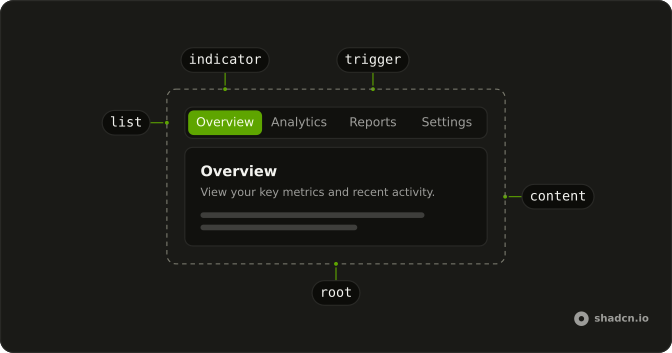
Tabs
├── TabsList
│   └── TabsIndicator
├── TabsTrigger
└── TabsContent
Usage
import {
  Card, CardContent, CardDescription, CardHeader, CardTitle,
} from "@/components/ui/card";
import {
  Tabs, TabsContent, TabsList, TabsTrigger,
} from "@/components/ui/tabs";
<Tabs className="w-[400px]" defaultValue="overview">
<TabsList>
<TabsTrigger value="overview">Overview</TabsTrigger>
<TabsTrigger value="analytics">Analytics</TabsTrigger>
<TabsTrigger value="reports">Reports</TabsTrigger>
<TabsTrigger value="settings">Settings</TabsTrigger>
</TabsList>
<TabsContent value="overview">
<Card>
<CardHeader>
<CardTitle>Overview</CardTitle>
<CardDescription>
View your key metrics and recent project activity. Track progress
across all your active projects.
</CardDescription>
</CardHeader>
<CardContent className="text-muted-foreground text-sm">
You have 12 active projects and 3 pending tasks.
</CardContent>
</Card>
</TabsContent>
<TabsContent value="analytics">
<Card>
<CardHeader>
<CardTitle>Analytics</CardTitle>
<CardDescription>
Track performance and user engagement metrics. Monitor trends and
identify growth opportunities.
</CardDescription>
</CardHeader>
<CardContent className="text-muted-foreground text-sm">
Page views are up 25% compared to last month.
</CardContent>
</Card>
</TabsContent>
<TabsContent value="reports">
<Card>
<CardHeader>
<CardTitle>Reports</CardTitle>
<CardDescription>
Generate and download your detailed reports. Export data in multiple
formats for analysis.
</CardDescription>
</CardHeader>
<CardContent className="text-muted-foreground text-sm">
You have 5 reports ready and available to export.
</CardContent>
</Card>
</TabsContent>
<TabsContent value="settings">
<Card>
<CardHeader>
<CardTitle>Settings</CardTitle>
<CardDescription>
Manage your account preferences and options. Customize your
experience to fit your needs.
</CardDescription>
</CardHeader>
<CardContent className="text-muted-foreground text-sm">
Configure notifications, security, and themes.
</CardContent>
</Card>
</TabsContent>
</Tabs>
Accessibility
- Tab
- When focus moves onto the tabs, focuses the active trigger. When a trigger is focused, moves focus to the active content.
- Arrow Down
- Moves focus to the next trigger in vertical orientation and activates its associated content.
- Arrow Right
- Moves focus to the next trigger in horizontal orientation and activates its associated content.
- Arrow Up
- Moves focus to the previous trigger in vertical orientation and activates its associated content.
- Arrow Left
- Moves focus to the previous trigger in horizontal orientation and activates its associated content.
- Home
- Moves focus to the first trigger and activates its associated content.
- End
- Moves focus to the last trigger and activates its associated content.
- Enter
- In manual mode, when a trigger is focused, moves focus to its associated content.
- Space
- In manual mode, when a trigger is focused, moves focus to its associated content.
Demos
Line
The list drops the filled track and underlines the active trigger. Overview, Analytics, and Reports are the list, with no panels under them. Use the underline when the tabs sit on a page that already has cards, and another boxed list would stack containers. Keep the default list when the control is small and needs a visible boundary of its own.
Vertical
orientation is vertical, so Account, Password, and Notifications stack, and the arrow keys that move between them are up and down. Only the list is on the page, and the panel belongs beside it. Use a vertical list when the labels are long enough to wrap in a horizontal row, such as a settings column. Two short words can stay horizontal.
Disabled
Home can be selected. The settings trigger sets disabled, so it is skipped and cannot become the active tab. Use a disabled trigger for a section this account cannot open yet, a missing permission or an unfinished area, while the label stays as a promise. If it will never apply, drop the trigger rather than showing a control that goes nowhere.
Icons
Preview and Code each lead with an icon, and the icons are aria-hidden because the words are the names. Use icons when the pair is a familiar mode switch, a preview against its source, and the picture helps at a glance. Do not ship icon-only triggers. The text is what gets announced, and a mystery glyph is not a tab label.
Rtl
Arabic labels and card copy, with dir set to rtl. The list follows the reading order, and the panel text aligns to the start. The trigger values stay overview, analytics, reports, and settings, and only the visible words change. Use this for a localized product, not as a visual flip on an English page.
FAQ
How do I control the selected tab in React?
Keep the selected tab's value in state and pass it back to Tabs; each trigger and panel is matched by its value. Use the default prop when you only need the first tab.
Pass value; onValueChange receives the new value.
How do I keep inactive Tabs panels mounted?
Inactive panels are unmounted by default, so their state resets when you switch back. Keep them mounted to preserve form input or scroll position.
With Base UI, set keepMounted on each TabsContent.
How do I make underline Tabs with Base UI?
Set variant="line" on TabsList, as the Line demo does: the list loses its background and the active tab gets an underline.
How do I show Tabs vertically?
Set orientation="vertical" on Tabs: the list stacks the triggers on the side and the Up and Down arrow keys move between them, as in the Vertical demo.
Are the Tabs accessible with the keyboard?
Yes. Tab moves focus into the list, the arrow keys move between triggers, and Home and End jump to the first and last; disabled triggers are skipped. The next Tab moves on to the open panel, which shows a focus ring.
Focusing a tab selects it, as on the other bases: TabsList turns on Base UI's activateOnFocus, which Base UI leaves off. Set activateOnFocus={false} to select only with Enter or Space.
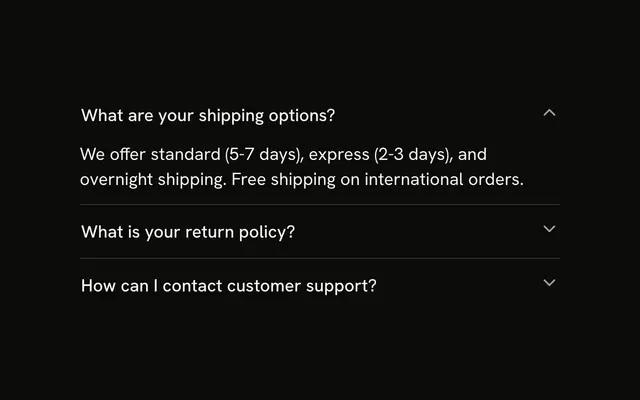
Should I use Tabs or an Accordion?
Use Tabs when people switch between a few views of the same area, one at a time. Use an Accordion when sections stack vertically and several may be read in order, or on narrow screens where tab labels would not fit.
API Reference
Tabs
<div> data-slot="tabs"
value?TabsTab.Value
The value of the currently active Tab. Use when the component is controlled.
When the value is null, no Tab will be active.
defaultValue?TabsTab.Value
The default value. Use when the component is not controlled.
When the value is null, no Tab will be active.
- Default
0
onValueChange?(value: TabsTab.Value, eventDetails: TabsRoot.ChangeEventDetails) → void
Callback invoked when new value is being set.
The event reason is none for user-initiated changes, such as a click
or keyboard navigation; initial for the first automatic selection or
fallback in uncontrolled roots when defaultValue is omitted or
undefined, including when the implicit initial value is disabled or
missing; disabled for automatic fallback when the selected tab becomes
disabled in uncontrolled roots; or missing for automatic fallback when
the selected tab is removed, or when an explicit defaultValue never
matches a mounted tab in uncontrolled roots.
For automatic changes, the selected value can be null when no enabled Tab
is available as a fallback.
Automatic changes cannot be canceled; calling eventDetails.cancel() for
initial, disabled, or missing has no effect.
- Type
(value: TabsTab.Value, eventDetails: TabsRoot.ChangeEventDetails) → void- Parameters
value– TabsTab.ValueeventDetails– TabsRoot.ChangeEventDetails- Returns
void
orientation?TabsRoot.Orientation
The component orientation (layout flow direction).
- Default
"horizontal"
render?ReactElement | ((props: object, state: object) => ReactElement)
Replace the host element or compose it with another component.
- Type
ReactElement | ((props: object, state: object) => ReactElement)
className?string
Merged with the part's classes.
data-focus?string
Present when focused is true.
data-orientation?string
Mirrors orientation.
TabsList
<div> data-slot="tabs-list"
activateOnFocus?boolean
Whether to automatically change the active tab on arrow key focus.
Otherwise, tabs will be activated using <kbd>Enter</kbd> or <kbd>Space</kbd> key press. Ark default: false.
- Default
true
loopFocus?boolean
Whether to loop keyboard focus back to the first item when the end of the list is reached while using the arrow keys.
- Default
true
variant?"default" | "line"
The visual style.
- Type
"default" | "line"- Default
"default"
render?ReactElement | ((props: object, state: object) => ReactElement)
Replace the host element or compose it with another component.
- Type
ReactElement | ((props: object, state: object) => ReactElement)
className?string
Merged with the part's classes.
data-focus?string
Present when focused is true.
data-orientationstring
Mirrors the orientation prop.
data-variant?string
Mirrors variant.
TabsTrigger
<button> data-slot="tabs-trigger"
valueTabsTab.Value
The value of the Tab.
disabled?boolean
Whether the Tab is disabled.
If a first Tab on a <Tabs.List> is disabled, it won't initially be selected.
Instead, the next enabled Tab will be selected.
However, it does not work like this during server-side rendering, as it is not known
during pre-rendering which Tabs are disabled.
To work around it, ensure that defaultValue or value on <Tabs.Root> is set to an enabled Tab's value.
nativeButton?boolean
Whether the component renders a native <button> element when replacing it
via the render prop.
Set to false if the rendered element is not a button (for example, <div>).
- Default
true
render?ReactElement | ((props: object, state: object) => ReactElement)
Replace the host element or compose it with another component.
- Type
ReactElement | ((props: object, state: object) => ReactElement)
className?string
Merged with the part's classes.
TabsContent
<div> data-slot="tabs-content"
valueTabsTab.Value
The value of the TabPanel. It will be shown when the Tab with the corresponding value is active.
keepMounted?boolean
Whether to keep the HTML element in the DOM while the panel is hidden.
- Default
false
render?ReactElement | ((props: object, state: object) => ReactElement)
Replace the host element or compose it with another component.
- Type
ReactElement | ((props: object, state: object) => ReactElement)
className?string
Merged with the part's classes.