shadcn.io is an independent project built on shadcn/ui
A status line above the trigger reads Open or Closed. Toggle content shows a short note, and that line follows the same open state.
Use it when another control must open the same region. Several sections that open one at a time belong in an Accordion. In React, Ark UI does not keep this value after a reload.
Installation
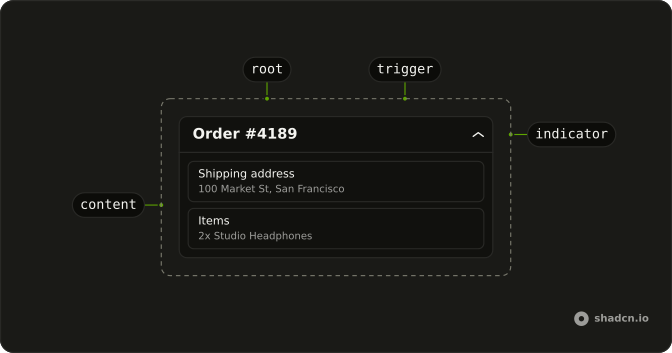
Anatomy
Usage
<div className="flex w-full max-w-lg flex-col gap-4">
  <p className="text-muted-foreground text-sm">
    Status: {isOpen ? "Open" : "Closed"}
  </p>
  <Collapsible onOpenChange={handleOpenChange} open={isOpen}>
    <CollapsibleTrigger className="font-medium text-sm underline-offset-4 hover:underline">
      Toggle content
    </CollapsibleTrigger>
    <CollapsibleContent className="mt-2 text-muted-foreground text-sm">
      This is a controlled collapsible component. The open state is managed
      externally.
    </CollapsibleContent>
  </Collapsible>
</div>
FAQ
How does this file wire the open state?
isOpen is state in the demo, starting false. The status line prints Open or Closed from it, and Collapsible is controlled with that same value.
Pass open and update it in onOpenChange, which receives { open }.
How do I make it start open?
Start the state at true. The status line follows that value on the first render.
Does Toggle content still open and close the panel?
Yes. The trigger asks the collapsible to change, the change handler writes the state, and the collapsible and the status line both read it.
How do I open it from a second button?
Set the state from that button. The collapsible opens because it reads the same value as the trigger.
API Reference
Collapsible
Sets onOpenChange={handleOpenChange} and open={isOpen}. The rest is on the Collapsible page.