Notion Design System
Notion's purple #5645d4 CTA, navy #0a1530 hero and Notion Sans as a DESIGN.md file, with a large component set for React, Next.js and AI tools.
- Primary color
- #5645d4
- Typeface
- Notion Sans
- Shape
- Mixed
- Base radius
- 8px
- Colors
- 47
- Type tokens
- 17
- Components
- 50
- Spacing values
- 12
About Notion DESIGN.md
Curated by Dov Azencot, updated May 12, 2026. Source notion.com (opens in a new tab).
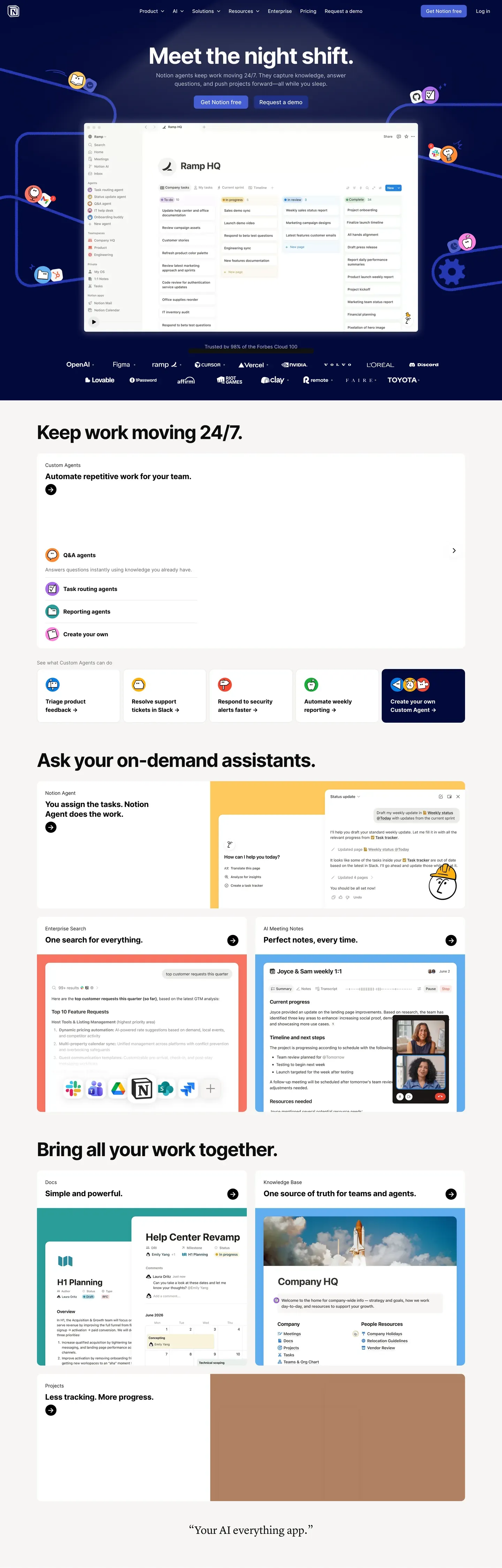
Notion's design system reads as a workspace, not a marketing site. The homepage opens with "Meet the night shift." centered over a deep navy band ("#0a1530") decorated with brand-colored sticky-note dots and mesh wire illustrations — atmosphere rather than chrome. The dominant action is a single purple pill button at "#5645d4", and a real "Ramp HQ" kanban mockup floats below the buttons with a 24px diffuse drop shadow. The voice is confident and illustration-rich without leaning maximalist.
This DESIGN.md packages the whole spec into one machine-readable file. Inside: 47 colors tokens grouped into brand purples, a 10-color brand spectrum, 9 pastel card tints, surface, hairline, text, and semantic scales; 17 typography tokens running Notion Sans (Inter-based) from 80px hero-display down to 11px micro-uppercase; 8 corner radii from 4px chips to 24px feature cards; 12 spacing tokens up to 120px hero gutters; and 50+ components covering buttons, pastel feature cards (peach, rose, mint, lavender, sky, yellow, cream), inputs, pill and segmented tabs, badges, the 4-tier pricing comparison, the embedded workspace mockup, FAQ accordions, and the multi-column footer. Format follows the Google Labs DESIGN.md spec.
A working React developer feeds this file to Claude, Cursor, or Copilot and gets components that match Notion's discipline — rectangular 8px buttons, 12px-rounded cards, purple reserved for one CTA per page, navy bands paired with sticky-note decoration — instead of a generic shadcn theme. Reference the tokens directly inside Tailwind config, CSS variables, or your own component library. The system is worth studying for one reason: it proves that "all-in-one workspace" branding can be illustration-rich and colorful without resorting to gradient bling or pill-button-everywhere uniformity.
What makes it distinct
5 highlights
- Signature purple voltage#5645d4 reserved for the dominant 'Get Notion free' CTA, never decorative
- Deep navy #0a1530 hero band with scattered sticky-note dots and mesh wire illustrations
- Nine pastel card tintsPeach, rose, mint, lavender, sky, yellow, cream, gray, plus bold yellow #f9e79f
- Rectangular 8px buttons, not pillsSober-editorial geometry distinguishes it from Stripe and Linear
- Live workspace mockup card embedded in the hero with a 24px diffuse drop shadow
Live at notion.com
Notion in production, as captured. Scroll the window to see the whole page.
47 colors
Notion's system runs on #5645d4 as its primary voltage, used in 3 of 50 components. Type is set in Notion Sans across 17 tokens from 11px to 80px, weights 400–600. Shape language is mixed across 50 components, blending pills, soft rounds, and squarer corners.
Brand & Accent
Sparing, CTA-only voltage · 17
Surface
Page and card backgrounds · 3
Text
Headlines, body, captions · 8
Borders & Hairlines
Dividers, outlines, rules · 3
Semantic
Status, errors, success, links · 3
Other
Specialty colors · 13
17 type tokens
Set in Notion Sans across 17 tokens, from 11px to 80px, weights 400–600. Shown in its own stack: where the font isn't installed, the fallback the file names stands in.
- hero-display80px · weight 600 · lh 1.05 · tracking -2pxThe quick brown fox jumps over the lazy dog
- display-lg56px · weight 600 · lh 1.1 · tracking -1pxThe quick brown fox jumps over the lazy dog
- heading-148px · weight 600 · lh 1.15 · tracking -0.5pxThe quick brown fox jumps over the lazy dog
- heading-236px · weight 600 · lh 1.2 · tracking -0.5pxThe quick brown fox jumps over the lazy dog
- heading-328px · weight 600 · lh 1.25The quick brown fox jumps over the lazy dog
- heading-422px · weight 600 · lh 1.3The quick brown fox jumps over the lazy dog
- heading-518px · weight 600 · lh 1.4The quick brown fox jumps over the lazy dog
- subtitle18px · weight 400 · lh 1.5The quick brown fox jumps over the lazy dog
- body-md16px · weight 400 · lh 1.55The quick brown fox jumps over the lazy dog
- body-md-medium16px · weight 500 · lh 1.55The quick brown fox jumps over the lazy dog
- body-sm14px · weight 400 · lh 1.5The quick brown fox jumps over the lazy dog
- body-sm-medium14px · weight 500 · lh 1.5The quick brown fox jumps over the lazy dog
- caption13px · weight 400 · lh 1.4The quick brown fox jumps over the lazy dog
- caption-bold13px · weight 600 · lh 1.4The quick brown fox jumps over the lazy dog
- micro12px · weight 500 · lh 1.4The quick brown fox jumps over the lazy dog
- micro-uppercase11px · weight 600 · lh 1.4 · tracking 1pxThe quick brown fox jumps over the lazy dog
- button-md14px · weight 500 · lh 1.3The quick brown fox jumps over the lazy dog
Radii and spacing
8 corner radii and 12 spacing values. Shape language: mixed, on a 8px base radius.
Radii8
- xs4px
- sm6px
- md8px
- lg12px
- xl16px
- xxl20px
- xxxl24px
- full9999px
Spacing12
- xxs4px
- xs8px
- sm12px
- md16px
- lg20px
- xl24px
- xxl32px
- xxxl40px
- section-sm48px
- section64px
- section-lg96px
- hero120px
50 components
Each rendered from its tokens (color, type, radius, padding) on Notion's own canvas.
- Button PrimaryButton Primarybutton-primary
- Button Primary PressedButton Primary Pressedbutton-primary-pressed
- Button Primary DisabledButton Primary Disabledbutton-primary-disabled
- Button DarkButton Darkbutton-dark
- Button SecondaryButton Secondarybutton-secondary
- Button On DarkButton On Darkbutton-on-dark
- Button Secondary On DarkButton Secondary On Darkbutton-secondary-on-dark
- Button GhostButton Ghostbutton-ghost
- Button LinkButton Linkbutton-link
- Card BaseCard Basecard-base
- Card FeatureCard Featurecard-feature
- Card Feature Yellow BoldCard Feature Yellow Boldcard-feature-yellow-bold
- Card Feature PeachCard Feature Peachcard-feature-peach
- Card Feature RoseCard Feature Rosecard-feature-rose
- Card Feature MintCard Feature Mintcard-feature-mint
- Card Feature SkyCard Feature Skycard-feature-sky
- Card Feature LavenderCard Feature Lavendercard-feature-lavender
- Card Feature YellowCard Feature Yellowcard-feature-yellow
- Card Feature CreamCard Feature Creamcard-feature-cream
- Card Agent TileCard Agent Tilecard-agent-tile
- Card TemplateCard Templatecard-template
- Card Startup PerkCard Startup Perkcard-startup-perk
- Pricing CardPricing Cardpricing-card
- Pricing Card FeaturedPricing Card Featuredpricing-card-featured
- Type here…Text Inputtext-input
- Type here…Text Input Focusedtext-input-focused
- Search PillSearch Pillsearch-pill
- Pill TabPill Tabpill-tab
- Pill Tab ActivePill Tab Activepill-tab-active
- Segmented TabSegmented Tabsegmented-tab
- Segmented Tab ActiveSegmented Tab Activesegmented-tab-active
- Badge PurpleBadge Purplebadge-purple
- Badge PinkBadge Pinkbadge-pink
- Badge OrangeBadge Orangebadge-orange
- Badge Tag PurpleBadge Tag Purplebadge-tag-purple
- Badge Tag OrangeBadge Tag Orangebadge-tag-orange
- Badge Tag GreenBadge Tag Greenbadge-tag-green
- Badge PopularBadge Popularbadge-popular
- Promo BannerPromo Bannerpromo-banner
- Hero Band DarkHero Band Darkhero-band-dark
- Workspace Mockup CardWorkspace Mockup Cardworkspace-mockup-card
- Cta Banner LightCta Banner Lightcta-banner-light
- Comparison TableComparison Tablecomparison-table
- Comparison RowComparison Rowcomparison-row
- Testimonial CardTestimonial Cardtestimonial-card
- Logo Wall ItemLogo Wall Itemlogo-wall-item
- Faq Accordion ItemFaq Accordion Itemfaq-accordion-item
- Stat RowStat Rowstat-row
- Footer RegionFooter Regionfooter-region
- Footer LinkFooter Linkfooter-link
The system, in use
Notion's tokens on the kind of product it builds.
Plan, build and ship in one place
Bring your team's work together, from the first idea to the final release.
Notion design system FAQ
Notion's tokens, its components and how to use this DESIGN.md in your project.
Notion's DESIGN.md has 47 color tokens: primary (#5645d4), primary-pressed (#4534b3), primary-deep (#3a2a99), on-primary (#ffffff), brand-navy (#0a1530), brand-navy-deep (#070f24) and 41 more. Every value is a quoted hex you can copy.
The color token `primary` is #5645d4, used by 3 components. The surface behind it is `canvas` (#ffffff).
Map the tokens to your CSS variables: `primary` (#5645d4) to `--primary`, `canvas` (#ffffff) to `--background`, `link-blue` (#0075de) to `--foreground`. shadcn/ui's Tailwind setup maps them to classes such as `bg-primary` and `text-foreground`, so they then use Notion's palette.
Notion's signature color is the purple at #5645d4, used exclusively for the dominant 'Get Notion free' primary CTA. It pairs with #4534b3 for the pressed state and #3a2a99 for deeper emphasis. The purple is held back from body text and large background surfaces — the rest of the system runs on the deep navy hero band #0a1530, near-black ink #1a1a1a, warm charcoal #37352f, and a wide pastel card-tint palette. That restraint is what makes the purple register as a brand signal rather than decoration.
Not as a togglable theme. The public marketing site is light-only, with #ffffff canvas and #f6f5f4 surfaces carrying most of the page. The only dark surfaces are the hero bands — #0a1530 navy with white text — and a promo strip variant at #070f24. The Notion app itself has a full dark theme, but the DESIGN.md captured here documents the marketing surfaces (homepage, Enterprise, Product AI, Product Agents, Startups, Pricing) where dark mode is band-scoped rather than global.
Notion's DESIGN.md sets its type in Notion Sans. The first family is the one most tokens use.
17 type tokens, such as `hero-display`, from 11px to 80px, in weights 400 to 600. Each token carries its family, size, weight, line height and letter spacing.
Notion Sans is Notion's main family and may be proprietary or need its own license. Keep the sizes, weights, line heights and letter spacing from the file and swap the family for an open font of similar proportions, such as a font from Google Fonts, set in `--font-sans`.
Notion runs Notion Sans, a custom Inter-based variable typeface, across every UI surface including the homepage and product pages. Fallbacks walk Inter, -apple-system, system-ui, 'Segoe UI', Helvetica, sans-serif. The 80px hero-display token sits at weight 600 with -2px letter-spacing and 1.05 line-height; body-md runs 16px / 400 / 1.55 for documentation-friendly reading. Inter is the cleanest open-source substitute — proportions transfer almost identically, since Notion Sans is itself a fork.
50 components, among them `button-primary`, `button-primary-pressed`, `button-primary-disabled`, `button-dark` and `button-secondary`. Each lists properties such as its background, text color, type token and corner radius as references to the other tokens.
8 corner radii: xs (4px), sm (6px), md (8px), lg (12px), xl (16px) and 3 more. 12 spacing values: xxs (4px), xs (8px), sm (12px), md (16px), lg (20px) and 7 more. The file reads as a mix of pills, soft rounds and squarer corners.
Notion's shape language is sober-editorial. Buttons render at 8px radius (`{rounded.md}`), inputs at 8px, cards at 12px (`{rounded.lg}`), and pill tabs and status badges at 9999px. Only tabs and badges are fully pill-shaped — every other interactive surface is a rectangle. The choice distinguishes Notion from pill-button-everywhere brands like Stripe and Linear and reinforces the workspace identity: rectangles feel like document blocks, pills feel like consumer apps.
Copy the color and radius tokens into your `globals.css`: Notion's `primary` (#5645d4) becomes `--primary`, and `md` (8px) becomes `--radius`. The shadcn/ui components read those variables, so they change with the file.
Download Notion's DESIGN.md (or copy it as Markdown) and put it in your project, or paste it into the chat. Then ask Claude Code, Cursor or another agent to build a page "in the style of the Notion DESIGN.md": it reads the tokens and writes matching components.
Yes. The file is free to download or copy, with no account, from the buttons at the top and bottom of this page. The raw Markdown is also at `/design/notion/raw`.
Notion's page describes the look of its public website (www.notion.com), curated from what is visible there: the colors, type and components. It is an interpretation.
No. The Notion DESIGN.md describes the look of a public website. It is not official, and Notion has not endorsed or reviewed it. The name and logo belong to Notion.
Yes. The file is structured for AI consumption — drop it into Claude, Cursor, or Copilot and the agent will reproduce Notion's purple-CTA discipline, navy hero bands, pastel feature card grid, and 8px-rectangle button geometry instead of a generic shadcn theme. You can also pull tokens directly: every hex (#5645d4, #0a1530, #f9e79f, the nine pastel tints) and every radius / spacing / typography value is a quoted token you can paste into Tailwind config, CSS variables, or your own component library.
A short list, documented in the Known Gaps section. Dark-mode token values are only surfaced for the hero bands — the in-app dark theme isn't captured. Animation and transition timings weren't extracted; 150–200ms ease is a safe default. Form-validation success state is not explicitly captured beyond the focused-input purple border. And the pastel-tint mapping (which feature card uses peach versus rose versus lavender) is observation-based from the six captured surfaces — the actual brand library may have additional tints.
Related reading
Specs, directories and component libraries that pair with this design system.
Use Notion in your project
One machine-readable file. Drop it into Claude Code, Cursor, VS Code or any AI tool that reads DESIGN.md.
Download the DESIGN.md
One machine-readable file: every color, type, radius, spacing, and component token of Notion.
Feed it to your AI tool
Drop it into Claude, Cursor, or GitHub Copilot. The agent writes React components and Tailwind classes that match Notion's visual language.
Reference the tokens directly
Or paste the values into your Tailwind config, CSS variables, or component library: every color, size and radius is a quoted, ready-to-copy value.
Read the full DESIGN.md overview, rationale, do’s and don’ts
Overview
Notion presents itself as the all-in-one workspace through a confident, illustration-rich brand voice. The homepage opens with "Meet the night shift." rendered centered over a deep navy hero band ("#0a1530"), decorated with brand-colored sticky-note dots and mesh wire illustrations scattered around the headline. The signature purple pill primary CTA ("#5645d4") "Get Notion free" sits at the visual center, paired with an outlined "Request a demo" secondary. Below the buttons, a real Notion workspace UI mockup card (the "Ramp HQ" kanban board) breaks out of the hero band with a deep diffuse drop shadow.
Below the hero, the page cycles through a distinctive sequence of feature sections: a dense sticky-note "Keep work moving 24/7" panel with red/blue/green/purple/teal status icons; a bold yellow ("#f9e79f") "Ask your on-demand assistants" banner card flanked by orange/rose/mint pastel feature tiles showing assistant UI mockups; and a "Bring all your work together" 3-column grid with brand-colored mockups (sky-blue tutorial card, light Notion calendar, brown/rust testimonial slate). The pricing page renders 4 tiers (Free / Plus / Business / Enterprise) horizontally with one tier featured (purple-bordered) and a dense feature comparison table running below.
The system uses a Notion-Sans typeface (Inter-based) across every UI surface — humanist-geometric character that pairs naturally with the colorful illustrations. Buttons are 8px rectangles, NOT pills — distinguishing Notion's sober rectangular geometry from competitors that use pills universally. Cards use 12px corner rounding consistently.
Key Characteristics:
- Deep navy hero band ("#0a1530") with scattered sticky-note dots + mesh wire decorative illustrations
- Signature purple pill ("#5645d4") primary CTA — Notion's recognizable "Get Notion free" button color
- Real Notion workspace UI mockup card embedded in the hero with deep drop shadow
- Bold yellow feature banner ("#f9e79f") for high-emphasis content sections
- Pastel feature card palette (peach, rose, mint, lavender, sky, yellow) echoing the live product database properties
- Notion-Sans (Inter-based) across every UI surface
- 8px-rounded buttons (NOT pills), 12px-rounded cards — sober editorial geometry
- 4-tier pricing comparison with dense feature table
- Centered hero layout (different from the left-aligned norm of most B2B SaaS)
Known Gaps
- Specific dark-mode token values not surfaced beyond hero bands
- Animation/transition timings not extracted; recommend 150–200ms ease
- Form validation success state not explicitly captured
- Pastel-tint mapping (which feature uses which tint) is observation-based — the actual brand library may have more entries
More systems like this
Airtable, Amie, Anytype and 50 more in Productivity & SaaS: each brand's colors, type and components in one file your AI agent builds from.
Build it with Pro
The DESIGN.md files are free. Pro adds 6,000+ blocks, premium templates and the MCP server, so your AI editor builds in your system for you.
4.9/5 out of 5 · 150+ reviewsfrom 150+ founders and developers.
- Secure checkout via Stripe
- Code lives in your repo
- Keep what you've shipped if you cancel
- License terms
4.9 out of 5 from 150+ developers


Your system, built for you
Every block, template and icon, installed by your AI agent in your design system. The DESIGN.md files stay free.
Get Pro