Billing blocks for every framework.
167 billing sections for React, Vue, Svelte and Solid, ready to paste into a page. Billing sections for inside your app: current plan, usage, upgrades and downgrades, checkout, invoices, payment methods and cancellation. Try each one right here.
Every billing block
167 blocks.
 Abandoned Checkout Alert BillingCheckout and pricingAn unfinished checkout against today's price: the held quote and how many of its 30 days remain beside the current list price, and a toggle for resuming by the quote's last day or after it that works out the price at Payment and how long seats are held.
 Add Card BillingCards and payment methodsA card form for Podmoor with the number grouped as you type and four checks that tick beside it (length, check digit, expiry, CVC), the network named in text, and only the network, last four digits and expiry kept.
 Add-on Bundle Pricing BillingCheckout and pricingFour add-ons as check rows under a discount ladder (10%, 20% and 25% off for two, three and four), each row showing what it nets once the bigger or smaller discount re-applies, with the subtotal, saving and total.
 Add-on Marketplace BillingCheckout and pricingTwelve add-ons in four categories with search, where adding resolves the rules: Audit logs also adds the Security pack it requires, Priority support replaces Standard support, and some need the Business plan.
 Add-On Usage Breakdown BillingPlan and usagePaid add-ons (storage, support seats, API boost) as bars of used over paid, with a size select per row that re-prices it and a button that schedules the right-sized plan for the renewal date.
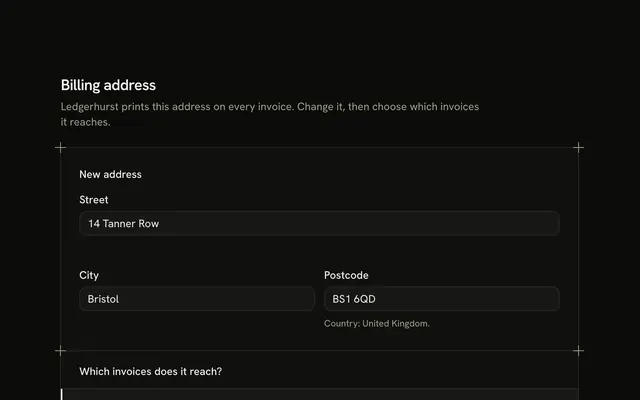 Address Form BillingTeam and contactsChange a billing address and choose which invoices it reaches: from the next invoice, also the open invoice reissued, or the last three after a review, with a printed preview and a list of what changes.
 Affiliate Commission Summary BillingReferrals and rewardsA partner's eight commissions waiting out a 30 day hold, each with the day it releases and the hold served so far, four figures that add up from the rows and one request for whatever is payable now.
 Annual Discount BillingOffers and discountsWhat yearly billing really saves on one account: the headline 20% beside the effective percent, worked out from the next twelve months in four lines you can tick, and a Monthly / Yearly projected total.
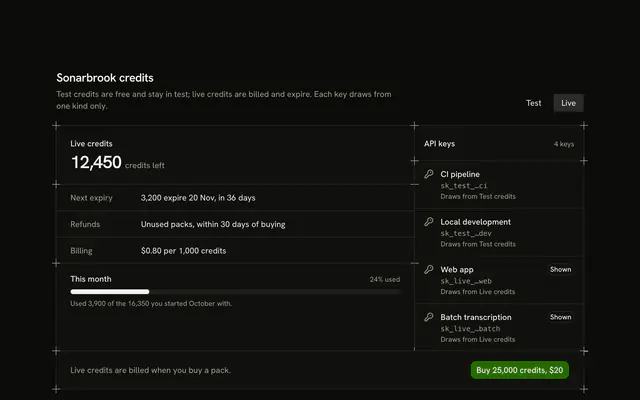 API Credits BillingCredits and prepaid balanceTest credits and live credits for a speech-to-text API behind one Test and Live switch: the balance, expiry, refund and billing rules of each mode, the keys that draw from each, and a primary that resets the free test grant or buys a live pack.
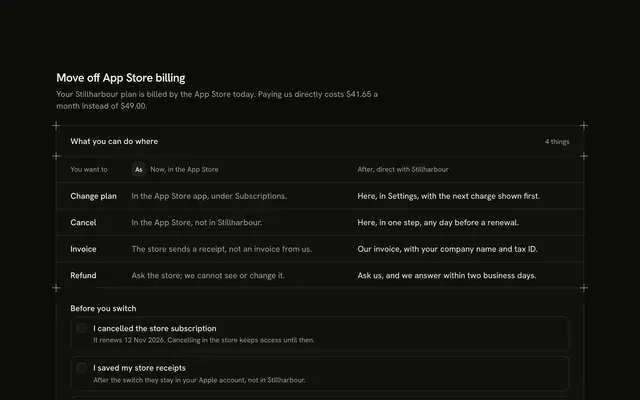 App Store Receipt BillingInvoices and receiptsMove a subscription from App Store billing to direct billing: a table of what you can do where, a three-box checklist, the first direct charge dated to the store renewal, and the monthly difference.
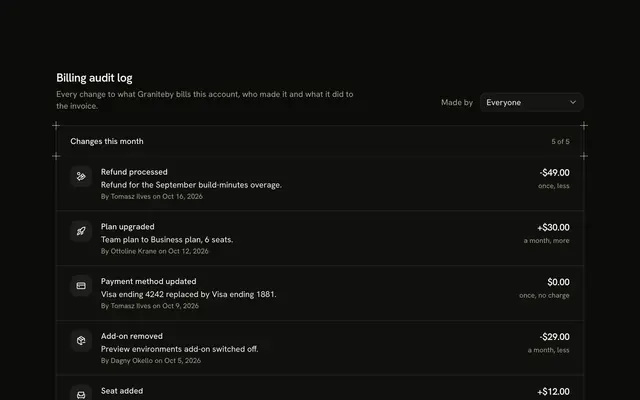 Audit Logs BillingInvoices and receiptsFive account changes read as a bill: who made each, the day, and its effect on the invoice as a signed amount and a word, filtered by person, with a net effect line and a real CSV download.
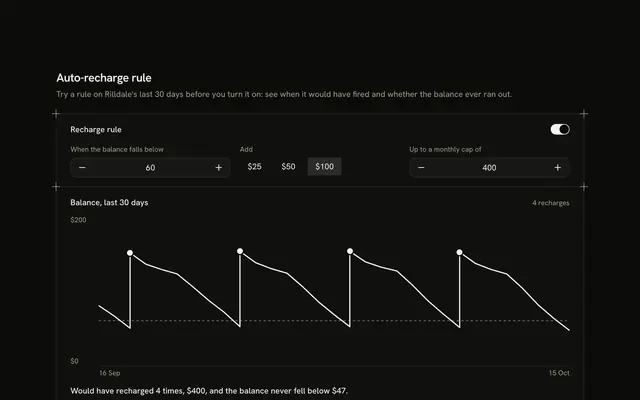 Auto Recharge BillingCredits and prepaid balanceAn auto-recharge rule (a threshold, an amount and a monthly cap) tried on the last 30 days of a voice-agent API: a balance line that jumps where the rule would have fired, and a sentence saying how many recharges, how much, and whether the balance ever ran out.
Or describe it. With Pro, your AI agent picks the block you describe and installs it on your stack.
Get ProPricing
Every billing block, one prompt away, with Pro
Your AI agent installs any of the 167 billing blocks, and every component, example and icon, with every Pro plan.
4.9/5 out of 5 · 150+ reviewsfrom 150+ founders and developers.
- Secure checkout via Stripe
- Code lives in your repo
- Keep what you've shipped if you cancel
- License terms
FAQ
Frequently asked questions
Answers on the 167 billing blocks: what they are, how to customize and install them, the license and your AI agent.
167 billing screens for inside a SaaS app, shown to a customer who already has an account: current plan, usage and limits, upgrades and downgrades, invoices, payment methods, credits, seats, tax details and cancellation. A pricing table sells plans to visitors; these manage the plan after the sale. The gallery sorts them into 14 groups: Plan and usage, Payment and invoices, Upgrade and downgrade, Upsell and retention, Credits and prepaid balance, Usage and limits, Cards and payment methods, Invoices and receipts, Team and contacts, Tax and verification, Checkout and pricing, Offers and discounts, Referrals and rewards, Payouts.
For invoices use Invoice History Billing. For cancelling use Cancel Retention Billing, or Pause Subscription Billing to offer a pause. For a plan change use Upgrade Proration Billing and Downgrade Confirmation Billing. For quotas use Usage Meters Billing, for team seats Seat Management Billing, and for a card on file Payment Method Billing.
No. They are the interface only. Amounts, plans and invoices are typed into each file, a few blocks name Stripe in text, and none calls a payment API. The comments in the files mark where your billing provider call goes, and card fields should be your provider's hosted fields.
They work them out from the typed figures. Upgrade Proration Billing computes the credit for the days left on the old plan, the new plan's cost for the same days and what is due today. Cancel Retention Billing computes the discounted price and the saving. Your server remains the source of truth for what is actually charged.
Invoice History Billing reads an INVOICES array of objects (id, date, description, amount, status of paid, due or failed, and optionally dueOn and a note). Map your provider's invoice list into that shape, note that the amount is a number of dollars there, and link the PDF button to the invoice's hosted or PDF address. The status filter and the counts follow from the data.
The buttons only change the page's state. In Cancel Retention Billing the three steps (reason, offer, confirm) end on a confirmation with Undo, so call your server when the last step is confirmed and when the offer is accepted. In Invoice History Billing the Retry payment button settles the failed invoice in the tab: replace that with a retry call and show its result.
Edit the ACCOUNT and PLANS constants in Upgrade Proration Billing: the billing period's start and end, today, the seats and the current plan's seat price, plus each plan in PLANS. Replace the fixed today with the current date and the credit, the new cost and the amount due today are recalculated. Mind the unit, since some billing blocks keep money in whole cents and others in dollars.
In Usage Meters Billing each meter is an object with a label, a limit, a used value, a unit and a sentence on what happens next. Fill them from your metering data. The bar turns to a warning tone from 80% (WARN_AT) and to an over-limit tone past 100%, and a tick marks the 80% line.
Payment Method Billing checks the card fields in the page and never stores them, and its comment says to wire the form to your payment provider's hosted fields. Replace the number, expiry and CVC inputs with your provider's elements so card digits never reach your own code, and keep the expiry warning and the make-default buttons.
This page lists 167 of the category's 167 billing blocks for React on Base UI. The category comes in React (Base UI, React Aria, Ark UI and Radix UI), Vue, Svelte and Solid; the framework and UI library pickers at the top of any block's page switch between them.
The billing blocks here are written on Base UI primitives; the layout, the copy and the theme tokens are the same on every base, and the install path follows it (/r/billing-cancel-retention.json). The other bases are one picker away from /billing-block.
Each block is TypeScript and Tailwind CSS v4, styled with your theme's tokens, and imports our components (installed with it) on Base UI. Icons come from lucide-react.
Open a block, copy its command and run it: `npx shadcn@latest add` with the block's registry URL, such as /r/billing-cancel-retention.json for Cancel Retention Billing. The code is copied into your project and it's yours to edit.
The block's file and the components it imports: Cancel Retention Billing brings Button, Data List, Field, Guides, Radio Group, Shine Button, Steps and Textarea, installed before it. Nothing else changes in your project.
Use the filters above the grid: 14 kinds of billing block, led by checkout and pricing (21), invoices and receipts (20), usage and limits (19) and upsell and retention (14), and sort by popular or name. A good first look: Cancel Retention Billing, Checkout Plan Picker Billing and Credit Top Up Billing. Each card opens the block's live page.
Every block draws the same page column and side rails with a top rule only (the Guides component), so a billing block lines up with the one above and below it. Stack one per section and the rails read as a single drawing; pick across the the account, changing plan and checkout and tax kinds.
Open its page and use the full-screen viewer (/view/billing/cancel-retention) or the device-width previews. Every preview is free for everyone; only the code needs Pro.
Each billing block uses semantic HTML: one heading level, real lists and labelled controls. Interactive parts sit on Base UI, a headless library that follows the WAI-ARIA patterns, and the layouts use logical properties so they hold in right-to-left languages.
Yes. They use semantic tokens only (bg-card, text-muted-foreground), never palette colors, so they follow your preset, radius and dark mode. The primary color marks one action per block and is never a background.
No animation library: the billing blocks' motion is CSS (transitions, entrance animations and SVG), and it stands still under prefers-reduced-motion.
The previews are free for everyone. The code of all 167 billing blocks is Pro, as is every block: Pro unlocks the code, the install command and the MCP.
Only with a Team or Organization license: client work, SaaS products and anything your users pay for. The Individual license is for personal, non-commercial projects. See the license page for the full terms.
You keep using what you installed in your existing projects, but get no new downloads or updates, and the MCP stops answering. A Lifetime license includes all future updates.
No. You can use them in your own End Products, but not redistribute the code or designs on their own, or in a UI library, kit, template or website builder.
With Pro, yes: the MCP server (22 tools, one personal URL from /dashboard/mcp) lets your agent search_blocks for a billing block, read it with get_block and install it on your React on Base UI stack.
Pass `category: "billing"` to search_blocks to search only the 167 billing blocks, or to list_blocks for the 14 groups with their blocks. get_block then returns one with its install command.
plan_page plans a page as a stack of blocks for a brief. Pass `sections` with category ids, such as ["hero", "billing", "footer"], to force the order; each section gets a pick and two alternatives, and get_block installs the stack.
4.9 out of 5 from 150+ developers


Every billing block. One prompt away.
167 billing blocks with Pro, the previews free to try. With Pro, your AI agent installs them from a prompt.
Get Pro