Pricing blocks for every framework.
108 pricing sections for React, Vue, Svelte and Solid, ready to paste into a page. Pricing sections for product and SaaS pages: plan cards, billing toggles, comparison tables and calculators. Try each one right here.
Every pricing block
108 blocks.
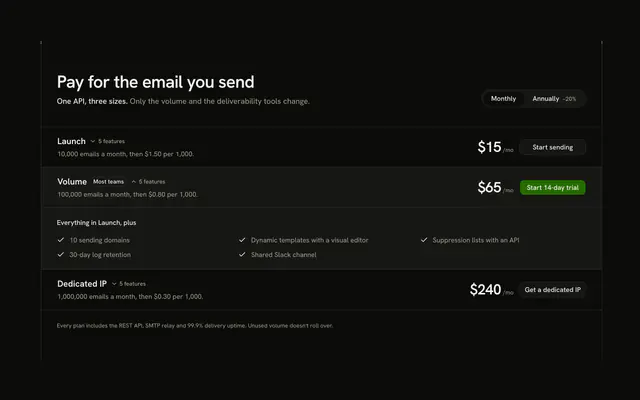 Accordion Plans PricingPlan rowsThree plan rows for an email API, each its own band with its price and call to action in view, opening in place to list its features, with a monthly and annual switch in the header row.
 Addon Builder PricingCalculatorsA CRM sold as a base plan plus six add-ons that switch on and off in cells sharing hairlines, with the price per seat rolling big beside them and a sticky total bar on phones.
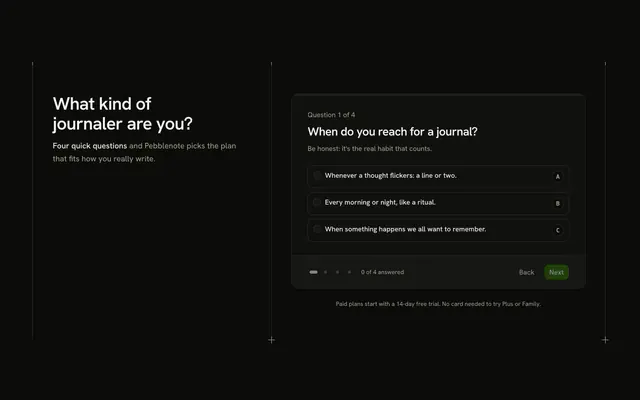 Affinity Quiz PricingPlan findersA four-question personality quiz that matches visitors to a plan: the headline beside the quiz, lettered answer cards, and a result with the matched plan, its price and each plan's share of the answers.
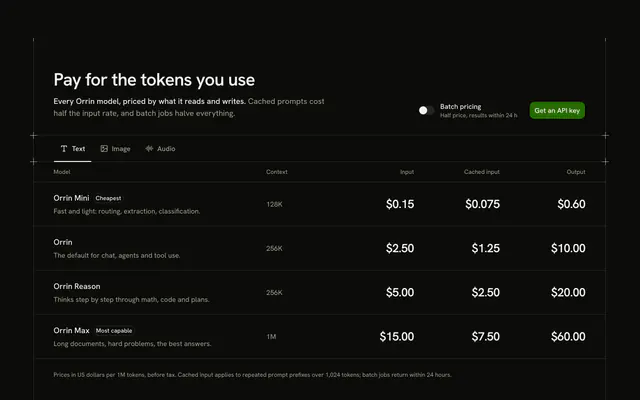 AI Model Rates PricingUsage and creditsA per-model rate card for an AI API: input, cached input and output prices per 1M tokens, with modality tabs for text, image and audio, and a batch switch that halves every rate.
 All Inclusive PricingSingle planOne price over a wall of everything it includes: 36 features as ticked chips in six ruled groups, with the price and one call to action in the header row and nothing gated or extra to buy.
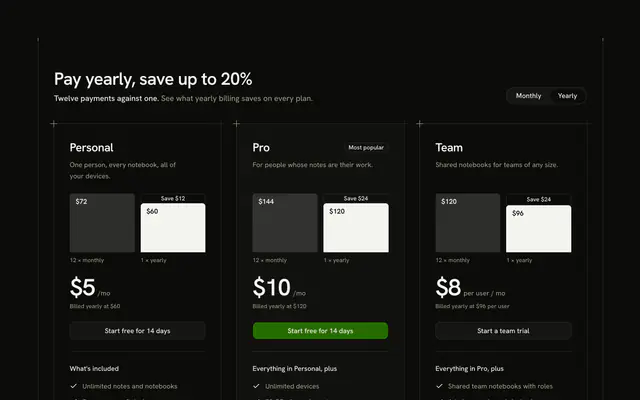 Annual Savings PricingBilling switchesThree plans that show what yearly billing saves: each plan's head holds two bars, twelve monthly payments against one yearly payment, with the saving printed in the gap, under a monthly and yearly switch.
 Audience Tabs PricingPlan cardsThree large audience tiles in the header row (freelancer, studio, agency) that open their own plans: cells that share hairlines on desktop, one plan at a time behind a segment group on a phone.
 Bento Grid PricingPlan cardsEdge hosting in a bento grid on shared hairlines: a tall Pro tile down the middle with its price and call to action up top, among four compact tiles for Hobby, Scale, a bandwidth add-on and Enterprise.
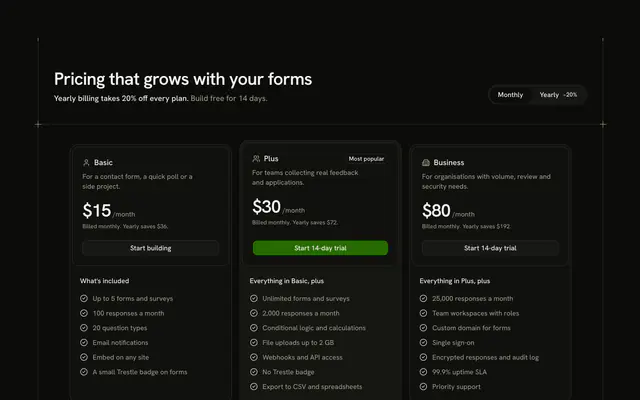 Billing Toggle PricingBilling switchesThree plan cards under a monthly and yearly switch that wears its saving in the header row, with prices that roll to their new amount and each plan a card in a card.
 Bundle Deal PricingDiscounts and offersTwo products priced alone beside a bundle of both: the bundle leads on a raised card with the sum of the parts struck through, the bundle price at display size, and a list of features that collapses on phones.
 Column Chart Picker PricingPlan findersFour backup plans drawn as columns of a storage chart, to scale: choosing a column shows its plan's price, price per terabyte, features and call to action beside the chart.
 Committed Spend Discount PricingBilling switchesFour big commitment chips, $500 to $50k a month, and in the same row the discount each earns at display size, over every unit's committed price against its on-demand price, with the call to action beside the result.
Or describe it. With Pro, your AI agent picks the block you describe and installs it on your stack.
Get ProPricing
Every pricing block, one prompt away, with Pro
Your AI agent installs any of the 108 pricing blocks, and every component, example and icon, with every Pro plan.
4.9/5 out of 5 · 150+ reviewsfrom 150+ founders and developers.
- Secure checkout via Stripe
- Code lives in your repo
- Keep what you've shipped if you cancel
- License terms
FAQ
Frequently asked questions
Answers on the 108 pricing blocks: what they are, how to customize and install them, the license and your AI agent.
They are 108 pricing sections for product and SaaS pages, in 13 kinds: plan cards, plan rows, single plan, comparison tables, charts and figures, proof and guarantees, billing switches, calculators, plan finders, usage and credits, seats and teams, discounts and offers, sales and partners. Each one is a React section with its plans, prices and copy written at the top of the file, so you replace the sample plans with your own and keep the layout.
For a classic subscription page start from Three Columns Pricing or Two Plans Pricing, add Billing Toggle Pricing when you sell monthly and yearly, and Featured Plan Pricing when one plan should stand alone. Comparison Table Pricing and Feature Matrix Pricing line the plans up feature by feature for buyers who compare.
Usage Slider Pricing works out a bill from a monthly volume (a base price plus an overage rate), Per-Seat Pricing by Seat Type prices each kind of seat with its own stepper, Credit Packs Pricing sells prepaid packs, and Custom Quote Pricing takes a request from buyers who need a quote. Plan Recommender Pricing lights up the cheapest plan that covers the needs a visitor ticks.
The plans sit in typed data near the top of the block: a name, a description, a feature list, prices, a call-to-action label and a link. The prices, plans and company in the demos are invented samples, not an integration, so nothing is billed until you wire the buttons yourself.
Use Billing Toggle Pricing. Each plan carries a `monthly` price and a `yearly` price (the price of one month under each billing), a segment switch holds the billing state, and the prices roll when it changes. The saving shown on the Yearly side is computed from those two numbers, so edit the prices and the badge follows.
In Billing Toggle Pricing a plan has a `featured` flag: the featured plan stands taller and holds the section's one primary button, with a badge such as Most popular. Contrast Highlight Pricing raises the recommended plan as one card among flat cells, and Featured Plan Pricing puts a single plan in the spotlight; move the highlight to the plan you want.
Currency Select Pricing keeps a price for each plan in each currency, as local price points and not a conversion. To add a currency, add an entry to its currency list (code, symbol, decimals, name) and a price for that code on every plan. For live exchange rates, compute those prices on your server and pass them in.
Each plan's call to action takes a `href` (the samples use `#`) and renders as a link styled as a button, so point it at your checkout URL or at a route of yours that creates the session. No payment provider is built in. Where a block has a form, such as Custom Quote Pricing, the submit handler marks a comment where you send the fields to your sales inbox or CRM.
In Usage Slider Pricing the pricing rules are constants at the top: the base price, the included volume, the overage rate per thousand and the list of volumes the slider stops at. Change them and the estimate, the quota meter and the itemised bill are recomputed from them.
This page lists 108 of the category's 108 pricing blocks for React on Base UI. The category comes in React (Base UI, React Aria, Ark UI and Radix UI), Vue, Svelte and Solid; the framework and UI library pickers at the top of any block's page switch between them.
The pricing blocks here are written on Base UI primitives; the layout, the copy and the theme tokens are the same on every base, and the install path follows it (/r/pricing-two-plans.json). The other bases are one picker away from /pricing-block.
Each block is TypeScript and Tailwind CSS v4, styled with your theme's tokens, and imports our components (installed with it) on Base UI. Icons come from lucide-react.
Open a block, copy its command and run it: `npx shadcn@latest add` with the block's registry URL, such as /r/pricing-two-plans.json for Two Plans Pricing. The code is copied into your project and it's yours to edit.
The block's file and the components it imports: Two Plans Pricing brings Badge, Frame, Guides, Segment Group, Shine Button and Sliding Number, installed before it. Nothing else changes in your project.
Use the filters above the grid: 13 kinds of pricing block, led by comparison tables (13), calculators (12), discounts and offers (12) and single plan (9), and sort by popular or name. A good first look: Two Plans Pricing. Each card opens the block's live page.
Every block draws the same page column and side rails with a top rule only (the Guides component), so a pricing block lines up with the one above and below it. Stack one per section and the rails read as a single drawing; pick across the layouts, what it shows and interaction kinds.
Open its page and use the full-screen viewer (/view/pricing/two-plans) or the device-width previews. Every preview is free for everyone; only the code needs Pro.
Each pricing block uses semantic HTML: one heading level, real lists and labelled controls. Interactive parts sit on Base UI, a headless library that follows the WAI-ARIA patterns, and the layouts use logical properties so they hold in right-to-left languages.
Yes. They use semantic tokens only (bg-card, text-muted-foreground), never palette colors, so they follow your preset, radius and dark mode. The primary color marks one action per block and is never a background.
No animation library: the pricing blocks' motion is CSS (transitions, entrance animations and SVG), and it stands still under prefers-reduced-motion.
The previews are free for everyone. The code of all 108 pricing blocks is Pro, as is every block: Pro unlocks the code, the install command and the MCP.
Only with a Team or Organization license: client work, SaaS products and anything your users pay for. The Individual license is for personal, non-commercial projects. See the license page for the full terms.
You keep using what you installed in your existing projects, but get no new downloads or updates, and the MCP stops answering. A Lifetime license includes all future updates.
No. You can use them in your own End Products, but not redistribute the code or designs on their own, or in a UI library, kit, template or website builder.
With Pro, yes: the MCP server (22 tools, one personal URL from /dashboard/mcp) lets your agent search_blocks for a pricing block, read it with get_block and install it on your React on Base UI stack.
Pass `category: "pricing"` to search_blocks to search only the 108 pricing blocks, or to list_blocks for the 13 groups with their blocks. get_block then returns one with its install command.
plan_page plans a page as a stack of blocks for a brief. Pass `sections` with category ids, such as ["hero", "pricing", "footer"], to force the order; each section gets a pick and two alternatives, and get_block installs the stack.
4.9 out of 5 from 150+ developers


Every pricing block. One prompt away.
108 pricing blocks with Pro, the previews free to try. With Pro, your AI agent installs them from a prompt.
Get Pro