Chat blocks for every framework.
200 chat sections for React, Vue, Svelte and Solid, ready to paste into a page. Chat sections: conversations, threads, composers, attachments, presence and message states. Try each one right here.
Every chat block
200 blocks.
 Agent Assignment ChatSupport desksA help desk thread that routes you: three team cells in the bot's first message, a three-line connecting wait, then an agent card with role, rating, reply time and languages before the person writes.
 AI Assistant ChatAssistantsA team messenger with an inbox and a bot named Quill that is a contact like the others: typed replies by keyword, one message it writes first, and a switch that mutes it.
 AI Image Generation ChatAssistantsA commission thread with an illustrator: drawn sketch, colour and final plates, Approve and Request changes buttons, a progress list, and a real SVG download of the final.
 Anonymous ChatChannels and roomsA narrow chat with a stranger known only by an animal alias and glyph: Next person pairs you with the next of three typed strangers, shared interests are worked out, and End chat leaves an empty state with Find someone.
 Apartment Hunt ChatShopping and bookingsA lettings broker's thread with floor-plan listing cards, a Compare toggle on each, a side-by-side Compare pane with the better side marked in words, and a viewing request with three typed slots.
 API Request Thread ChatCode and engineeringA team channel where teammates share API requests as cards with the method, URL, a fold for headers, a typed last run, a real Copy as cURL button and a Show response fold, and where pasting a method and URL makes a new card marked as not run.
 Art Critique ChatAssistantsAn art teacher's thread with a critique card of a drawn landscape plate and four rubric scores in dots, tabs for two rounds that show the change in words, a quote button on each criterion and a Versions pane with a swap toggle.
 Astrology Reading ChatAssistantsAn astrologer's thread labelled for entertainment, with a drawn birth chart wheel of ten placed planets listed in words and a two-sign compatibility card that answers Harmonious, Mixed or Challenging from a typed element matrix.
 Attachment Menu ChatMedia and filesA narrow messenger thread with a docked attach panel of six tiles (photo, file, place, contact, event, audio) that stage removable attachment cards with captions before Send posts them.
 Auction Bidding ChatShopping and bookingsThe auctioneer's call in a thread: bids from numbered paddles, a lot band with the current bid derived from the list, two chips for the next valid bids, and a Going once, Going twice, Sold chain with a pause button.
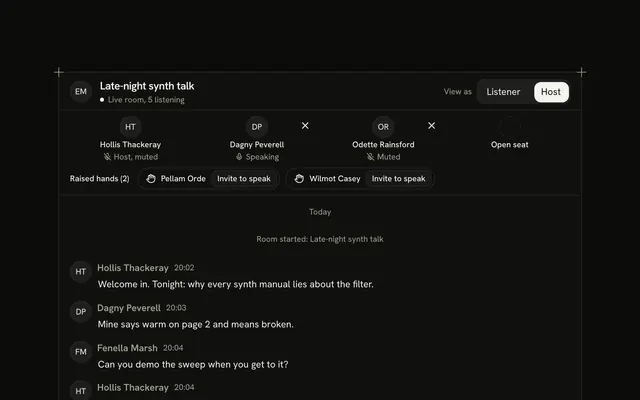 Audio Rooms ChatChannels and roomsThe text side of a live audio room: a stage band with four seats and raised hands, a Listener or Host view that lets the host invite hands to speak, and a flat room chat.
 Auto Reply ChatSupport desksA shop chat with a demo switch for offline hours: your first message gets one automatic reply with the opening hours in a data list, a second gets none, and online a person answers.
Or describe it. With Pro, your AI agent picks the block you describe and installs it on your stack.
Get ProPricing
Every chat block, one prompt away, with Pro
Your AI agent installs any of the 200 chat blocks, and every component, example and icon, with every Pro plan.
4.9/5 out of 5 · 150+ reviewsfrom 150+ founders and developers.
- Secure checkout via Stripe
- Code lives in your repo
- Keep what you've shipped if you cancel
- License terms
FAQ
Frequently asked questions
Answers on the 200 chat blocks: what they are, how to customize and install them, the license and your AI agent.
200 chat UI sections for React: support desks, team and group messengers, inboxes, message actions, delivery and presence, attachments, assistants, bots and feeds, and one thread drawn in the style of each messenger. The gallery sorts them into 19 groups, from Support desks to States and overlays. Each one is a fixed-height window with a log, a composer and typed sample messages that you replace.
For a help desk start from Customer Support Chat, Chatbot Handoff Chat or Split Inbox Chat. For a team messenger use Group Chat or Direct Message Chat with Conversation List Chat for the inbox. For an assistant that answers with a card use AI Assistant Chat, and for the look of a known messenger pick from the App styles group, such as Slack Style Chat or iMessage Style Chat.
No. The chat blocks are the interface only. Each file keeps its messages in React state and answers from a short typed script, and the line under the composer says that nothing is sent and no model runs. The place for your backend is the send handler, which carries a comment such as "Send the message to your agents here; this demo replies from a script."
Offline Banner Chat shows the thread read with no connection, Chat Connection Error State shows a dropped network with a Retry now loop, and Loading Skeleton Chat and Empty Inbox Chat cover loading and a first visit. They are in the States and overlays group, so you can lift the one you need into a live thread.
Find the comment in the send handler, for example in Customer Support Chat, and replace the script call after it with a request to your server. Append the user's message to the items state first, show the typing line while you wait, then append the reply when it arrives. For tokens that arrive in pieces, update the last message's text as each chunk comes in instead of adding a new item.
The log is a scrollable region and an effect sets its scrollTop to its scrollHeight whenever the number of lines or the typing line changes, so the thread opens on the newest line and follows new ones. Keep that effect and make sure your incoming messages go through the same state. The log also has role log, and the status line is a polite live region, so a screen reader hears each new line once.
In Customer Support Chat Enter sends, Shift and Enter add a line, and an IME keeps its own Enter while composing. That check sits in a keys handler next to the send function, so change it there if you want Enter to add a line or Ctrl and Enter to send.
Start from Drag Drop Files Chat: it takes dropped files with real drag events, has an Attach files button that opens the browser's file chooser, stages up to five in a tray and posts them as a message of cards. It only reads each file's name and size and never uploads the bytes, so add your upload call where Send posts the message. Attachment Menu Chat and File Sharing Chat cover the menu and the shared-file views.
Each person is typed data with initials, and the avatar is an Avatar with an AvatarFallback, so add an AvatarImage with the person's photo inside it and the initials stay as the fallback. The typing line in Typing Indicator Group Chat comes from a pure typingLine function of the names who are typing, and the read markers in Read Receipts Group Chat come from a typed list, so feed those from your presence and read events.
Most thread blocks use the shared Message, Bubble and Textarea components from the library, so changing a bubble in one place changes it in every block that imports it. The App styles blocks draw the same thread for each messenger, so start from the one nearest your design and edit its classes.
This page lists 200 of the category's 200 chat blocks for React on Base UI. The category comes in React (Base UI, React Aria, Ark UI and Radix UI), Vue, Svelte and Solid; the framework and UI library pickers at the top of any block's page switch between them.
The chat blocks here are written on Base UI primitives; the layout, the copy and the theme tokens are the same on every base, and the install path follows it (/r/chat-agent-assignment.json). The other bases are one picker away from /chat-block.
Each block is TypeScript and Tailwind CSS v4, styled with your theme's tokens, and imports our components (installed with it) on Base UI. Icons come from lucide-react.
Open a block, copy its command and run it: `npx shadcn@latest add` with the block's registry URL, such as /r/chat-agent-assignment.json for Agent Assignment Chat. The code is copied into your project and it's yours to edit.
The block's file and the components it imports: Agent Assignment Chat brings Avatar, Badge, Bubble, Button, Guides, Message, Shine Button, Textarea and Typing Indicator Text, installed before it. Nothing else changes in your project.
Use the filters above the grid: 19 kinds of chat block, led by message mechanics (18), support desks (16), plans and schedules (16) and app styles (14), and sort by popular or name. A good first look: Agent Assignment Chat, AI Assistant Chat and AI Image Generation Chat. Each card opens the block's live page.
Every block draws the same page column and side rails with a top rule only (the Guides component), so a chat block lines up with the one above and below it. Stack one per section and the rails read as a single drawing; pick across the support and teams, messages and media and assistants with cards kinds.
Open its page and use the full-screen viewer (/view/chat/agent-assignment) or the device-width previews. Every preview is free for everyone; only the code needs Pro.
Each chat block uses semantic HTML: one heading level, real lists and labelled controls. Interactive parts sit on Base UI, a headless library that follows the WAI-ARIA patterns, and the layouts use logical properties so they hold in right-to-left languages.
Yes. They use semantic tokens only (bg-card, text-muted-foreground), never palette colors, so they follow your preset, radius and dark mode. The primary color marks one action per block and is never a background.
No animation library: the chat blocks' motion is CSS (transitions, entrance animations and SVG), and it stands still under prefers-reduced-motion.
The previews are free for everyone. The code of all 200 chat blocks is Pro, as is every block: Pro unlocks the code, the install command and the MCP.
Only with a Team or Organization license: client work, SaaS products and anything your users pay for. The Individual license is for personal, non-commercial projects. See the license page for the full terms.
You keep using what you installed in your existing projects, but get no new downloads or updates, and the MCP stops answering. A Lifetime license includes all future updates.
No. You can use them in your own End Products, but not redistribute the code or designs on their own, or in a UI library, kit, template or website builder.
With Pro, yes: the MCP server (22 tools, one personal URL from /dashboard/mcp) lets your agent search_blocks for a chat block, read it with get_block and install it on your React on Base UI stack.
Pass `category: "chat"` to search_blocks to search only the 200 chat blocks, or to list_blocks for the 19 groups with their blocks. get_block then returns one with its install command.
plan_page plans a page as a stack of blocks for a brief. Pass `sections` with category ids, such as ["hero", "chat", "footer"], to force the order; each section gets a pick and two alternatives, and get_block installs the stack.
4.9 out of 5 from 150+ developers


Every chat block. One prompt away.
200 chat blocks with Pro, the previews free to try. With Pro, your AI agent installs them from a prompt.
Get Pro