shadcn.io is an independent project built on shadcn/ui
The button shows a calendar icon and a range from the 6th through the 22nd of this month. The popover shows two months side by side.
Use a range for a stay or a report window. Separate days are a different picker, and a Calendar is enough when you only need to show the span. Ark UI in React does not format the two dates on the button.
Installation
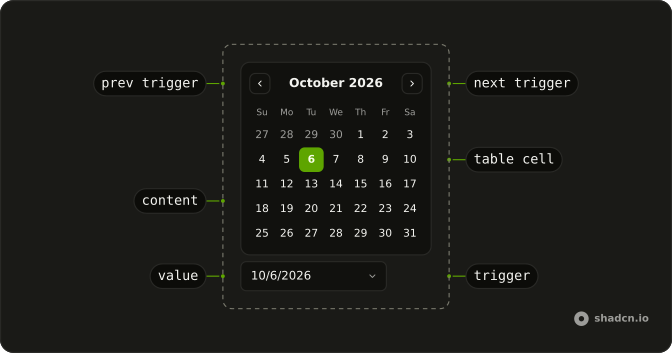
Anatomy
Usage
<DatePicker
  defaultFocusedValue={initialRange[0]}
  numOfMonths={2}
  onValueChange={handleValueChange}
  positioning={positioning}
  selectionMode="range"
  value={value}
>
  <DatePickerTrigger asChild>
    <Button className="w-70 justify-start font-normal" variant="outline">
      <CalendarIcon aria-hidden="true" data-icon="inline-start" />
      <span>{label}</span>
    </Button>
  </DatePickerTrigger>
  <DatePickerContent>
    <CalendarViewControl>
      <CalendarPrevTrigger />
      <CalendarViewDate />
      <CalendarNextTrigger />
    </CalendarViewControl>
    <div className="flex gap-4">
      <CalendarTable>
        <CalendarWeekDays />
        <CalendarTableDays />
      </CalendarTable>
      <CalendarTable>
        <CalendarWeekDays />
        <CalendarTableNextMonth />
      </CalendarTable>
    </div>
  </DatePickerContent>
</DatePicker>
FAQ
Which props make it a range picker?
selectionMode="range" and numOfMonths={2} on DatePicker. The content renders the visible month and the next one in two tables, under one header with the previous and next arrows.
Where are the start and end stored?
In the value, a list of two dates: start, then end. It starts on the 6th and 22nd of the current month, and the calendar opens there.
How does the button format the range?
Each date with Intl.DateTimeFormat as a short month, two-digit day and year, joined with a hyphen. With only a start it prints that date, and with nothing, Pick a date range.
Does picking the end date close the picker?
Yes, a complete range closes it. Set closeOnSelect to false to keep it open, for example when you add presets beside the months.
API Reference
Date Picker
Sets defaultFocusedValue={initialRange[0]}, numOfMonths={2}, onValueChange={handleValueChange}, positioning={positioning}, selectionMode="range" and value={value}. The rest is on the Date Picker page.
Button
Sets variant="outline". The rest is on the Button page.
Calendar
No extra props in this demo. The rest is on the Calendar page.