shadcn.io is an independent project built on shadcn/ui
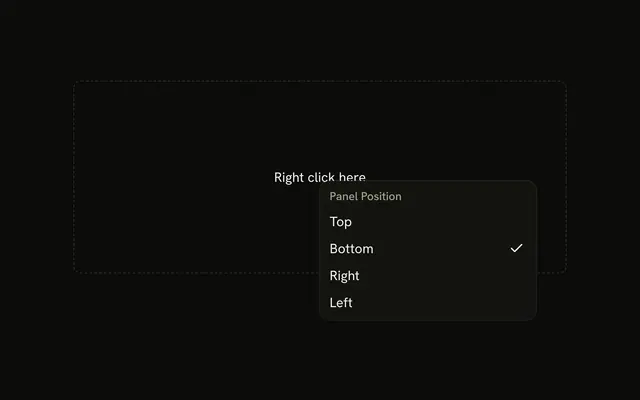
Position lists Top, Bottom, Right, and Left as radio items under Panel Position. The demo starts on Bottom. The button still reads Position.
Use it when exactly one layout choice belongs in a menu. If every option should stay visible, use a Radio Group. In React, Ark UI holds one value and does not move a panel.
Installation
Anatomy

Usage
<DropdownMenu>
  <DropdownMenuTrigger asChild>
    <Button variant="outline">
      Position
      <ChevronDownIcon aria-hidden="true" data-icon="inline-end" />
    </Button>
  </DropdownMenuTrigger>
  <DropdownMenuContent className="w-56">
    <DropdownMenuRadioGroup
      onValueChange={handlePositionChange}
      value={position}
    >
      <DropdownMenuLabel>Panel Position</DropdownMenuLabel>
      <DropdownMenuSeparator />
      <DropdownMenuRadioItem value="top">Top</DropdownMenuRadioItem>
      <DropdownMenuRadioItem value="bottom">Bottom</DropdownMenuRadioItem>
      <DropdownMenuRadioItem value="right">Right</DropdownMenuRadioItem>
      <DropdownMenuRadioItem value="left">Left</DropdownMenuRadioItem>
    </DropdownMenuRadioGroup>
  </DropdownMenuContent>
</DropdownMenu>
FAQ
How does the panel position stay selected?
The chosen position is one value, bottom to start, kept in the component. Picking a row stores its value and moves the check.
DropdownMenuRadioGroup takes value, and onValueChange receives details.value.
What is Panel Position?
The DropdownMenuLabel at the top of the radio group, followed by a separator. It names the group and can't be picked.
What does the trigger look like?
An outline Button that reads Position, with a chevron after it. The menu is w-56.
API Reference
Dropdown Menu
Sets asChild, onValueChange={handlePositionChange}, value={position}, value="top", value="bottom" and value="right". The rest is on the Dropdown Menu page.
Button
Sets variant="outline". The rest is on the Button page.