shadcn.io is an independent project built on shadcn/ui
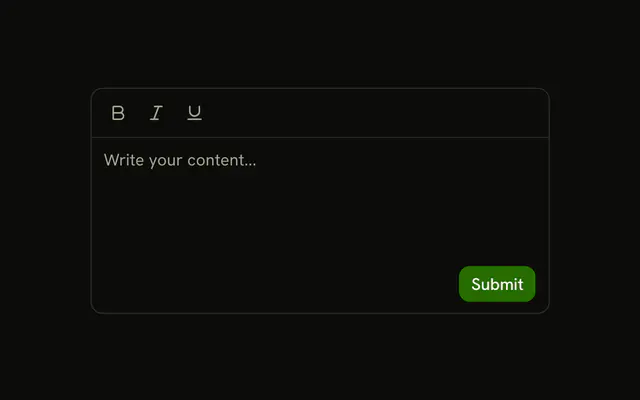
Five ghost icon buttons sit in a row above a textarea: Bold, Italic, Underline, Link, and List. They show the layout of a formatting bar. Pressing them does not change the text.
Use it as the shell of a composer, then wire the buttons to your editor. If a format should stay on, start from a Toggle Group. In React, Ark UI does not format the textarea.
Installation
Anatomy

Usage
<InputGroup className="w-full max-w-sm bg-background">
  <InputGroupTextarea
    aria-label="Content"
    className="min-h-[150px]"
    placeholder="Write your content..."
  />
  <InputGroupAddon align="block-start" className="border-b">
    <InputGroupButton aria-label="Bold" size="icon-xs" variant="ghost">
      <BoldIcon aria-hidden="true" />
    </InputGroupButton>
    <InputGroupButton aria-label="Italic" size="icon-xs" variant="ghost">
      <ItalicIcon aria-hidden="true" />
    </InputGroupButton>
    <InputGroupButton aria-label="Underline" size="icon-xs" variant="ghost">
      <UnderlineIcon aria-hidden="true" />
    </InputGroupButton>
    <InputGroupButton aria-label="Link" size="icon-xs" variant="ghost">
      <LinkIcon aria-hidden="true" />
    </InputGroupButton>
    <InputGroupButton aria-label="List" size="icon-xs" variant="ghost">
      <ListIcon aria-hidden="true" />
    </InputGroupButton>
  </InputGroupAddon>
</InputGroup>
FAQ
How is the toolbar placed above the text?
An InputGroupAddon with align="block-start" and border-b, written after the textarea.
Do the buttons format the text?
No. A textarea holds plain text: insert Markdown around the selection, or use a rich text editor in the frame.
How do I show active formats?
Use a Toggle Group with multiple selection for the format buttons, which tracks which are on.
API Reference
Input Group
Sets aria-label="Content", placeholder="Write your content...", align="block-start", aria-label="Bold", size="icon-xs" and variant="ghost". The rest is on the Input Group page.