shadcn.io is an independent project built on shadcn/ui
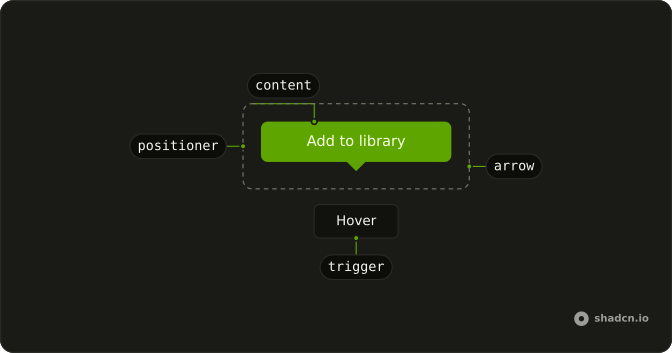
An outline button says Hover me. Its tooltip is a single line, This is a tooltip.
Use a one-line tooltip to name a control that is not obvious on its own. A Popover fits if the note should stay open or hold a link. Ark UI in React does not write the tooltip text.
Installation
Anatomy
Usage
<Tooltip>
  <TooltipTrigger asChild>
    <Button variant="outline">Hover me</Button>
  </TooltipTrigger>
  <TooltipContent>
    <p>This is a tooltip</p>
  </TooltipContent>
</Tooltip>
FAQ
When should I use tooltips versus other help patterns?
Use a Tooltip for a short, supplementary label, a few words that clarify a control people can already see. For a longer explanation, or content with links and inputs, use a Popover, which opens on click and stays open. Anything essential belongs on the page: hover-only text is easy to miss.
How does the Button become the tooltip trigger?
The trigger and the Button are one element, so there is no extra wrapper and no button nested in a button.
TooltipTrigger renders its child as the trigger (asChild), merging its props and events onto the Button.
How long should tooltips remain visible on hover?
As long as the trigger is hovered or focused: the Tooltip never times out while someone is reading it. It opens without a delay by default and closes when the pointer leaves or the trigger loses focus.
Set openDelay and closeDelay on Tooltip (the close delay defaults to 100 ms), or delay on a TooltipProvider around a group.
Are basic tooltips accessible to screen readers?
It opens when the trigger gets keyboard focus and closes on Escape. The trigger still needs its own accessible name, here its visible label, because the tooltip only supplements it. The tooltip text is linked to the trigger as its description, so screen readers read it after the trigger's name.
API Reference
Tooltip
Sets asChild. The rest is on the Tooltip page.
Button
Sets variant="outline". The rest is on the Button page.