shadcn.io is an independent project built on shadcn/ui
Preferences pairs a settings icon with a chevron. It opens, on a muted background, to Profile, Notifications, and Privacy, each with an icon.
Use it in an account menu. If this is the app's main navigation, use a Sidebar. In React, Base UI does not remember that Preferences was open.
Installation
Anatomy
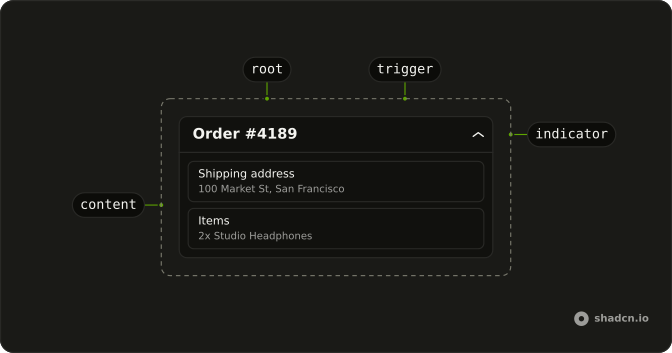
Usage
<Collapsible className="w-full max-w-lg overflow-hidden rounded-lg border bg-card">
  <CollapsibleTrigger className="group flex w-full items-center justify-between p-3 font-medium text-sm hover:bg-muted">
    <span className="flex items-center gap-2">
      <SettingsIcon aria-hidden="true" className="size-4" />
      Preferences
    </span>
    <ChevronDownIcon
      aria-hidden="true"
      className="size-4 transition-transform duration-200 group-aria-expanded:rotate-180"
    />
  </CollapsibleTrigger>
  <CollapsibleContent>
    <div className="border-t bg-muted/50">
      <nav className="flex flex-col gap-1 p-2">
        {items.map((item) => (
          <a
            className="flex items-center gap-2 rounded-md p-2 text-sm hover:bg-background"
            href="#"
            key={item.label}
          >
            <item.icon aria-hidden="true" className="size-4" />
            {item.label}
          </a>
        ))}
      </nav>
    </div>
  </CollapsibleContent>
</Collapsible>
FAQ
What is in the Preferences trigger?
A settings icon and the label at the start, and a chevron at the end, in a justify-between row that tints on hover. The trigger has the group class and sets aria-expanded while open, so group-aria-expanded:rotate-180 on ChevronDownIcon turns it, eased by transition-transform duration-200.
How is the opened list styled?
CollapsibleContent has border-t bg-muted/50, and the links sit in a nav with flex flex-col gap-1 p-2. Each link turns to the background color on hover, so it lifts off the muted panel.
API Reference
Collapsible
No extra props in this demo. The rest is on the Collapsible page.