shadcn.io is an independent project built on shadcn/ui
The heading is Confirm Transaction, with a line about sending $1,250.00 to John Doe. A Security Check alert sits above six boxes, then Cancel and Confirm Transaction.
Ask for the code before money moves. If the step should block the rest of the app, put it in a Dialog. In React, Base UI does not verify the code.
Installation
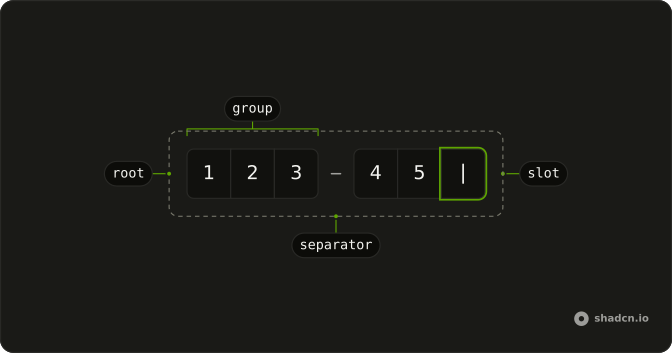
Anatomy
Usage
<div className="flex w-full max-w-sm flex-col gap-6">
  <div className="flex flex-col gap-2 text-center">
    <h2 className="font-semibold text-2xl">Confirm Transaction</h2>
    <p className="text-muted-foreground text-sm">
      You’re about to send $1,250.00 to John Doe
    </p>
  </div>
  <Alert>
    <TriangleAlertIcon aria-hidden="true" />
    <AlertTitle>Security Check</AlertTitle>
    <AlertDescription>
      For your security, please enter the confirmation code sent to your
      registered email address.
    </AlertDescription>
  </Alert>
  <form className="flex flex-col gap-6" onSubmit={handleSubmit}>
    <Field invalid={error !== ""}>
      <FieldLabel className="sr-only" htmlFor="transaction-code">
        Confirmation code
      </FieldLabel>
      <div className="flex justify-center">
        <InputOTP
          id="transaction-code"
          maxLength={6}
          onChange={handleValueChange}
          value={value}
        >
          <InputOTPGroup>
            <InputOTPSlot className="bg-background" index={0} />
            <InputOTPSlot className="bg-background" index={1} />
            <InputOTPSlot className="bg-background" index={2} />
{/* The rest of the file is under Installation. */}
FAQ
How is the security notice built?
An Alert with a TriangleAlertIcon, an AlertTitle reading Security Check and an AlertDescription that says where the code was sent.
What does Confirm Transaction do?
With a full code, it disables itself and reads Confirming... while a timer stands in for the request, then reports success. A short code shows Confirmation code must be 6 characters. in FieldError.
What does Cancel do?
It clears the code and any error and reports Transaction cancelled. In your app, close the dialog or go back.
API Reference
Alert
No extra props in this demo. The rest is on the Alert page.
Field
Sets invalid={error !== ""} and htmlFor="transaction-code". The rest is on the Field page.
Input OTP
Sets id="transaction-code", maxLength={6}, onChange={handleValueChange}, value={value}, index={0} and index={1}. The rest is on the Input OTP page.
Button
Sets onClick={handleCancel}, type="button", variant="outline", disabled={isConfirming} and type="submit". The rest is on the Button page.