shadcn.io is an independent project built on shadcn/ui
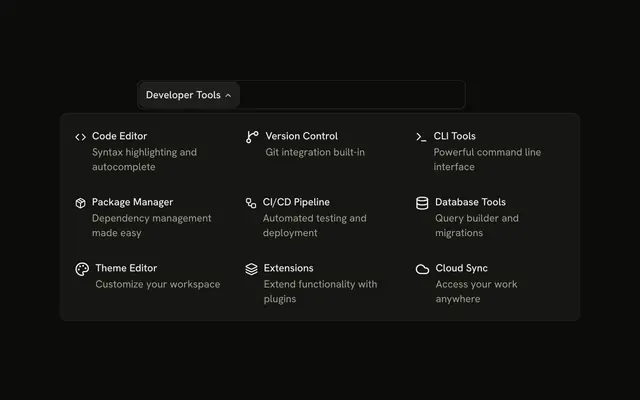
The bar shows Collaboration. The panel groups links under Team Tools, Project Tools, and Management, including Team Management, Project Timeline, and Reports.
Use section headings when the links are related but not the same kind of thing. A Sidebar keeps those groups open while people work. In React, Base UI moves between the triggers with Tab.
Installation
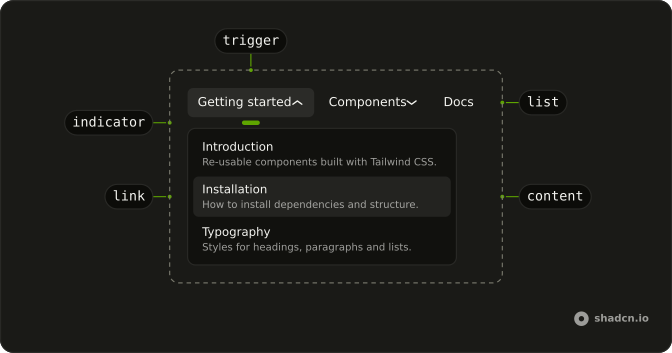
Anatomy
Usage
<div className="w-full max-w-md rounded-md border bg-background p-px">
  <NavigationMenu>
    <NavigationMenuList>
      <NavigationMenuItem>
        <NavigationMenuTrigger>Collaboration</NavigationMenuTrigger>
        <NavigationMenuContent>
          <div className="flex w-[400px] max-w-full flex-col gap-4 p-2">
            {sections.map((section) => (
              <div className="flex flex-col gap-1" key={section.title}>
                <h4 className="px-2 font-semibold text-sm">
                  {section.title}
                </h4>
                {section.items.map((item) => (
                  <NavigationMenuLink
                    className="items-start gap-2"
                    key={item.label}
                    render={<Link href={item.href} />}
                  >
                    <item.icon aria-hidden="true" className="mt-0.5 size-4" />
                    <div className="flex flex-col gap-0.5">
                      <span className="font-medium">{item.label}</span>
                      <span className="text-muted-foreground">
                        {item.description}
                      </span>
                    </div>
                  </NavigationMenuLink>
                ))}
              </div>
            ))}
          </div>
        </NavigationMenuContent>
{/* The rest of the file is under Installation. */}
FAQ
How are the sections built?
From a list of sections at the top of the file, each a title and its links. Each renders an h4 heading followed by its NavigationMenuLinks.
How are the icons rendered?
Each item's icon is a Lucide component stored in the data, rendered inside the link and hidden from assistive tech, since the label beside it names the link.
How do the links use my router?
Each link is your router's link rendered through NavigationMenuLink, so it keeps the menu's styles and focus handling.
NavigationMenuLink takes the Next.js Link through render, as in render={<Link href="#" />}.
API Reference
Navigation Menu
No extra props in this demo. The rest is on the Navigation Menu page.