shadcn.io is an independent project built on shadcn/ui
All, Active and Completed share the row in three equal columns. All is selected and lists Review pull request #123, Update documentation and Fix bug in authentication, each with a dot.
Use equal tabs for a few status filters of the same list. A Select is smaller when the filters will not fit a row. On Solid, Ark UI does not filter the tasks.
Installation
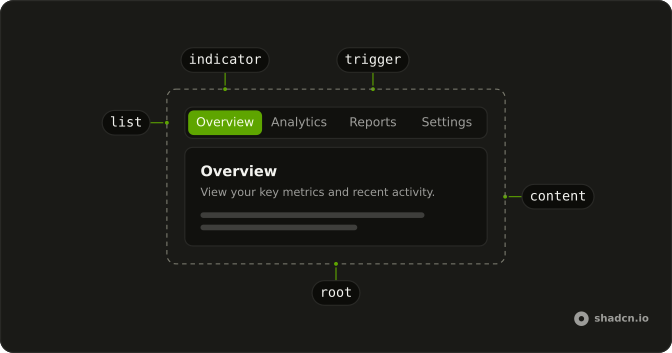
Anatomy
Usage
<Tabs class="w-full max-w-md" defaultValue="all">
    <TabsList class="grid w-full grid-cols-3">
      <TabsTrigger value="all">All</TabsTrigger>
      <TabsTrigger value="active">Active</TabsTrigger>
      <TabsTrigger value="completed">Completed</TabsTrigger>
    </TabsList>
    {panels.map(panel => <TabsContent value={panel.value}>
        <div class="rounded-lg border bg-card p-6 text-card-foreground shadow-sm">
          <h3 class="mb-4 font-semibold text-lg">{panel.title}</h3>
          <div class="flex flex-col gap-3">
            {panel.items.map(task => <div class="flex items-center gap-3 rounded-md border p-3">
                <div class={cn("size-2 rounded-full", task.done ? "bg-success" : "bg-info")} />
                <span class="text-sm">{task.title}</span>
              </div>)}
          </div>
        </div>
      </TabsContent>)}
  </Tabs>
FAQ
How do the triggers become equal width?
TabsList has grid w-full grid-cols-3. There are three triggers, so each one fills a column.
Which tab is selected first?
All, the default value on Tabs. The group is w-full max-w-md, and each panel matches its trigger: all, active and completed.
What happens if I add a fourth trigger?
grid-cols-3 is three columns, so a fourth trigger wraps to a second row. Change it to grid-cols-4 along with the new trigger.
What does each panel show?
A bordered bg-card block with a heading and task rows filtered from one tasks array. All shows three, Active the two that are not done and Completed the one that is.
API Reference
Tabs
Sets defaultValue="all", value="all", value="active", value="completed" and value={panel.value}. The rest is on the Tabs page.