shadcn.io is an independent project built on shadcn/ui
Edit opens Undo, Redo, Cut and Copy. Each row ends with a hint: ⌘Z, ⇧⌘Z, ⌘X and ⌘C. The hints are text on the row.
Show hints for commands people expect to type. The hint does not press the command. Put a Kbd in the row only where you also listen for the keys. Ark UI in Solid does not register those keys.
Installation
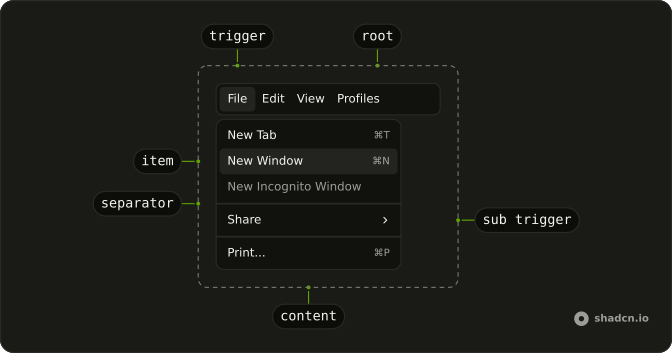
Anatomy
Usage
<Menubar>
    <MenubarMenu>
      <MenubarTrigger>Edit</MenubarTrigger>
      <MenubarContent>
        <MenubarItem value="undo">
          Undo
          <MenubarShortcut>⌘Z</MenubarShortcut>
        </MenubarItem>
        <MenubarItem value="redo">
          Redo
          <MenubarShortcut>⇧⌘Z</MenubarShortcut>
        </MenubarItem>
        <MenubarItem value="cut">
          Cut
          <MenubarShortcut>⌘X</MenubarShortcut>
        </MenubarItem>
        <MenubarItem value="copy">
          Copy
          <MenubarShortcut>⌘C</MenubarShortcut>
        </MenubarItem>
      </MenubarContent>
    </MenubarMenu>
  </Menubar>
FAQ
Which hints does this Edit menu show?
Undo ⌘Z, Redo ⇧⌘Z, Cut ⌘X and Copy ⌘C, each in a MenubarShortcut at the end of its row.
Do these hints register the keys?
No. MenubarShortcut only prints the text. Listen for the keys on the page and run the same command the row runs, so they work while the menu is closed. Show Ctrl instead of ⌘ on Windows and Linux.
What is the menu structure?
One MenubarMenu with a MenubarTrigger that reads Edit and a MenubarContent of four MenubarItems, each holding its label and a MenubarShortcut.
How do I add Paste with a hint?
Add a fifth MenubarItem with the label Paste followed by a MenubarShortcut with ⌘V.
API Reference
Menubar
Sets value="undo", value="redo", value="cut" and value="copy". The rest is on the Menubar page.