shadcn.io is an independent project built on shadcn/ui
Profile, Settings and Billing sit on the outer row. Profile is selected, and inside it Personal Info, Social Links and Preferences switch a short list of labeled values. Personal Info shows John Doe.
Use a second row when every section has subsections, such as an account page. A Navigation Menu fits if those sections are destinations, not panels. In Solid, Ark UI does not write the rows of labeled values.
Installation
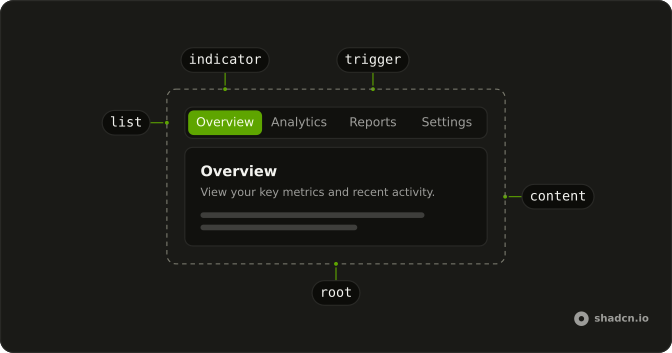
Anatomy
Usage
<Tabs class="w-full max-w-2xl" defaultValue="profile">
    <TabsList>
      {sections.map(section => <TabsTrigger value={section.value}>
          {section.label}
        </TabsTrigger>)}
    </TabsList>
    {sections.map(section => <TabsContent value={section.value}>
        <div class="rounded-lg border bg-card p-6 text-card-foreground shadow-sm">
          <h3 class="mb-4 font-semibold text-lg">{section.label}</h3>
          <Tabs defaultValue={section.defaultValue}>
            <TabsList>
              {section.tabs.map(tab => <TabsTrigger value={tab.value}>
                  {tab.label}
                </TabsTrigger>)}
            </TabsList>
            {section.tabs.map(tab => <TabsContent value={tab.value}>
                <div class="mt-4 flex flex-col gap-3 rounded-md border p-4">
                  {tab.rows.map(row => <div>
                      <p class="font-medium text-sm">{row.label}</p>
                      <p class="text-muted-foreground text-sm">
                        {row.value}
                      </p>
                    </div>)}
                </div>
              </TabsContent>)}
          </Tabs>
        </div>
      </TabsContent>)}
  </Tabs>
FAQ
How is the outer tab set up?
Tabs starts on profile and is w-full max-w-2xl. The triggers are Profile, Settings and Billing, built from a sections array, and each panel is a bordered block headed by the section name.
Where do the second tabs come from?
Each outer panel renders its own Tabs from the section's tabs. Profile starts on Personal Info, Settings on General and Billing on Current Plan.
Does the inner tab stay put when I leave the outer tab?
No. Inactive panels unmount, so the inner tabs mount again at their default when you come back.
Set lazyMount and unmountOnExit to false on Tabs to keep the inner tabs mounted.
What is inside an inner panel?
A bordered box of rows, each a font-medium label over muted text. Personal Info shows Full Name, Email and Location.
API Reference
Tabs
Sets defaultValue="profile", value={section.value}, defaultValue={section.defaultValue} and value={tab.value}. The rest is on the Tabs page.