shadcn.io is an independent project built on shadcn/ui
A month grid sits beside a scrolling list labeled Available Times. Fourteen slots run from 9:00 AM to 4:30 PM, skipping noon. None is filled until a slot is clicked. Choosing another day leaves that slot filled.
Use it on a booking page where the day and the time are chosen together. Keep the same layout off the page until needed, in a Dialog. In Svelte, Ark UI does not reserve the slot.
Installation
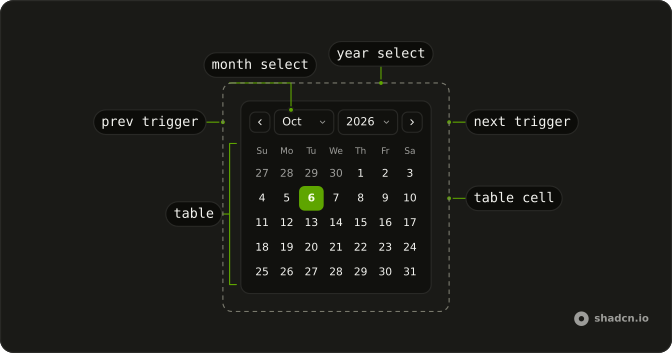
Anatomy
Usage
<div class="flex divide-x overflow-hidden rounded-md border bg-background"><Calendar onValueChange={handleValueChange} value={value}><CalendarViewControl><CalendarPrevTrigger /><CalendarViewDate /><CalendarNextTrigger /></CalendarViewControl><CalendarTable><CalendarWeekDays /><CalendarTableDays /></CalendarTable></Calendar><div class="relative w-62 overflow-hidden"><div class="absolute inset-0 flex flex-col gap-4"><p class="px-4 pt-4 text-center font-medium text-sm">Available Times</p><ScrollArea class="min-h-0 flex-1"><div class="flex flex-col gap-2 px-4 pb-4">{#each availableTimes as time (time)}<Button onclick={handleTimeClick} size="sm" value={time} variant={selectedTime === time ? "default" : "outline"}>{time}</Button>{/each}</div></ScrollArea></div></div></div>FAQ
How do I read the date the person picked?
value is a list holding the selected date, and onValueChange receives { value }. This demo starts the list from parseDate(new Date()).
How does a time slot get selected?
Each time is a Button with that string as value. The click handler stores event.currentTarget.value in selectedTime, and that button uses variant="default" while the others stay outline.
Where does the list of times come from?
The times are a fixed availableTimes array: 9:00 AM through 11:30 AM, then 1:00 PM through 4:30 PM, in 30 minute steps. The date handler only updates the date, so the highlighted time stays until a time button is clicked.
How does the time list scroll?
The times column is w-62, filled by an absolute inset-0 wrapper. ScrollArea has min-h-0 flex-1 under the heading Available Times, so the buttons scroll inside the row.
API Reference
Calendar
Sets onValueChange={handleValueChange} and value={value}. The rest is on the Calendar page.
Scroll Area
No extra props in this demo. The rest is on the Scroll Area page.
Button
Sets onclick={handleTimeClick}, size="sm", value={time} and variant={selectedTime === time ? "default" : "outline"}. The rest is on the Button page.