Skip to content

shadcn.io is an independent project built on shadcn/ui

Free

Nested Sidebar Items Collapsible for Svelte

A two-level sidebar where Documentation opens to Components, which opens to Button and Input.

UI library: Ark UI

Documentation opens to Components, which opens to Button and Input. Each level has a chevron that points down, and the inner list is indented.

Use it for a small docs tree. A large tree with selection belongs in a Tree View. In Svelte, Ark UI opens each level on its own.

Preview

Preview width

Installation

MCP · Pro
Make your AI a shadcn expert
Your agent installs components, builds pages and restyles your app from one prompt, in Claude Code, Cursor or VS Code.
Part of Pro

Anatomy

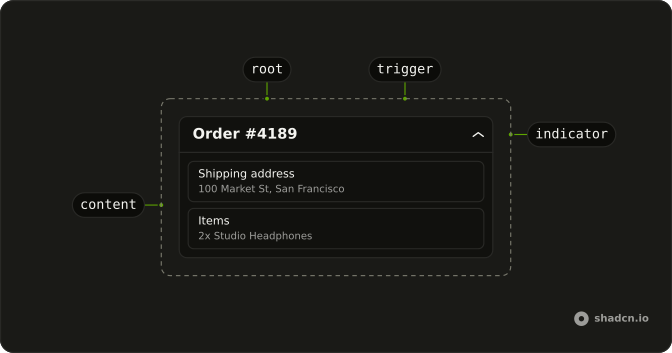
Collapsible anatomy: root, trigger, indicator, content

Usage

<Collapsible class="w-full max-w-lg"><CollapsibleTrigger class="group flex w-full items-center gap-2 rounded-md px-2 py-1.5 font-medium text-sm hover:bg-muted"><ChevronRightIcon aria-hidden="true" class="size-4 transition-transform duration-200 group-aria-expanded:rotate-90" />Documentation</CollapsibleTrigger><CollapsibleContent class="ms-2 mt-1 border-s-2 ps-2"><Collapsible><CollapsibleTrigger class="group flex w-full items-center gap-2 rounded-md px-2 py-1.5 text-sm hover:bg-muted"><ChevronRightIcon aria-hidden="true" class="size-3 transition-transform duration-200 group-aria-expanded:rotate-90" />Components</CollapsibleTrigger><CollapsibleContent><nav class="ms-4 mt-1 flex flex-col gap-1">{#each components as component (component)}<a class="flex items-center gap-2 rounded-md px-2 py-1 text-sm hover:bg-muted" href="#"><CircleIcon aria-hidden="true" class="size-1.5 fill-current" />{component}</a>{/each}</nav></CollapsibleContent></Collapsible></CollapsibleContent></Collapsible>

FAQ

How are the two levels nested?

The inner Collapsible sits inside the outer CollapsibleContent. Each one opens and closes on its own, so Components keeps its state while Documentation is closed.

What draws the line beside Components?

The outer CollapsibleContent has ms-2 border-s-2 ps-2: a start border that follows the page direction, with Components indented past it.

Which icon does each row use?

The two triggers use ChevronRightIcon, size-4 for Documentation and size-3 for Components. The links use a filled CircleIcon at size-1.5 as a bullet. All are aria-hidden.

Do the chevrons turn when a level opens?

Yes, a quarter turn to point down. Each trigger has the group class and sets aria-expanded while open, so group-aria-expanded:rotate-90 on its chevron turns it.

How do I start a level open?

Set defaultOpen on that level's Collapsible.

Both levels start closed.

When should this outline be a Tree View?

For a short static outline, nested collapsibles are enough: each trigger is its own button, and Tab moves between them. When people select items or expect arrow keys to move through the tree, use a Tree View.

API Reference

Collapsible

No extra props in this demo. The rest is on the Collapsible page.