shadcn.io is an independent project built on shadcn/ui
A warning-tinted banner shows an alert icon and Limited time offer, plus a Details button. The card is titled Special Promotion and states 50% off the first month, through December 31st.
Keep the banner to one line and leave the terms in the card. If Details must work on a tap, use a Popover. In Svelte, Ark UI does not apply the discount.
Installation
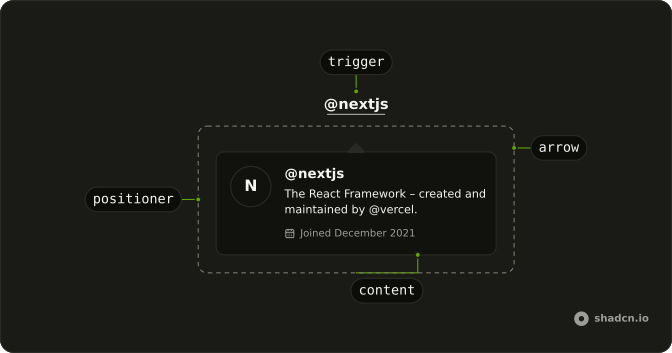
Anatomy
Usage
<div class="flex w-full max-w-sm items-center gap-2 rounded-lg border border-warning/30 bg-warning/10 p-3"><CircleAlertIcon aria-hidden="true" class="size-4 text-warning" /><span class="text-sm">Limited time offer</span><HoverCard><HoverCardTrigger>{#snippet asChild(props)}<button {...props({ class: "ms-auto text-warning text-xs underline underline-offset-4", type: "button" })}>Details</button>{/snippet}</HoverCardTrigger><HoverCardContent><div class="flex flex-col gap-2"><h4 class="font-semibold text-sm">Special Promotion</h4><p class="text-muted-foreground text-sm">Get 50% off your first month when you upgrade to Pro before the end of this week. This offer expires on December 31st.</p></div></HoverCardContent></HoverCard></div>FAQ
How is the Details button made the trigger?
HoverCardTrigger renders the Details button through its asChild snippet.
What is in the card?
The title Special Promotion and a muted paragraph with the discount, who it applies to and when it ends.
How does Details sit at the end of the banner?
ms-auto pushes it to the end of the row, which is the right in left-to-right layouts and the left in right-to-left ones.
How do I change how fast the card opens and closes?
The card opens a moment after the pointer rests on the trigger and stays up long enough for the pointer to move into it. Both delays are in milliseconds.
Set openDelay and closeDelay on HoverCard; they default to 10 and 100. positioning picks another side than the bottom.
Does the card open from the keyboard and on touch screens?
Focusing Details opens the card, moving focus away or pressing Escape closes it. Touch screens have no hover, so keep what matters reachable elsewhere, or use a Popover when the card has to open on a tap.
API Reference
Hover Card
No extra props in this demo. The rest is on the Hover Card page.