shadcn.io is an independent project built on shadcn/ui
The bar shows What's New. The panel lists six features, including AI Assistant, Instant Deploy, and Premium Templates. Each row has an icon, a description, and a badge such as New, Beta, Preview, or Pro.
Use the badge for what changed, not for every link. A Badge next to a page title is enough when there is no menu. In Svelte, Ark UI closes the open panel when you press Escape.
Installation
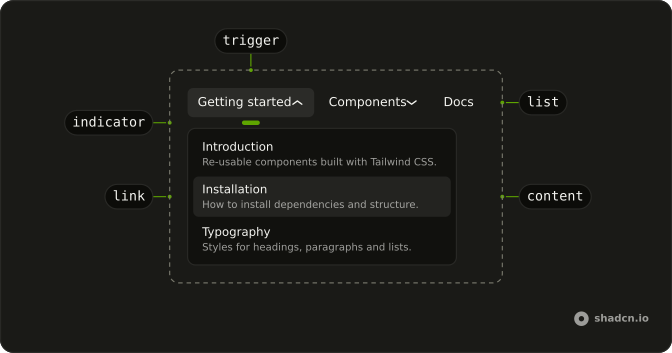
Anatomy
Usage
<div class="w-full max-w-md rounded-md border bg-background p-px"><NavigationMenu><NavigationMenuList><NavigationMenuItem><NavigationMenuTrigger>What's New</NavigationMenuTrigger><NavigationMenuContent><div class="flex w-[400px] max-w-full flex-col gap-1 p-2">{#each features as feature (feature.label)}<NavigationMenuLink class="items-start gap-2">{#snippet asChild(props)}<a {...props({ href: feature.href })}><feature.icon aria-hidden="true" class="mt-0.5 size-5" /><div class="flex flex-1 flex-col gap-0.5"><div class="flex items-center gap-2"><span class="font-medium">{feature.label}</span><Badge variant={feature.badgeVariant}>{feature.badge}</Badge></div><span class="text-muted-foreground">{feature.description}</span></div></a>{/snippet}</NavigationMenuLink>{/each}</div></NavigationMenuContent></NavigationMenuItem></NavigationMenuList></NavigationMenu></div>FAQ
How are the badges chosen?
Each feature has a badge label and a variant in the data: the default fill for New, secondary for Beta, outline for Preview and Pro.
Are the badges read out?
Yes, as part of the link's text, after the name, such as AI Assistant New. Keep them to one short word.
How are the icons rendered?
Each item's icon is a Lucide component stored in the data, rendered inside the link and hidden from assistive tech, since the label beside it names the link.
How do the links use my router?
Each link is your router's link rendered through NavigationMenuLink, so it keeps the menu's styles and focus handling.
The demo puts an anchor inside NavigationMenuLink. SvelteKit routes plain links, so that is enough.
API Reference
Navigation Menu
No extra props in this demo. The rest is on the Navigation Menu page.
Badge
Sets variant={feature.badgeVariant}. The rest is on the Badge page.