shadcn.io is an independent project built on shadcn/ui
A tall bordered panel lists Item 1 onward, each with a one-line description. It starts with ten items. A Load More button sits under the panel.
Grow a list inside a fixed panel when more pages load on demand. Pagination fits if each page should replace the rows. In Svelte, Ark UI does not fetch the next page.
Installation
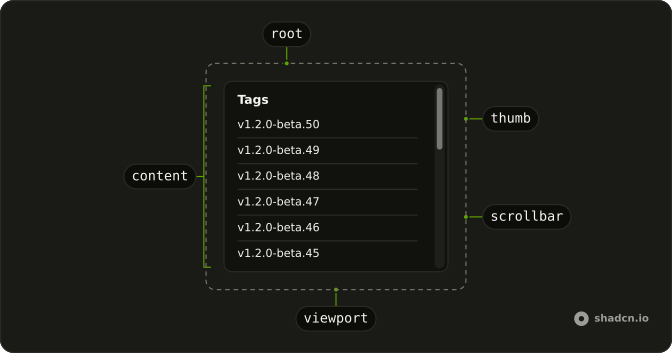
Anatomy
Usage
<div class="flex w-full max-w-md flex-col gap-4"><ScrollArea class="h-[400px] rounded-md border bg-background"><div class="flex flex-col gap-4 p-4">{#each items as item (item.id)}<div class="rounded-lg border bg-card p-4 text-card-foreground shadow-sm"><h3 class="font-semibold text-sm">{item.title}</h3><p class="mt-1 text-muted-foreground text-sm">{item.description}</p></div>{/each}<Button class="w-full" onclick={handleLoadMore} variant="outline">Load More</Button></div></ScrollArea><p class="text-center text-muted-foreground text-sm">Showing {items.length} items</p></div>FAQ
How many cards show at first?
Ten. createItems(1, 10) builds the initial state. Each card is a bordered div with an h3 title, "Item" plus the id, and a p description, inside ScrollArea at h-[400px].
What does Load More add?
The button's onClick appends five items. PAGE_SIZE is 5, and the new ids continue after items.length. The button is a Button with variant outline and className w-full, after the cards, inside the scroller.
Where does the count update?
A p under ScrollArea prints Showing and items.length. It is text-center text-sm text-muted-foreground. Appending cards updates that number because items is state.
Does the list jump when cards are added?
The new cards are spread onto the end of items. The scroll offset is unchanged by that append, so the view stays on the cards you were reading, with Load More still after the last card.
API Reference
Scroll Area
No extra props in this demo. The rest is on the Scroll Area page.
Button
Sets onclick={handleLoadMore} and variant="outline". The rest is on the Button page.