shadcn.io is an independent project built on shadcn/ui
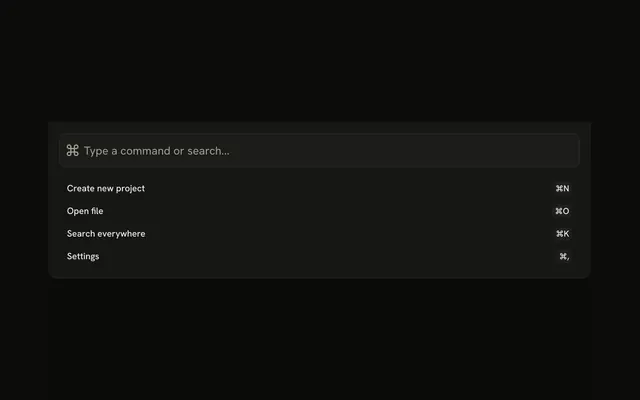
Search drops from the top with a large search field. Recent Searches lists Project files and Team documents, and Quick Access lists My Projects and Recent Files.
Use it when search should cover the screen from the top. A small field in the header can open a Popover. In Svelte, Ark UI does not run the search.
Installation
Anatomy

Usage
<Drawer swipeDirection="up"><DrawerTrigger>{#snippet asChild(props)}<Button {...props()} variant="outline"><SearchIcon aria-hidden="true" data-icon="inline-start" />Search</Button>{/snippet}</DrawerTrigger><DrawerContent showBar={false}><DrawerTitle class="sr-only">Search</DrawerTitle><div class="flex flex-col gap-4 p-4"><InputGroup class="h-12"><InputGroupInput aria-label="Search" class="text-base" placeholder="Search for files, folders, or content..." type="search" /><InputGroupAddon><SearchIcon aria-hidden="true" class="size-5" /></InputGroupAddon></InputGroup><div class="flex flex-col gap-2"><h3 class="font-medium text-muted-foreground text-xs uppercase">Recent Searches</h3><div class="flex flex-col gap-1"><Button class="justify-start" size="sm" variant="ghost"><ClockIcon aria-hidden="true" data-icon="inline-start" />Project files</Button><Button class="justify-start" size="sm" variant="ghost"><ClockIcon aria-hidden="true" data-icon="inline-start" />Team documents</Button></div></div><div class="flex flex-col gap-2"><h3 class="font-medium text-muted-foreground text-xs uppercase">Quick Access</h3><div class="flex flex-col gap-1"><Button class="justify-start" size="sm" variant="ghost"><FolderIcon aria-hidden="true" data-icon="inline-start" />My Projects</Button><Button class="justify-start" size="sm" variant="ghost"><FileIcon aria-hidden="true" data-icon="inline-start" />Recent Files</Button></div></div></div></DrawerContent></Drawer>FAQ
How is the search field built?
An Input Group, h-12, with an InputGroupInput of type="search" and aria-label="Search", and the search icon in an InputGroupAddon after the input in the markup.
What's under the field?
Recent Searches, with Project files and Team documents, and Quick Access, with My Projects and Recent Files. Each section has a small uppercase heading.
Does typing show results?
Not in this demo: the field is uncontrolled. Keep the query in state and replace the two sections with matching results as people type.
Do the recent searches run anything?
No, they're ghost buttons with a clock, folder or file icon and no handler. Fill the field with the search, or open the place, from each one.
API Reference
Drawer
Sets swipeDirection="up" and showBar={false}. The rest is on the Drawer page.
Button
Sets props, variant="outline", size="sm" and variant="ghost". The rest is on the Button page.
Input Group
Sets aria-label="Search", placeholder="Search for files, folders, or content..." and type="search". The rest is on the Input Group page.