shadcn.io is an independent project built on shadcn/ui
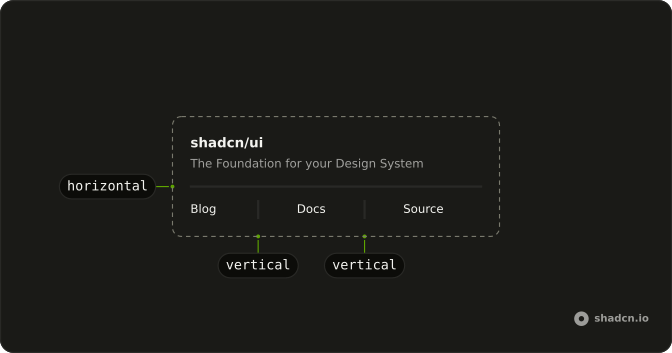
Blog, Docs, and Source sit in a row. A vertical line stands between each pair, and the row sets the height.
Use a vertical line to split a short horizontal cluster. A Breadcrumb fits when the row is a trail of pages, not three peers. In Svelte, Ark UI does not label the line.
Installation
Anatomy
Usage
<div class="flex h-5 items-center gap-4 text-sm"><div>Blog</div><Separator orientation="vertical" /><div>Docs</div><Separator orientation="vertical" /><div>Source</div></div>FAQ
When should I use a vertical separator?
When content flows in a row: navigation links, toolbar actions, metadata such as author and date. With three or more items, a line is clearer than a gap alone. Don't put one between every word, or between items that already have borders.
How tall should a vertical separator be?
As tall as its row: give the parent a height (h-5) and items-center, and the Separator stretches to fill it. Match the row to the text line, or slightly taller. A height class on the Separator itself works too, but then each line needs it.
How much space should sit on each side?
gap-4 on the flex row gives a 16 pixel pause on both sides, as here; gap-2 suits compact navigation. Keep it even so the line reads as a divider, not a margin on one item.
Why set orientation to vertical explicitly?
The default is horizontal, which draws a full-width line. orientation="vertical" switches the line to one pixel wide and full height, and tells assistive tech the orientation.
API Reference
Separator
Sets orientation="vertical". The rest is on the Separator page.