shadcn.io is an independent project built on shadcn/ui
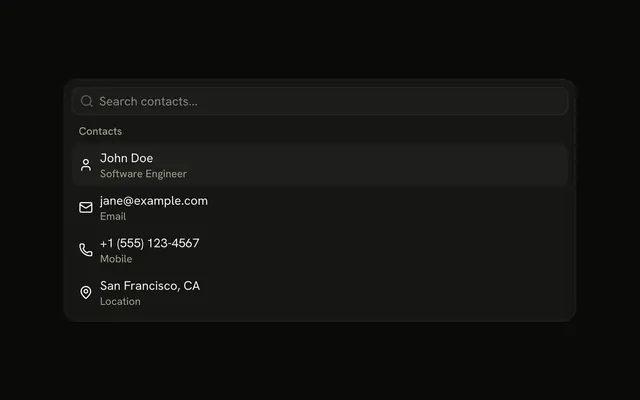
An outline Search Contacts button opens the popover. John Doe, an email, a mobile number, and San Francisco, CA each carry a muted second line.
Keep the popover when the contact list should sit next to the button. Use a Dialog if the details need more room. In Vue, Ark UI leaves the chosen action to you.
Installation
Anatomy
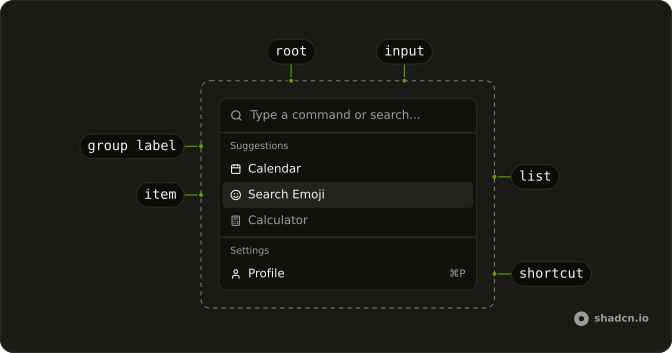
Usage
<Popover @open-change="handleOpenChange" :positioning='{ placement: "bottom-start" }'>
  <PopoverTrigger :asChild="true">
    <Button variant="outline">Search Contacts</Button>
  </PopoverTrigger>
  <PopoverContent class="w-[400px] max-w-[calc(100vw-2rem)] p-0">
    <PopoverTitle class="sr-only">Search Contacts</PopoverTitle>
    <Command :collection="collection" @input-value-change="handleInputValueChange">
      <CommandInput placeholder="Search contacts..." />
      <CommandContent>
        <CommandList>
          <CommandEmpty>No contacts found.</CommandEmpty>
          <CommandGroup heading="Contacts">
            <CommandItem v-for="item in collection.items" :item="item" :key="item.value">
              <component :is="item.icon" aria-hidden="true" />
              <div class="flex flex-col">
                <span>{{ item.label }}</span>
                <span class="text-muted-foreground text-xs">
                  {{ item.description }}
                </span>
              </div>
            </CommandItem>
          </CommandGroup>
        </CommandList>
      </CommandContent>
    </Command>
  </PopoverContent>
</Popover>
FAQ
How is this menu anchored to the button?
The Search Contacts button is the trigger, and the panel opens below it, lined up with its start edge. The panel is 400px wide, never wider than the screen, and has no padding, so the Command fills it. A visually hidden PopoverTitle names it.
PopoverTrigger takes the button with asChild, and positioning on Popover sets placement: "bottom-start". When the popover closes, the demo clears the filter.
How does each contact get a second line?
The name and the detail sit in a div with flex flex-col. The detail is a span with text-muted-foreground text-xs: Software Engineer under John Doe, Email under jane@example.com, Mobile under the phone number, and Location under San Francisco, CA. The search matches the first line only.
What are the icons beside the contacts?
User, Mail, Phone and MapPin, the first child of each CommandItem. They're decorative and hidden from screen readers, and the item centers each one against the two lines.
What appears when nothing matches the search?
CommandEmpty in the list says "No contacts found." It shows only when the search leaves nothing.
How do I run an item from this menu in Vue?
These items don't run anything yet.
Listen to @value-change on Command, which receives the chosen item's value, and keep value empty so every choice fires.
How do the keys work in this menu?
The arrow keys move through the items, Enter runs the highlighted one, and typing filters the list. Escape or a click outside closes the popover, and focus goes back to the button. CommandInput shows "Search contacts..." until someone types.
The filtering is the demo's: it builds the items with useListCollection and a contains filter, and calls filter with the input's value as it changes.
API Reference
Popover
Sets open-change="handleOpenChange", positioning="{ placement: bottom-start }" and asChild. The rest is on the Popover page.
Button
Sets variant="outline". The rest is on the Button page.
Command
Sets collection="collection", input-value-change="handleInputValueChange", placeholder="Search contacts...", heading="Contacts", v-for="item in collection.items" and item="item". The rest is on the Command page.