shadcn.io is an independent project built on shadcn/ui
The button shows a calendar icon and today's date. The popover puts a month beside a list labeled Available Times, from 09:00 AM down to 04:30 PM.
Use it to book a date and a slot together. A Calendar alone is enough when there is no time to pick. In Vue, Ark UI does not know which times are free.
Installation
Anatomy
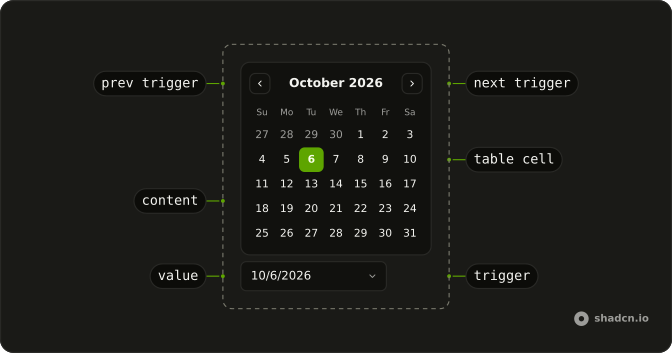
Usage
h(Button as never, { key: time, onClick: handleTimeClick, size: "sm", value: time, variant: selectedTime.value === time ? "default" : "outline" }, [time])FAQ
Why doesn't the picker close when I pick a day?
closeOnSelect is false on DatePicker, so it stays open for the time. Escape, a click outside or the button close it.
Where do the time slots come from?
A fixed list of fourteen strings in the file, half-hour steps with a lunch gap. The selected one is a solid button and the rest are outlined. Load the list for the picked day from your booking system to show real availability.
What does the button say?
The date in long form, plus at and the time once a slot is picked, or Pick a date and time with neither. The button prints the value itself, formatted with Intl.DateTimeFormat, so the text needs no date library.
How are the calendar and the slots laid out?
DatePickerContent is a row split by divide-x. The calendar keeps its padding, and the slots column has a fixed width with the Available Times heading and a Scroll Area that fills the calendar's height.