shadcn.io is an independent project built on shadcn/ui
Files and Preview sit side by side, with a drag handle between them. Files lists file-1.tsx onward. Preview is titled File Content and holds several paragraphs. Each side scrolls.
Use two scrolling panes for a list and a preview, such as a file browser. A Resizable pair is enough when each side is short. Ark UI in Vue does not read the files.
Installation
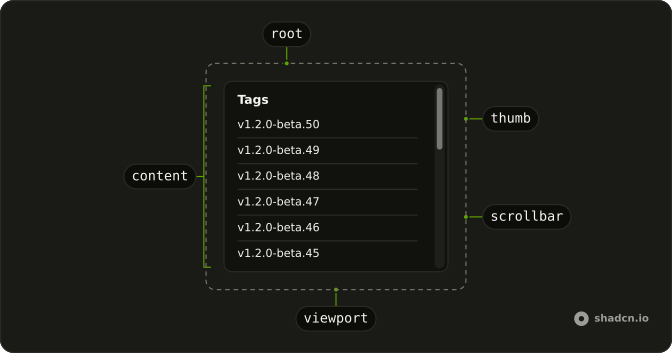
Anatomy
Usage
<Resizable
  class="max-w-4xl rounded-lg border bg-background"
  :defaultSize="[50, 50]"
  :panels='[
    { id: "files", minSize: 30 },
    { id: "preview", minSize: 30 },
  ]'
>
  <ResizablePanel id="files">
    <div class="flex h-[400px] flex-col">
      <div class="border-b p-4"><h3 class="font-semibold">Files</h3></div>
      <ScrollArea class="min-h-0 flex-1">
        <div class="flex flex-col gap-1 p-2">
          <button
            v-for="file in files"
            class="w-full rounded-md px-3 py-2 text-start text-sm transition-colors hover:bg-accent"
            :key="file.name"
            type="button"
          >
            <div class="font-medium">{{ file.name }}</div>
            <div class="text-muted-foreground text-xs">{{ file.updated }}</div>
          </button>
        </div>
      </ScrollArea>
    </div>
  </ResizablePanel>
  <ResizableResizeTrigger id="files:preview" :withHandle="true" />
  <ResizablePanel id="preview">
    <div class="flex h-[400px] flex-col">
      <div class="border-b p-4"><h3 class="font-semibold">Preview</h3></div>
      <ScrollArea class="min-h-0 flex-1">
<!-- The rest of the file is under Installation. -->
FAQ
How are the two panels sized?
Files and Preview sit side by side. Each one starts at half the group.
Pass defaultSize as [50, 50] on Resizable, with panel ids files and preview and minSize 30. The trigger id is files:preview.
What does withHandle do?
ResizableResizeTrigger sets withHandle, which shows the grip between Files and Preview. The trigger's accessible name is Resize. Focus it and the arrow keys change the sizes. Home and End jump toward the ends of the range.
Why do the scroll areas use min-h-0 and flex-1?
Each panel's body is a h-[400px] column, flex flex-col. The header is a border-b row. ScrollArea has min-h-0 flex-1, so it takes the height left under that header and scrolls inside it.
What is in the Files list?
Thirty buttons, type button, labeled file-1.tsx through file-30.tsx, each with "Updated N days ago" in text-xs text-muted-foreground. The button is w-full with px-3 py-2 and hover:bg-accent. The list wrapper is gap-1 p-2.
API Reference
Resizable
Sets defaultSize="[50, 50]", panels, id="files", id="files:preview", withHandle and id="preview". The rest is on the Resizable page.
Scroll Area
No extra props in this demo. The rest is on the Scroll Area page.