shadcn.io is an independent project built on shadcn/ui
The label is Feedback. The field shows Too short, with a destructive border. Under it, the message reads Feedback must be at least 10 characters. The invalid state is fixed in the demo. It does not check as you type.
Use it to show what is wrong and how to fix it, after someone leaves the field or tries to submit. Clear it when the value becomes valid. One line belongs in an Input. In Vue, Ark UI does not decide that the text is too short.
Installation
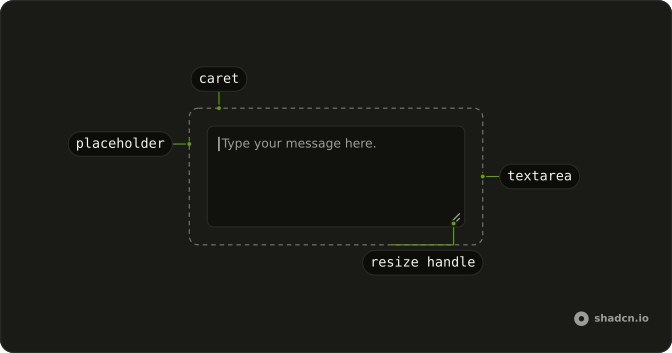
Anatomy
Usage
<Field class="max-w-md" :invalid="true">
  <FieldLabel>Feedback</FieldLabel>
  <Textarea
    class="bg-background"
    defaultValue="Too short"
    placeholder="Share your feedback"
  />
  <FieldError>Feedback must be at least 10 characters.</FieldError>
</Field>
FAQ
When should I show textarea validation errors?
After people leave the field or try to submit, not on the first keystroke: an error that appears while someone is still typing reads as a scolding. Once it's shown, clear it as soon as the value becomes valid.
Why use aria-invalid on the textarea element?
It tells screen readers the value is invalid when the field gets focus, and the Textarea's styles read it to turn the border and ring destructive.
invalid on the Field sets it on the Textarea and shows the FieldError.
What makes a good error message for textareas?
Say what's wrong and how to fix it, as Feedback must be at least 10 characters does. Invalid input or Error leaves people guessing.
Can I use colors other than red for error messages?
The error uses the destructive theme color, so change that token to restyle errors everywhere at once. Keep the message text itself, since color alone doesn't reach everyone.
API Reference
Field
Sets invalid. The rest is on the Field page.
Textarea
Sets defaultValue="Too short" and placeholder="Share your feedback". The rest is on the Textarea page.