Settings blocks for every framework.
100 settings sections for React, Vue, Svelte and Solid, ready to paste into a page. Settings sections: preferences, toggles, appearance, notifications and danger zones. Try each one right here.
Every settings block
100 blocks.
 Access Token Hygiene SettingsSign-in and securityAn access token settings panel that flags risky tokens (no end date, unused for 90 days, the admin scope, ending soon), gives a token an end date from a menu, and revokes the ticked ones after an alert dialog lists them.
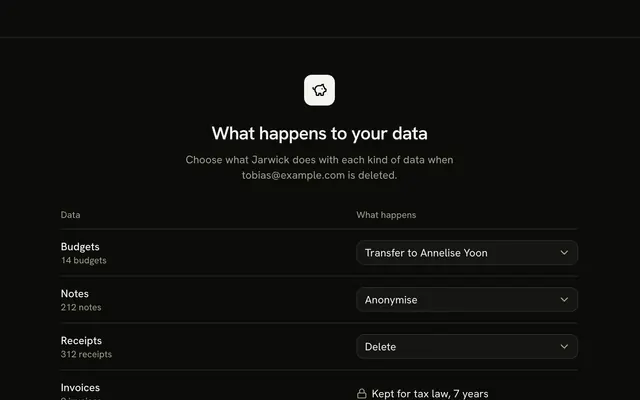 Account Deletion SettingsBackups and exportsA whole-page account deletion that first asks what happens to each kind of data (delete, anonymise or transfer, with invoices locked for tax law), sums the choices in one sentence, then schedules deletion 14 days out behind a typed-email alert dialog.
 Alert Rules SettingsAlerts and auditAn alert rules panel where each rule is a sentence you edit in place with menus and a number field, beside a framed chart of its metric with the threshold line and a computed count of how often it would have fired.
 API Key Builder SettingsAPI and webhooksAn API key settings panel with a table of keys, a builder that sets None, Read or Write for each resource, and a try-a-request check that answers Allowed or Denied with the reason before anything is saved.
 API Rate Limit Tiers SettingsAPI and webhooksA matrix of API limits with the plans across and a number field in every cell, a daily capacity worked out under each plan and a guard that stops a higher plan from allowing less than the plan before it.
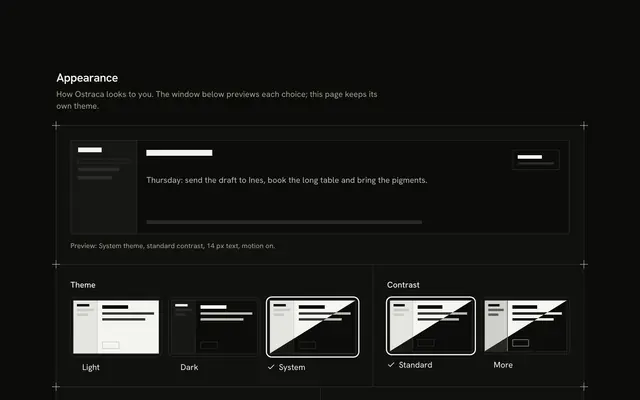 Appearance SettingsAppearance and localeAn appearance settings panel that previews instead of applying: a drawn app window that wears the choices, theme and contrast cards with a drawn thumbnail each, a text-size slider with a sample sentence and a reduce motion switch with a replay.
 Audit Log Retention SettingsBackups and exportsAn audit log retention panel with a row for each class of event, a preset for how long to keep it, an archive-after menu, a legal hold that freezes the row and a two-part bar to one scale, with the gigabytes searchable and archived added up from typed daily volumes.
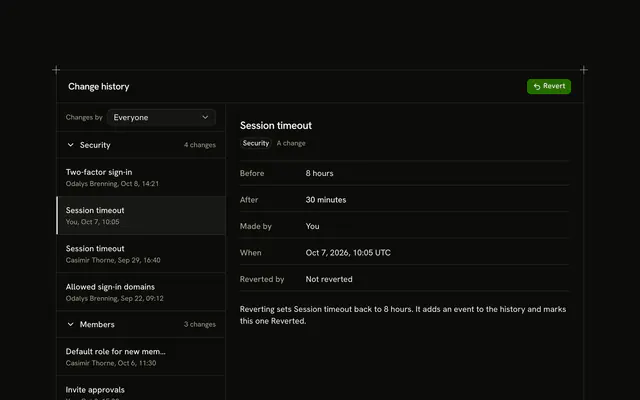 Audit Log SettingsAlerts and auditA settings change history in a fixed-height window: changes grouped by area in folds with counts, an actor filter, and a detail pane with the before and after values, who and when, and a Revert that undoes only the latest change to a setting, marks the original and adds a revert event at the top.
 Auto Replies SettingsNotificationsA vacation responder settings panel that leads with the sentence the settings amount to, a form with a subject, a message with variable chips, two date fields and a once-per-sender rule, beside a framed drawn email filled from a sample sender.
 Backup and Restore SettingsBackups and exportsA backups page with a list of six snapshots and the three-step restore that opens from it, shown open on load: choose what to bring back, read the impact and type the snapshot date to confirm, then watch a progress bar fill and end on a plain statement that nothing was restored in the demo.
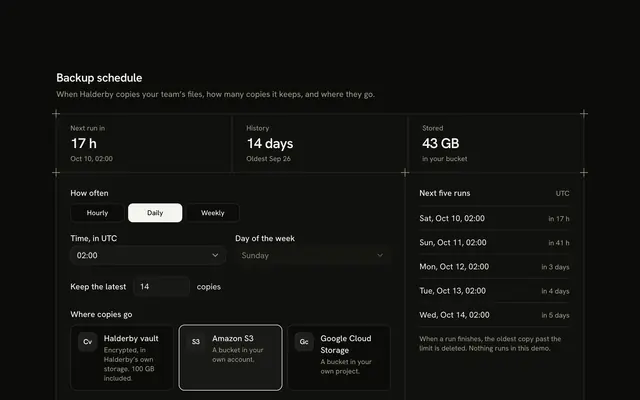 Backup Schedule SettingsBackups and exportsA backup schedule panel that leads with what the schedule amounts to (the next run, how much history the copies cover, how much space they take), with frequency, time, retention and destination controls beside a list of the next five runs.
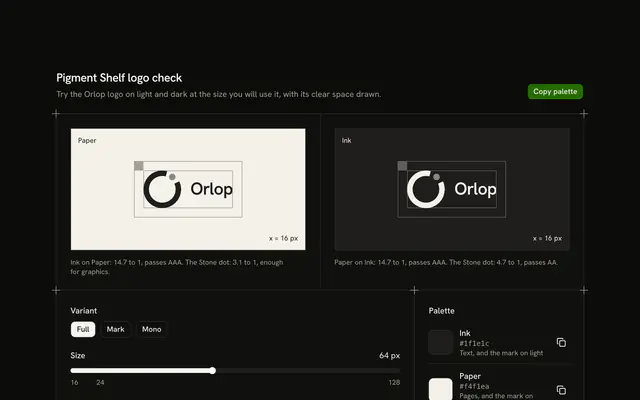 Brand Asset SettingsAppearance and localeA logo check panel: Paper and Ink tiles showing a drawn lettermark at true size with its clear space in hairlines and its contrast worked out from the hex values, a Full, Mark or Mono toggle, a size slider that warns below 24 px, and a four-colour palette with Copy.
Or describe it. With Pro, your AI agent picks the block you describe and installs it on your stack.
Get ProPricing
Every settings block, one prompt away, with Pro
Your AI agent installs any of the 100 settings blocks, and every component, example and icon, with every Pro plan.
4.9/5 out of 5 · 150+ reviewsfrom 150+ founders and developers.
- Secure checkout via Stripe
- Code lives in your repo
- Keep what you've shipped if you cancel
- License terms
FAQ
Frequently asked questions
Answers on the 100 settings blocks: what they are, how to customize and install them, the license and your AI agent.
They are 100 React settings screens for an app or a dashboard, in 17 groups: sign-in and security, team and roles, api and webhooks, domains and delivery, alerts and audit, privacy and consent, backups and exports, notifications, appearance and locale, fields and forms, product controls, billing and commerce, build and deploy, embeds and widgets, apps and assistants, storage and reports, workspace profile. Each is a whole settings page, a panel or a sheet for one job, with its controls, hints and states drawn.
Security Checkup Settings scores a workspace against eight checks, API Key Builder Settings sets what a key may read and write and tests a request, and Webhook Endpoints Settings edits an endpoint's events and signing secret. Notification Preferences Settings is a switch matrix of activities by channel, and Invoice Delivery Settings sets who gets each invoice and when.
Blocks mark in their notes when they are a whole page, a window or an overlay; the rest are panels. Overlay blocks, such as Webhook Endpoints Settings, edit in a sheet or dialog; the preview draws it open in place, and the real sheet opens from the header button.
The records (keys, endpoints, members, preferences) are typed data and local state in the file, with fictional names and secrets. Changing a control changes the block's own state only, so no setting anywhere is touched until you connect it.
Notification Preferences Settings keeps a draft next to the saved state and counts the difference in its action foot. Its save handler is where your request goes: prevent the default, send the draft, and on success make it the saved state. Discard puts the saved state back, so reuse that path when the request fails.
The same draft and saved pattern covers it: the Save and Discard buttons stay inert while nothing changed, and the status line says how many changes are unsaved. Keep that wiring and swap the in-memory save for your update call, so users see the same unsaved-changes count.
Danger Zone Settings asks for more the harder the action is to undo: Pause takes one click, Archive an alert dialog, and Delete needs the workspace name typed exactly before a slide-to-confirm unlocks, with a 14-day window to restore. Keep those steps and call your pause, archive and delete endpoints from them.
In the demo, API Key Builder Settings only masks and stores a fictional key in the page. Create real keys on your server, return the secret once, store a hash, and show the table from your key list. Webhook Endpoints Settings likewise rolls a fictional secret and signs with `crypto.subtle` in the browser; sign real deliveries on your server.
Keep the real Sheet or Dialog and drop the in-place copy the preview uses: the `"in-place"` state, the scrim and its `dialog`, and the Escape effect. The block's notes list those parts, and the Sheet keeps focus trapping, Escape and returning focus to the button.
This page lists 100 of the category's 100 settings blocks for React on Base UI. The category comes in React (Base UI, React Aria, Ark UI and Radix UI), Vue, Svelte and Solid; the framework and UI library pickers at the top of any block's page switch between them.
The settings blocks here are written on Base UI primitives; the layout, the copy and the theme tokens are the same on every base, and the install path follows it (/r/settings-access-tokens.json). The other bases are one picker away from /settings-block.
Each block is TypeScript and Tailwind CSS v4, styled with your theme's tokens, and imports our components (installed with it) on Base UI. Icons come from lucide-react.
Open a block, copy its command and run it: `npx shadcn@latest add` with the block's registry URL, such as /r/settings-access-tokens.json for Access Token Hygiene Settings. The code is copied into your project and it's yours to edit.
The block's file and the components it imports: Access Token Hygiene Settings brings Alert Dialog, Badge, Button, Checkbox, Guides, Native Select and Toggle Group, installed before it. Nothing else changes in your project.
Use the filters above the grid: 17 kinds of settings block, led by sign-in and security (9), billing and commerce (9), backups and exports (8) and appearance and locale (8), and sort by popular or name. A good first look: Access Token Hygiene Settings, Account Deletion Settings and Alert Rules Settings. Each card opens the block's live page.
Every block draws the same page column and side rails with a top rule only (the Guides component), so a settings block lines up with the one above and below it. Stack one per section and the rails read as a single drawing; pick across the people and access, developer and data and privacy kinds.
Open its page and use the full-screen viewer (/view/settings/access-tokens) or the device-width previews. Every preview is free for everyone; only the code needs Pro.
Each settings block uses semantic HTML: one heading level, real lists and labelled controls. Interactive parts sit on Base UI, a headless library that follows the WAI-ARIA patterns, and the layouts use logical properties so they hold in right-to-left languages.
Yes. They use semantic tokens only (bg-card, text-muted-foreground), never palette colors, so they follow your preset, radius and dark mode. The primary color marks one action per block and is never a background.
No animation library: the settings blocks' motion is CSS (transitions, entrance animations and SVG), and it stands still under prefers-reduced-motion.
The previews are free for everyone. The code of all 100 settings blocks is Pro, as is every block: Pro unlocks the code, the install command and the MCP.
Only with a Team or Organization license: client work, SaaS products and anything your users pay for. The Individual license is for personal, non-commercial projects. See the license page for the full terms.
You keep using what you installed in your existing projects, but get no new downloads or updates, and the MCP stops answering. A Lifetime license includes all future updates.
No. You can use them in your own End Products, but not redistribute the code or designs on their own, or in a UI library, kit, template or website builder.
With Pro, yes: the MCP server (22 tools, one personal URL from /dashboard/mcp) lets your agent search_blocks for a settings block, read it with get_block and install it on your React on Base UI stack.
Pass `category: "settings"` to search_blocks to search only the 100 settings blocks, or to list_blocks for the 17 groups with their blocks. get_block then returns one with its install command.
plan_page plans a page as a stack of blocks for a brief. Pass `sections` with category ids, such as ["hero", "settings", "footer"], to force the order; each section gets a pick and two alternatives, and get_block installs the stack.
4.9 out of 5 from 150+ developers


Every settings block. One prompt away.
100 settings blocks with Pro, the previews free to try. With Pro, your AI agent installs them from a prompt.
Get Pro