Web3 blocks for every framework.
100 web3 sections for React, Vue, Svelte and Solid, ready to paste into a page. Web3 sections: wallets, balances, swaps and transactions with fictional tokens and honest demo results. Try each one right here.
Every web3 block
100 blocks.
 ABI Decoder Web3Developer toolsA calldata decoder over a typed table of six functions: paste hex or use a sample, and it names the function, lists its arguments with types and amounts, and shows the 32-byte words, with a note for odd, short or unknown input.
 Achievement Badges Web3Community and rewardsA case of eight soulbound badges drawn as greyscale hexagons weighted by tier, earned or locked with the exact need, rarity worked out from each badge's holder share, an All, Earned and In progress filter and a reading of the chosen badge.
 Activity Feed Web3Chain dataA protocol activity feed with type chips, twelve events with short addresses and a time, and a Show 3 new events button that adds a typed buffer to the top on request.
 Address Book Web3Names and contactsA payments address book with eight contacts, search and a network filter, and an Add a contact form that compares a new address with every saved one and flags a lookalike with the differing characters marked.
 Airdrop Checker Web3Launches and claimsAn airdrop eligibility checker with an address field that checks its shape, three programs listing their criteria as met or not met, a count like 2 of 3 met, a sample allocation for an eligible program and a miss that names the criterion.
 Airdrop Claim Web3Launches and claimsA token claim page with the allocation split into Base, Early user and Governance with the total derived, a vesting split of 25 percent now and 75 percent over 12 months, the claim deadline, the gas against the claim's value and a claim that signs nothing.
 Alerts Web3Market dataAn alerts desk with a dry run: a New alert dialog for price, gas or whale transfers, switchable rules that say how often they would have fired in 7 days, and a band of the latest firings.
 Analytics Web3Portfolio and historyA wallet activity report: eight protocols ranked as bars by transactions, gas spent or volume, a period select, and a list of facts with the first transaction, active days and busiest month.
 Auction House Web3NFT marketsOne auction with a large drawn token, a bid form, a derived reserve badge, a demo clock and an anti-sniping rule that moves the end 10 minutes later when a bid lands in the last 10.
 Block Explorer Web3Chain dataA block explorer on a sample chain: search a block number, a transaction hash or an address, browse the latest ten blocks with gas used against the limit, and open a transaction or an address in place.
 Bounty Board Web3Community and rewardsA bounty board with Open, In progress, In review and Paid tabs with counts, a skill filter, twelve tasks with difficulty, reward and due date, a limit of two active claims, and a link field that sends finished work for review.
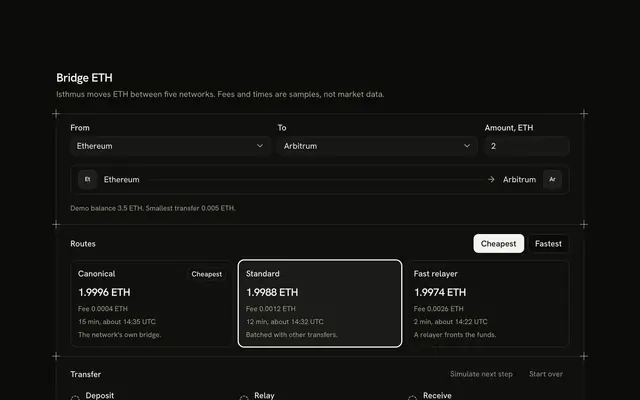 Bridge Web3Swaps and tradingA cross-network transfer form: two networks and an amount, three typed routes shown as cards with fee, amount received and arrival time, a Cheapest and Fastest re-order, and a three-step tracker advanced by a ghost button.
Or describe it. With Pro, your AI agent picks the block you describe and installs it on your stack.
Get ProPricing
Every web3 block, one prompt away, with Pro
Your AI agent installs any of the 100 web3 blocks, and every component, example and icon, with every Pro plan.
4.9/5 out of 5 · 150+ reviewsfrom 150+ founders and developers.
- Secure checkout via Stripe
- Code lives in your repo
- Keep what you've shipped if you cancel
- License terms
FAQ
Frequently asked questions
Answers on the 100 web3 blocks: what they are, how to customize and install them, the license and your AI agent.
They are 100 React web3 blocks in 17 groups, from wallets and keys and sending and paying to nft markets, collections and tokens and creating and minting. Each is a finished screen of an invented app, such as a wallet, a swap, a DAO dashboard or an NFT mint page, drawn with the catalog components.
Wallet Connect Web3 is a dialog with six wallets and a QR tab, Chain Selector Web3 is a network switcher, Wallet Balance Web3 shows token rows with a display unit, and Message Sign Web3 lays out a sign-in request with a verify step. Hardware Wallet Web3, Safe Wallet Web3 and Multisig Wallet Web3 sit in the same group.
Token Swap Web3 and DEX Aggregator Web3 cover a swap, Order Book Web3 and Perpetual Trading Web3 cover trading, Staking Dashboard Web3 and Yield Farming Web3 cover yield, and DAO Voting Web3 and DAO Proposal Web3 cover governance. NFT Marketplace Web3, NFT Mint Web3 and NFT Detail Web3 handle tokens and collections.
The tokens, collections, addresses, rates and amounts are typed samples at the top of the file, and the figures a screen shows, such as a fee, a price impact or an exposure, are computed from them. The apps and tokens are invented, and no block contains market data.
None of the blocks connect to a wallet: they import no web3 library and call no wallet. Wallet Connect Web3 waits 800 milliseconds and returns a typed demo address, so replace that step with your own connect call from wagmi, viem, ethers or another library and keep the dialog, the wallet list and the declined state around it.
No. The balances, rates and moves are typed samples, and Gas Tracker Web3 and Price Chart Web3 use a typed daily pattern and a seeded series. Replace the arrays at the top of the file with data from your RPC provider or price API, and keep the totals and chart code, which derive from them.
Token Swap Web3 works out the output from a typed constant-product pool with a 0.3 % fee, then the price impact, the minimum received at the chosen slippage and the fee. For a real swap keep the form and the review lines, replace the pool constant with a quote from your router or aggregator, and send the transaction from the swap button.
Revoke Approval Web3, Send Receive Web3 and NFT Transfer Web3 only change local state when you press the final button, and say so in the interface. Send the transaction from that handler, then update the row or show the sent note after the receipt comes back, and keep the review step so people see the fee first.
Message Sign Web3 shows the exact text to be signed and a typed sample signature, and its Verify tab compares edited text with the original. Ask the wallet to sign the same text, check the signature on your server against the nonce you issued, and keep the nonce and expiry lines the block already shows.
Yes, where it is shown. Wallet Connect Web3 and Message Sign Web3 open a real dialog with a focus trap and Escape, Token Swap Web3 and Revoke Approval Web3 keep the confirm button labelled with its action, and Price Chart Web3 has a table of every candle for screen readers. Check the block you pick, since the details differ.
This page lists 100 of the category's 100 web3 blocks for React on Base UI. The category comes in React (Base UI, React Aria, Ark UI and Radix UI), Vue, Svelte and Solid; the framework and UI library pickers at the top of any block's page switch between them.
The web3 blocks here are written on Base UI primitives; the layout, the copy and the theme tokens are the same on every base, and the install path follows it (/r/nft-auction-marketplace.json). The other bases are one picker away from /web3-block.
Each block is TypeScript and Tailwind CSS v4, styled with your theme's tokens, and imports our components (installed with it) on Base UI. Icons come from lucide-react.
Open a block, copy its command and run it: `npx shadcn@latest add` with the block's registry URL, such as /r/nft-auction-marketplace.json for NFT Auction Marketplace Web3. The code is copied into your project and it's yours to edit.
The block's file and the components it imports: NFT Auction Marketplace Web3 brings Button, Empty, Field, Guides, Input, Popover, Shine Button and Toggle Group, installed before it. Nothing else changes in your project.
Use the filters above the grid: 17 kinds of web3 block, led by wallets and keys (8), nft markets (8), launches and claims (7) and market data (7), and sort by popular or name. A good first look: NFT Auction Marketplace Web3, NFT Auctions Trending Web3 and Collection Gallery Web3. Each card opens the block's live page.
Every block draws the same page column and side rails with a top rule only (the Guides component), so a web3 block lines up with the one above and below it. Stack one per section and the rails read as a single drawing; pick across the wallets and payments, trading and defi and markets and data kinds.
Open its page and use the full-screen viewer (/view/web3/nft-auction-marketplace) or the device-width previews. Every preview is free for everyone; only the code needs Pro.
Each web3 block uses semantic HTML: one heading level, real lists and labelled controls. Interactive parts sit on Base UI, a headless library that follows the WAI-ARIA patterns, and the layouts use logical properties so they hold in right-to-left languages.
Yes. They use semantic tokens only (bg-card, text-muted-foreground), never palette colors, so they follow your preset, radius and dark mode. The primary color marks one action per block and is never a background.
No animation library: the web3 blocks' motion is CSS (transitions, entrance animations and SVG), and it stands still under prefers-reduced-motion.
The previews are free for everyone. The code of all 100 web3 blocks is Pro, as is every block: Pro unlocks the code, the install command and the MCP.
Only with a Team or Organization license: client work, SaaS products and anything your users pay for. The Individual license is for personal, non-commercial projects. See the license page for the full terms.
You keep using what you installed in your existing projects, but get no new downloads or updates, and the MCP stops answering. A Lifetime license includes all future updates.
No. You can use them in your own End Products, but not redistribute the code or designs on their own, or in a UI library, kit, template or website builder.
With Pro, yes: the MCP server (22 tools, one personal URL from /dashboard/mcp) lets your agent search_blocks for a web3 block, read it with get_block and install it on your React on Base UI stack.
Pass `category: "web3"` to search_blocks to search only the 100 web3 blocks, or to list_blocks for the 17 groups with their blocks. get_block then returns one with its install command.
plan_page plans a page as a stack of blocks for a brief. Pass `sections` with category ids, such as ["hero", "web3", "footer"], to force the order; each section gets a pick and two alternatives, and get_block installs the stack.
4.9 out of 5 from 150+ developers


Every web3 block. One prompt away.
100 web3 blocks with Pro, the previews free to try. With Pro, your AI agent installs them from a prompt.
Get Pro