Replicate Design System
Replicate's hot orange #ea2804 and huge rb-freigeist-neue headlines at 128px as a DESIGN.md file, with components for React, Next.js and AI tools.
- Primary color
- #ea2804
- Typeface
- basier-square
- Shape
- Pill
- Base radius
- 10px
- Colors
- 26
- Type tokens
- 17
- Components
- 20
- Spacing values
- 10
About Replicate DESIGN.md
Curated by Dov Azencot, updated May 12, 2026. Source replicate.com (opens in a new tab).
Replicate is a developer-tools platform built around running AI models in the cloud, and its marketing surfaces look nothing like the typical AI infrastructure site. The canvas is a warm cream (#f9f7f3) rather than pure white. The brand accent is a hot, almost-stamped orange (#ea2804) reserved for one CTA per viewport. Display headlines run at 128px in rb-freigeist-neue, a heavy condensed grotesque with -3px letter-spacing that lets multi-line titles pack into geometric typographic blocks. The overall personality reads less like a SaaS console and more like an art-zine: editorial-magazine restraint with a single hot accent doing all the brand work.
This page packages the full system as a single DESIGN.md file written to the Google Labs spec. Inside: 26 colors tokens grouped into brand, surface, text, and semantic families; 17 type styles across three families (rb-freigeist-neue for display, basier-square for UI, jetbrains-mono for every literal command); 10 spacing values from 2px through a 160px hero band; 6 corner radii from 0px to a fully rounded 9999px; and 20 components covering buttons, model cards, pricing tiers, dark-inverted code wells, contributor avatars, and the global footer. Every value is quoted as a hex, a px number, or a named token so an agent can read and reproduce it without guessing.
Feed the file to Claude, Cursor, or GitHub Copilot and the agent will produce React components that match Replicate's discipline rather than a generic dark-mode AI theme — cream canvas, scarce orange, fully-rounded interactive surfaces, code-as-print pull-quotes. Or use it as a reference for your own audit: this system is worth studying because it solves a specific problem (how does a developer platform feel warm and editorial without abandoning monospace code?), and the answer lives in a small set of strict rules about where orange, dark inversion, and 128px display type are allowed to appear.
What makes it distinct
5 highlights
- Cream canvas #f9f7f3Never pure white, the warm temperature carries every page above the fold
- Hot orange #ea2804 used as a stampOne orange element per viewport, never decorative
- rb-freigeist-neue at 128px / lineHeight 1.0 / -3px trackingDisplay headlines pack into geometric blocks
- Three-family stack: rb-freigeist-neue for display, basier-square for UI, jetbrains-mono for every code well
- Every interactive surface is fully rounded (9999px)Buttons, inputs, badges, avatars — while cards step to 10px
Live at replicate.com
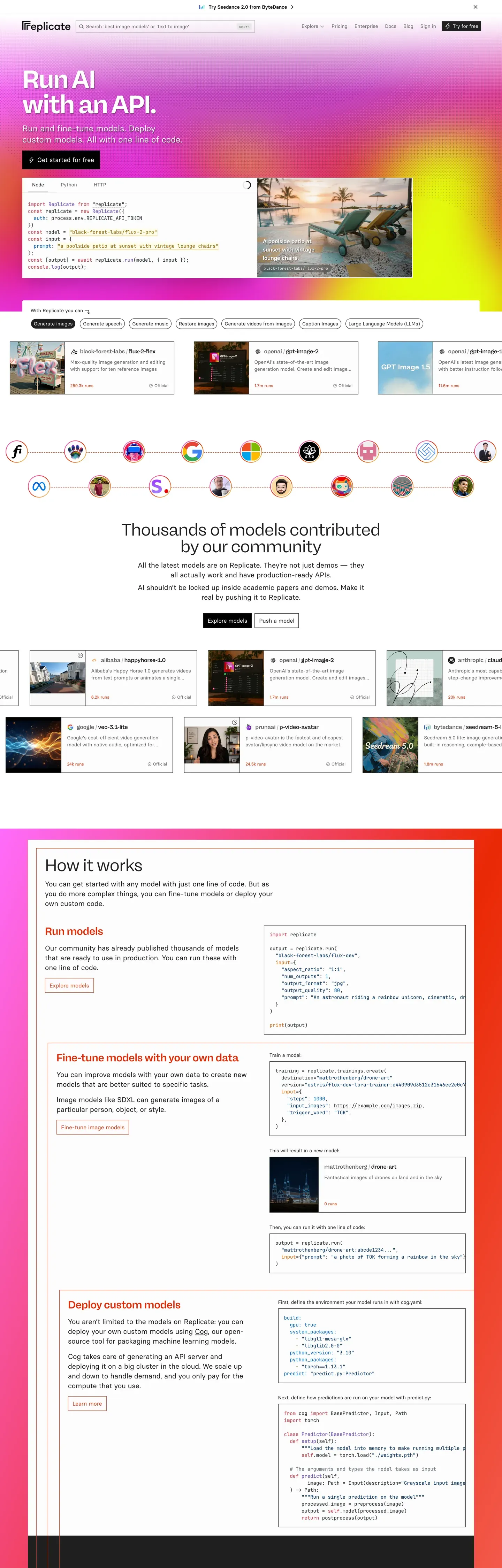
Replicate in production, as captured. Scroll the window to see the whole page.
26 colors
Replicate's system runs on #ea2804 as its primary voltage, used in 1 of 20 components. Type is set in basier-square across 17 tokens from 11px to 128px, weights 400–700. Shape language leans on pill geometry — fully rounded surfaces dominate the component library.
Brand & Accent
Sparing, CTA-only voltage · 2
Surface
Page and card backgrounds · 5
Text
Headlines, body, captions · 7
Borders & Hairlines
Dividers, outlines, rules · 3
Semantic
Status, errors, success, links · 1
Other
Specialty colors · 8
17 type tokens
Set in basier-square across 17 tokens, from 11px to 128px, weights 400–700. Shown in its own stack: where the font isn't installed, the fallback the file names stands in.
- display-xxl128px · weight 700 · lh 1 · tracking -3pxThe quick brown fox jumps over the lazy dog
- display-xl72px · weight 700 · lh 1 · tracking -1.8pxThe quick brown fox jumps over the lazy dog
- display-lg48px · weight 700 · lh 1 · tracking -1pxThe quick brown fox jumps over the lazy dog
- display-md30px · weight 600 · lh 1.2 · tracking -0.5pxThe quick brown fox jumps over the lazy dog
- heading-lg38.4px · weight 600 · lh 0.83 · tracking -0.5pxThe quick brown fox jumps over the lazy dog
- heading-md24px · weight 600 · lh 1.33 · tracking -0.35pxThe quick brown fox jumps over the lazy dog
- heading-sm20px · weight 600 · lh 1.4 · tracking -0.3pxThe quick brown fox jumps over the lazy dog
- subtitle18px · weight 600 · lh 1.56The quick brown fox jumps over the lazy dog
- body-lg18px · weight 400 · lh 1.56The quick brown fox jumps over the lazy dog
- body-md16px · weight 400 · lh 1.5The quick brown fox jumps over the lazy dog
- body-sm14px · weight 400 · lh 1.43The quick brown fox jumps over the lazy dog
- button-md16px · weight 600 · lh 1The quick brown fox jumps over the lazy dog
- button-sm14px · weight 600 · lh 1The quick brown fox jumps over the lazy dog
- caption12px · weight 400 · lh 1.33The quick brown fox jumps over the lazy dog
- caption-tight14px · weight 600 · lh 1.43 · tracking -0.35pxThe quick brown fox jumps over the lazy dog
- code-md14px · weight 400 · lh 1.43The quick brown fox jumps over the lazy dog
- code-sm11px · weight 400 · lh 1.5The quick brown fox jumps over the lazy dog
Radii and spacing
6 corner radii and 10 spacing values. Shape language: pill, on a 10px base radius.
Radii6
- none0px
- xs4px
- sm6px
- md10px
- lg16px
- full9999px
Spacing10
- xxs2px
- xs4px
- sm8px
- md12px
- lg16px
- xl24px
- xxl32px
- xxxl48px
- section96px
- band160px
20 components
Each rendered from its tokens (color, type, radius, padding) on Replicate's own canvas.
- Button PrimaryButton Primarybutton-primary
- Button Primary PressedButton Primary Pressedbutton-primary-pressed
- Button DarkButton Darkbutton-dark
- Button OutlineButton Outlinebutton-outline
- Button GhostButton Ghostbutton-ghost
- Button Iconbutton-icon
- Type here…Text Inputtext-input
- Hero BandHero Bandhero-band
- Model CardModel Cardmodel-card
- Collection TileCollection Tilecollection-tile
- Pricing TierPricing Tierpricing-tier
- Pricing Tier FeaturedPricing Tier Featuredpricing-tier-featured
- Code BlockCode Blockcode-block
- Code TabCode Tabcode-tab
- Badge StatusBadge Statusbadge-status
- Badge TagBadge Tagbadge-tag
- Nav BarNav Barnav-bar
- Sub Nav PillSub Nav Pillsub-nav-pill
- Contributor AvatarContributor Avatarcontributor-avatar
- FooterFooterfooter
The system, in use
Replicate's tokens on the kind of product it builds.
Think bigger with an AI at your side
Ask anything, write and analyze, and build with an assistant that understands your work.
Replicate design system FAQ
Replicate's tokens, its components and how to use this DESIGN.md in your project.
Related reading
Specs, directories and component libraries that pair with this design system.
Use Replicate in your project
One machine-readable file. Drop it into Claude Code, Cursor, VS Code or any AI tool that reads DESIGN.md.
Download the DESIGN.md
One machine-readable file: every color, type, radius, spacing, and component token of Replicate.
Feed it to your AI tool
Drop it into Claude, Cursor, or GitHub Copilot. The agent writes React components and Tailwind classes that match Replicate's visual language.
Reference the tokens directly
Or paste the values into your Tailwind config, CSS variables, or component library: every color, size and radius is a quoted, ready-to-copy value.
Read the full DESIGN.md overview, rationale, do’s and don’ts
Overview
Replicate is a developer-tools platform with the soul of an art zine. The public marketing surfaces sit on a warm cream canvas ({colors.canvas} — #f9f7f3) rather than the white-or-near-black default of typical AI infrastructure sites, and that single decision colors everything else: photography reads as editorial, code wells read as printed pull-quotes, and the brand orange ({colors.primary} — #ea2804) feels like a stamp rather than a notification.
The typography is the load-bearing decoration. rb-freigeist-neue — a heavy, slightly condensed grotesque — appears at sizes up to 128px in hero bands, with a tight lineHeight: 1.0 and negative letter-spacing that lets multi-line headlines pack into geometric blocks. The companion family, basier-square, takes care of body, button labels, and metadata in the 14–18px range. JetBrains Mono carries every code well, command, and example. Three families, three jobs, no overlap.
Page rhythm cycles between a default cream canvas, a bold full-bleed orange hero band, and a {colors.surface-dark} (#202020) section that hosts the code stories — the "how it works" walkthrough. Curves are intentional and soft: every interactive surface (buttons, inputs, tags, avatars) uses {rounded.full} (9999px), while content cards and code wells step up to {rounded.md} (10px) or {rounded.lg} (16px). There are no sharp corners on Replicate; the system reads as friendly precision.
Key Characteristics:
- A warm cream canvas (
{colors.canvas}—#f9f7f3) replaces the typical white background, paired with{colors.surface-bone}(#f3f0e8) for inset cards. - Hot orange (
{colors.primary}—#ea2804) is reserved for the primary CTA, the hero band, and inline link color. Never decorative. - Display headlines run massive —
{typography.display-xxl}at 128px in hero bands and{typography.display-xl}at 72px on section openers — with tightlineHeight: 1.0and negative letter-spacing down to -3px. - Three-family typography stack:
rb-freigeist-neuefor display,basier-squarefor UI/body,jetbrains-monofor code. - Every interactive element is fully rounded (
{rounded.full}9999px) — buttons, inputs, badges, avatars — while content cards step to{rounded.md}10px. - Dark code wells (
{colors.surface-dark}#202020background) sit inside the cream canvas as full-bleed reading surfaces, mimicking print pull-quotes. - Section rhythm: cream → orange hero → cream → dark code-story band → cream → black footer (
#000000).
Known Gaps
- Active/pressed visual states are documented for
button-primary-pressedonly; other components rely on the focus ring ({colors.ring-focus}—rgba(59,130,246,0.5)) for interactive feedback, which is not extracted as a per-component variant. - The model playground / try-this-model interactive surfaces (logged-in feature) are out of scope; only the public marketing canvas is documented.
- Dashboard / billing / API key management surfaces are not extracted — those live behind authentication.
- The home hero illustration ("the tinkerer at the workbench") is treated as decorative artwork, not a system component; replicating it requires bespoke illustration rather than tokens.
More systems like this
Algolia, Anthropic, Arc and 61 more in AI & LLM Platforms: each brand's colors, type and components in one file your AI agent builds from.
Build it with Pro
The DESIGN.md files are free. Pro adds 6,000+ blocks, premium templates and the MCP server, so your AI editor builds in your system for you.
4.9/5 out of 5 · 150+ reviewsfrom 150+ founders and developers.
Billing
Billed once a year in USD. Cancel anytime.
- How many people can use the license.
- Client work, SaaS products and anything you charge for.
- Page sections in 56 categories, from heroes and pricing tables to dashboards and settings, on every framework and UI library, in your theme.
- Complete Next.js sites for startups, SaaS, agencies and portfolios, every page designed, ready to ship.
- Your AI agent searches, previews and installs any component, block, icon or DESIGN.md from a prompt: 22 tools in Claude Code, Cursor, VS Code and 35 more clients.
- Buttons with motion and states of their own, from an arrow that slides in to a burst of confetti.
- Typewriters, scrambles, counters and more, for headlines, labels and numbers.
- Animated backgrounds for heroes, sections and cards, from a soft aurora to a flock that flees the cursor. Most are pure CSS.
- WebGPU shaders, from a slow aurora to a black hole, each drawing only while it's on screen.
- One design and one theme on all four: the components, blocks and effects are built for each framework.
- React on Base UI, Radix UI, React Aria or Ark UI: install the version for the library your project already uses. Vue, Svelte and Solid run on Ark UI.
- From a button to a date picker, a color picker or a guided tour: accessible, typed in TypeScript, each with live demos.
- Real-world patterns built from the components, in 53 galleries: forms, tables, menus, dialogs and more.
- Area, bar, line, pie, radar and radial charts on TanStack Charts, on every framework. React also gets the Recharts originals.
- Debounce, local storage, media queries and more: each hook is one typed file you own.
- From 222 libraries, Lucide, Heroicons, Tabler and Material Symbols among them, as SVG or a React component in one command.
- Stripe, Linear, Apple and 497 more: a brand's colors, typography and components in one file your AI agent builds from.
- Restyle every component and block at once: 8 styles, 8 grays, 18 colors and 5 radii, shared as a shadcn preset code.
- Priority requests are answered first.
Individual
For personal projects & open source
$32instead of $49/mo
$389 billed yearly
- Seats: 1 seat
- Commercial use: Personal & open source only
- Blocks: All 6,181 blocks
- Templates: All 14 templates
- MCP server: 38 AI clients
- Animated buttons: All 35 buttons
- Text effects: All 97 effects
- Backgrounds: All 100 backgrounds
- Shaders: All 100 shaders
- Frameworks: React, Vue, Svelte, Solid
- UI libraries: Base UI, Radix, Aria, Ark
- Components: All 174 components
- Examples: All 1,103 examples
- Charts: All 70 charts
- React hooks: All 35 hooks
- Icons: 294k+ icons
- DESIGN.md files: All 500 brands
- Theme builder: 8 styles × 18 colors
- Support: Standard
Team
Most popularFor freelancers, agencies & startups
$66instead of $99/mo
$789 billed yearly · ≈ $13/dev/mo
- Seats: Up to 5 seats
- Commercial use: Included
- Blocks: All 6,181 blocks
- Templates: All 14 templates
- MCP server: 38 AI clients
- Animated buttons: All 35 buttons
- Text effects: All 97 effects
- Backgrounds: All 100 backgrounds
- Shaders: All 100 shaders
- Frameworks: React, Vue, Svelte, Solid
- UI libraries: Base UI, Radix, Aria, Ark
- Components: All 174 components
- Examples: All 1,103 examples
- Charts: All 70 charts
- React hooks: All 35 hooks
- Icons: 294k+ icons
- DESIGN.md files: All 500 brands
- Theme builder: 8 styles × 18 colors
- Support: Priority
Organization
For companies with larger teams
$132instead of $199/mo
$1,589 billed yearly
- Seats: Unlimited seats
- Commercial use: Included
- Blocks: All 6,181 blocks
- Templates: All 14 templates
- MCP server: 38 AI clients
- Animated buttons: All 35 buttons
- Text effects: All 97 effects
- Backgrounds: All 100 backgrounds
- Shaders: All 100 shaders
- Frameworks: React, Vue, Svelte, Solid
- UI libraries: Base UI, Radix, Aria, Ark
- Components: All 174 components
- Examples: All 1,103 examples
- Charts: All 70 charts
- React hooks: All 35 hooks
- Icons: 294k+ icons
- DESIGN.md files: All 500 brands
- Theme builder: 8 styles × 18 colors
- Support: Priority
Billed once a year in USD. Cancel anytime.
Individual
For personal projects & open source
$32instead of $49/mo
$389 billed yearly
- How many people can use the license.Seats: 1 seat
- Client work, SaaS products and anything you charge for.Commercial use: Personal & open source only
- Page sections in 56 categories, from heroes and pricing tables to dashboards and settings, on every framework and UI library, in your theme.Blocks: All 6,181 blocks
- Complete Next.js sites for startups, SaaS, agencies and portfolios, every page designed, ready to ship.Templates: All 14 templates
- Your AI agent searches, previews and installs any component, block, icon or DESIGN.md from a prompt: 22 tools in Claude Code, Cursor, VS Code and 35 more clients.MCP server: 38 AI clients
- Buttons with motion and states of their own, from an arrow that slides in to a burst of confetti.Animated buttons: All 35 buttons
- Typewriters, scrambles, counters and more, for headlines, labels and numbers.Text effects: All 97 effects
- Animated backgrounds for heroes, sections and cards, from a soft aurora to a flock that flees the cursor. Most are pure CSS.Backgrounds: All 100 backgrounds
- WebGPU shaders, from a slow aurora to a black hole, each drawing only while it's on screen.Shaders: All 100 shaders
- One design and one theme on all four: the components, blocks and effects are built for each framework.Frameworks: React, Vue, Svelte, Solid
- React on Base UI, Radix UI, React Aria or Ark UI: install the version for the library your project already uses. Vue, Svelte and Solid run on Ark UI.UI libraries: Base UI, Radix, Aria, Ark
- From a button to a date picker, a color picker or a guided tour: accessible, typed in TypeScript, each with live demos.Components: All 174 components
- Real-world patterns built from the components, in 53 galleries: forms, tables, menus, dialogs and more.Examples: All 1,103 examples
- Area, bar, line, pie, radar and radial charts on TanStack Charts, on every framework. React also gets the Recharts originals.Charts: All 70 charts
- Debounce, local storage, media queries and more: each hook is one typed file you own.React hooks: All 35 hooks
- From 222 libraries, Lucide, Heroicons, Tabler and Material Symbols among them, as SVG or a React component in one command.Icons: 294k+ icons
- Stripe, Linear, Apple and 497 more: a brand's colors, typography and components in one file your AI agent builds from.DESIGN.md files: All 500 brands
- Restyle every component and block at once: 8 styles, 8 grays, 18 colors and 5 radii, shared as a shadcn preset code.Theme builder: 8 styles × 18 colors
- Priority requests are answered first.Support: Standard
Team
Most popularFor freelancers, agencies & startups
$66instead of $99/mo
$789 billed yearly · ≈ $13/dev/mo
Everything in Individual, plus
- How many people can use the license.Seats: Up to 5 seats
- Client work, SaaS products and anything you charge for.Commercial use: Included
- Priority requests are answered first.Support: Priority
Organization
For companies with larger teams
$132instead of $199/mo
$1,589 billed yearly
Everything in Team, plus
- How many people can use the license.Seats: Unlimited seats
- Secure checkout via Stripe
- Code lives in your repo
- Keep what you've shipped if you cancel
- License terms
4.9 out of 5 from 150+ developers


Your system, built for you
Every block, template and icon, installed by your AI agent in your design system. The DESIGN.md files stay free.
- Cancel anytime
- Keep what you've shipped