shadcn.io is an independent project built on shadcn/ui
A round 1 leads Can I cancel my subscription anytime? The question is a heading, and the answer is indented under the text.
Use it when questions should be read in order. If they are not a sequence, use an Accordion without numbers. In React, Ark UI does not number the rows.
Installation
Anatomy
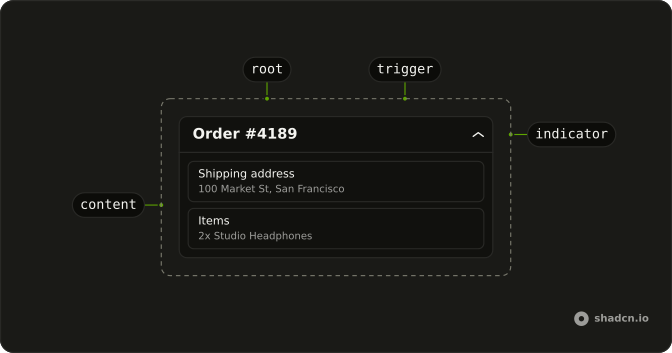
Usage
<Collapsible className="w-full max-w-lg border-b pb-4">
  <h3>
    <CollapsibleTrigger className="flex w-full items-start gap-4 text-start font-medium">
      <span className="flex size-6 shrink-0 items-center justify-center rounded-full bg-primary/10 font-semibold text-primary text-xs">
        1
      </span>
      Can I cancel my subscription anytime?
    </CollapsibleTrigger>
  </h3>
  <CollapsibleContent className="ms-10 pt-2 text-muted-foreground text-sm">
    Absolutely. You can cancel your subscription at any time from your account
    settings. Your access will continue until the end of your billing period.
  </CollapsibleContent>
</Collapsible>
FAQ
How is the number drawn?
A span with size-6 rounded-full bg-primary/10 and font-semibold text-primary text-xs, centered with flex. shrink-0 keeps it round when the question wraps.
Why does the answer use ms-10?
It's the badge's size-6 plus the gap-4 after it, so the answer lines up with the question text. ms follows the page direction.
Does the number get announced with the question?
Yes. The number is inside the trigger, so the name is 1 followed by the question. Move it out of the trigger if you don't want it read.
What does the heading around the trigger do?
The h3 wraps CollapsibleTrigger, so the question is a heading in the page outline and the trigger inside it is still the button. Pick the heading level that fits your page.
API Reference
Collapsible
No extra props in this demo. The rest is on the Collapsible page.