shadcn.io is an independent project built on shadcn/ui
Three outline rows that are links. Each has album art, a title with the album name, the artist and a duration. The first title is Midnight City Lights, at 3:45.
Use image rows for a media list people open, such as songs. A Table fits once artist, album and duration should be separate columns. In React, Ark UI does not play the track.
Installation
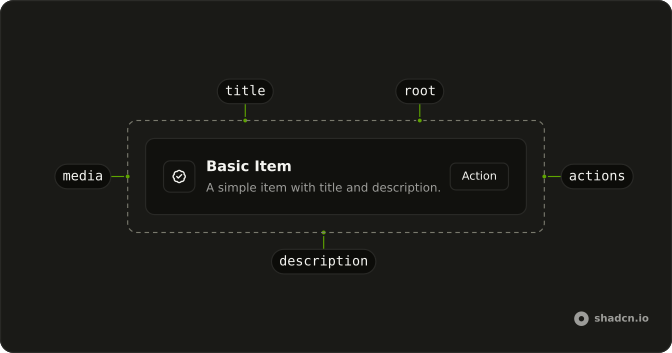
Anatomy
Usage
<div className="flex w-full max-w-md flex-col gap-6">
  <ItemGroup className="gap-4">
    {SONGS.map((song) => (
      <Item
        asChild
        className="bg-background"
        key={song.title}
        variant="outline"
      >
        <a href="#">
          <ItemMedia variant="image">
            <img
              alt=""
              className="object-cover grayscale"
              height={32}
              src={`https://avatar.vercel.sh/${song.album}`}
              width={32}
            />
          </ItemMedia>
          <ItemContent>
            <ItemTitle className="line-clamp-1">
              {song.title} -{" "}
              <span className="text-muted-foreground">{song.album}</span>
            </ItemTitle>
            <ItemDescription>{song.artist}</ItemDescription>
          </ItemContent>
          <ItemContent className="flex-none text-center">
            <ItemDescription>{song.duration}</ItemDescription>
          </ItemContent>
        </a>
      </Item>
{/* The rest of the file is under Installation. */}
FAQ
What does variant image do for ItemMedia?
It turns ItemMedia into a small square that clips its picture: the image fills it with object-cover, corners follow your style, and the square shrinks at the sm and xs sizes. You only supply the image and its width and height.
What is ItemGroup and when should I use it?
ItemGroup stacks related Items in a column and gives the block the list role. This list sets gap-4 on the group. Add grid classes on ItemGroup when the rows should sit in columns.
How do link rows differ from rows with a button?
Here the whole row is the link, so the title, art and duration are one target, and it gets a muted hover background and a focus ring. When a row needs a separate action, keep it a plain Item and put a Button in ItemActions instead.
How do I show several pieces of metadata in a row?
Put the main line in ItemTitle, the album here in a muted span, the secondary line in ItemDescription, and a short value like the duration in a second ItemContent with flex-none so it stays at its width at the inline end. The title clamps to one line, so long names don't push the duration out.
API Reference
Item
Sets asChild, variant="outline" and variant="image". The rest is on the Item page.