shadcn.io is an independent project built on shadcn/ui
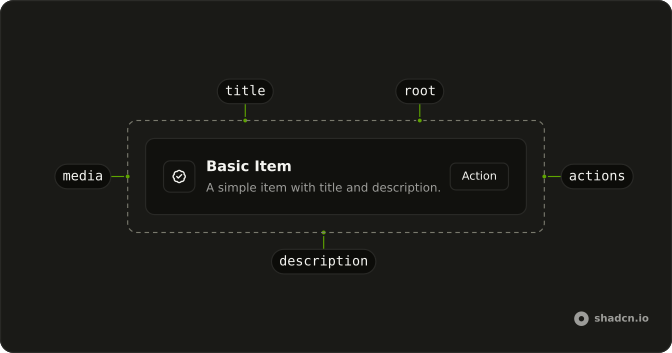
One outline row. The title is Basic Item, the description is A simple item with title and description, and the button says Action.
Use a row like this for one object with a title, a line of detail and a button. A Card fits when the block needs a picture or a footer. Ark UI in React does not make the whole row a button.
Installation
Anatomy
Usage
<div className="flex w-full max-w-md flex-col gap-6">
  <Item className="bg-background" variant="outline">
    <ItemContent>
      <ItemTitle>Basic Item</ItemTitle>
      <ItemDescription>
        A simple item with title and description.
      </ItemDescription>
    </ItemContent>
    <ItemActions>
      <Button size="sm" variant="outline">
        Action
      </Button>
    </ItemActions>
  </Item>
</div>
FAQ
When should I use an Item instead of a Card or a plain div?
Use an Item for a compact row (media, title, description, actions) that repeats in a list. Use a Card when the block is a subject of its own with a header, body and footer. A plain div is fine for a one-off layout, but you lose the shared spacing and slots.
What does the outline variant do?
variant takes default, outline or muted. default has a transparent border, outline draws a border, and muted fills the row with a light muted background. The example also adds bg-background so the outlined row is opaque on a tinted page.
What belongs in ItemActions?
Controls that act on the row: a button, an icon button, a menu trigger, or a chevron or badge that hints at what happens. ItemActions lays its children out in a row with a small gap, and ItemContent grows to push it to the inline end. Keep the main text in ItemContent so the actions stay small.
Does every Item need an ItemDescription?
No. Leave it out when the title says enough. When you include it, keep it short: ItemDescription is clamped to two lines and ItemTitle to one.
Should the whole Item be clickable, or just the button?
Make the whole row a link when the title and description are one destination. Keep a separate button, as here, when the action does something else. A button inside a row that is itself a link is invalid.
How do screen readers read an Item?
Item is a div, so the title and description are read as text in order and the button is announced with its label. Give the button a label that makes sense out of context, or an aria-label that names the row, when several rows share the same button text. For a list of rows, wrap them in ItemGroup, which has the list role.
API Reference
Item
Sets variant="outline". The rest is on the Item page.
Button
Sets size="sm" and variant="outline". The rest is on the Button page.