shadcn.io is an independent project built on shadcn/ui
The bar shows Success Stories. The panel is headed CUSTOMER STORIES and shows four cards: Vercel, Stripe, Airbnb, and Shopify. Each has an avatar, five stars, a quote, and Read case study.
Put proof in the header when the quote should be seen before the customers page. A Card on that page can carry the full story. In React, Ark UI closes the open panel when you press Escape.
Installation
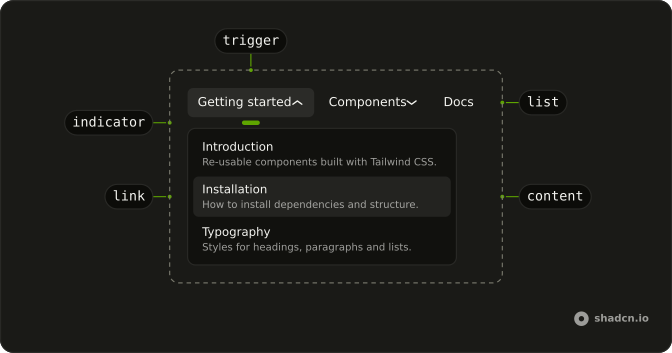
Anatomy
Usage
<div className="w-full max-w-md rounded-md border bg-background p-px">
  <NavigationMenu>
    <NavigationMenuList>
      <NavigationMenuItem>
        <NavigationMenuTrigger>Success Stories</NavigationMenuTrigger>
        <NavigationMenuContent>
          <div className="flex w-[700px] max-w-full flex-col gap-4 p-2">
            <h3 className="px-2 font-semibold text-muted-foreground text-sm">
              CUSTOMER STORIES
            </h3>
            <div className="grid grid-cols-2 gap-4">
              {testimonials.map((testimonial) => (
                <NavigationMenuLink
                  asChild
                  className="flex-col items-start gap-2"
                  key={testimonial.company}
                >
                  <Link href={testimonial.href}>
                    <div className="flex items-center gap-2">
                      <Avatar size="sm">
                        <AvatarImage
                          alt={testimonial.company}
                          height={24}
                          src={testimonial.avatarSrc}
                          width={24}
                        />
                        <AvatarFallback>
                          {testimonial.avatarFallback}
                        </AvatarFallback>
                      </Avatar>
                      <span className="font-medium">
{/* The rest of the file is under Installation. */}
FAQ
What is each card?
A whole NavigationMenuLink: an Avatar with the company's logo and initials as fallback, the name, five stars, the quote and Read case study with an arrow.
How is the rating announced?
The stars are hidden from assistive tech and a visually hidden Rated 5 out of 5 follows them. They are filled with the warning token so they follow the theme.
How do the links use my router?
Each link is your router's link rendered through NavigationMenuLink, so it keeps the menu's styles and focus handling.
NavigationMenuLink takes asChild, and the demo puts the Next.js Link inside it.
API Reference
Navigation Menu
Sets asChild. The rest is on the Navigation Menu page.
Avatar
Sets size="sm", alt={testimonial.company}, height={24}, src={testimonial.avatarSrc} and width={24}. The rest is on the Avatar page.