shadcn.io is an independent project built on shadcn/ui
Technologies heads a bordered panel. Inside, badges sit on one line, starting with React, Next.js, TypeScript and Tailwind CSS. The line scrolls sideways.
Keep tags on one scrolling line when wrapping would break a filter row. A Toggle Group fits if each tag is a control. In React, Ark UI does not choose which badges appear.
Installation
Sign in to get your install command
Free with an account. It carries your token, so the CLI installs everything in one go.
Use email insteadNo credit card
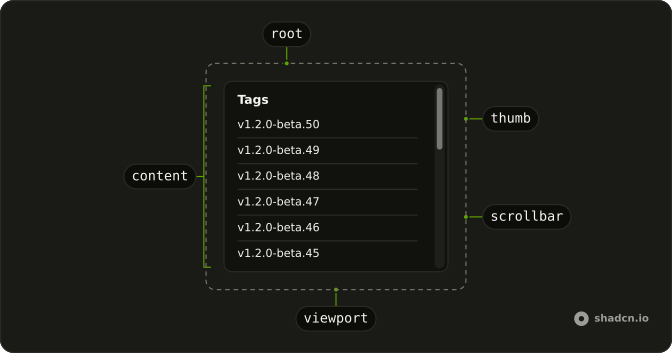
Anatomy
Usage
<div className="flex w-full max-w-md flex-col gap-2">
  <h3 className="font-semibold text-sm">Technologies</h3>
  <ScrollArea className="w-full whitespace-nowrap rounded-md border bg-background">
    <div className="flex w-max gap-2 p-4">
      {tags.map((tag) => (
        <Badge key={tag} variant="secondary">
          {tag}
        </Badge>
      ))}
    </div>
  </ScrollArea>
</div>
FAQ
API Reference
Scroll Area
No extra props in this demo. The rest is on the Scroll Area page.
Badge
Sets variant="secondary". The rest is on the Badge page.