shadcn.io is an independent project built on shadcn/ui
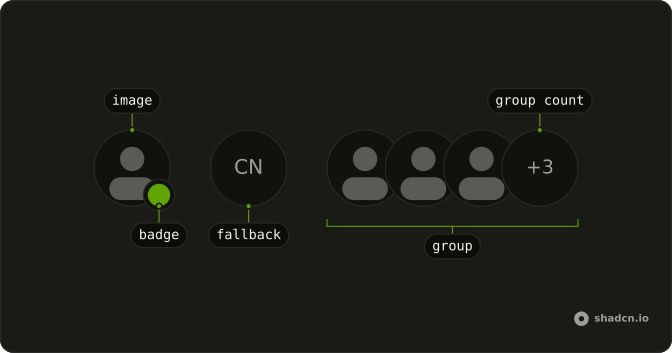
A round photo has a muted dot at the bottom corner. A hidden label on the dot says Offline. The initials CN show only if the picture fails.
Use it in a list that mixes people who are here and people who are not. The dot does not track presence. A text status fits a Badge beside the name. In React, Base UI does not know who is away.
Installation
Anatomy
Usage
<Avatar>
  <AvatarImage
    alt="@shadcn"
    height={32}
    src="https://github.com/shadcn.png"
    width={32}
  />
  <AvatarFallback>CN</AvatarFallback>
  <AvatarBadge className="bg-muted-foreground">
    <span className="sr-only">Offline</span>
  </AvatarBadge>
</Avatar>
FAQ
How is the offline dot made?
AvatarBadge uses bg-muted-foreground, so the dot picks up the theme's muted foreground in light and dark. It sits on the bottom end corner with a ring in the background color.
How do screen readers get Offline?
The badge contains a visually hidden "Offline". There is no icon. The gray class is not announced.
How do I use this dot for a different status?
Swap bg-muted-foreground for another background token, and change the hidden text to match. This file's pair is the muted token plus "Offline".
Does the dot scale with the avatar?
Yes. AvatarBadge reads size on Avatar. This file leaves size at the default, so you get the default dot.
API Reference
Avatar
Sets alt="@shadcn", height={32}, src="https://github.com/shadcn.png" and width={32}. The rest is on the Avatar page.


