shadcn.io is an independent project built on shadcn/ui
Premium Features sits next to a New badge, with a chevron at the end of the header. Opening the card shows one short paragraph about the premium plan.
Use it to flag a section as new without leaving it open. If the badge should stand alone, put a Badge outside the header. In React, Base UI does not remember that the card was opened.
Installation
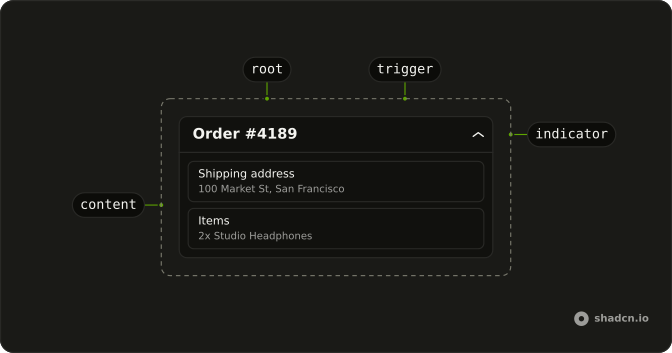
Anatomy
Usage
<Collapsible className="w-full max-w-lg rounded-lg border bg-card text-card-foreground shadow-sm">
  <CollapsibleTrigger className="group flex w-full items-center justify-between p-4">
    <span className="flex items-center gap-2">
      <span className="font-medium">Premium Features</span>
      <Badge variant="secondary">New</Badge>
    </span>
    <ChevronDownIcon
      aria-hidden="true"
      className="size-4 transition-transform duration-200 group-aria-expanded:rotate-180"
    />
  </CollapsibleTrigger>
  <CollapsibleContent>
    <div className="border-t p-4 text-muted-foreground text-sm">
      Unlock advanced features with our premium plan including priority
      support, advanced analytics, and custom integrations.
    </div>
  </CollapsibleContent>
</Collapsible>
FAQ
Where does the New badge sit?
Inside the trigger, in a flex items-center gap-2 group with the Premium Features title. The trigger's justify-between pushes the chevron to the end of the row.
Does New get announced with the heading?
Yes. The badge is inside the trigger, so the button's name is Premium Features New. Move the badge out of the trigger if it shouldn't be part of the name.
How do I change the New badge?
Change its text or variant: this one is secondary. Keep it short so the header stays on one line.
Can I put another badge on this header?
Yes. Add it to the same group as the title, and the gap-2 spaces it. Every badge inside the trigger becomes part of its name.
API Reference
Collapsible
No extra props in this demo. The rest is on the Collapsible page.
Badge
Sets variant="secondary". The rest is on the Badge page.