shadcn.io is an independent project built on shadcn/ui
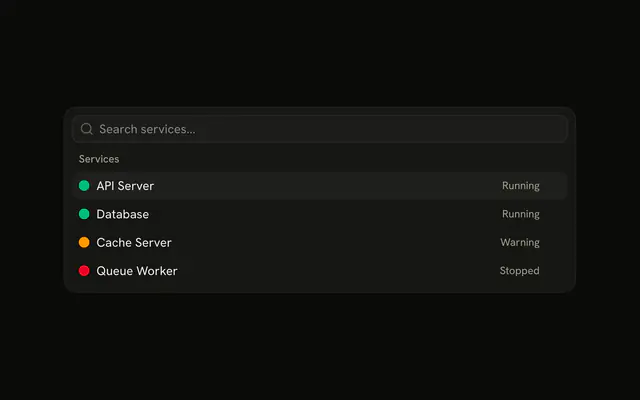
An outline View Services button opens the popover. Four services show a colored dot and a word: Running, Running, Warning, and Stopped.
Keep the popover beside the control that asked for status. Open a Dialog when the list should cover the rest of the page. In React, Base UI does not change the page.
Installation
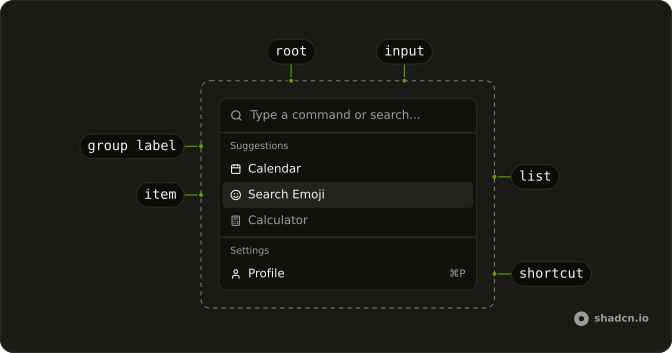
Anatomy
Usage
<Popover>
  <PopoverTrigger render={<Button variant="outline" />}>
    View Services
  </PopoverTrigger>
  <PopoverContent
    align="start"
    className="w-[400px] max-w-[calc(100vw-2rem)] p-0"
  >
    <PopoverTitle className="sr-only">View Services</PopoverTitle>
    <Command>
      <CommandInput placeholder="Search services..." />
      <CommandList>
        <CommandEmpty>No services found.</CommandEmpty>
        <CommandGroup heading="Services">
          {items.map((item) => (
            <CommandItem key={item.value}>
              <span
                aria-hidden="true"
                className={cn("size-3 shrink-0 rounded-full", item.dot)}
              />
              <span className="flex-1">{item.label}</span>
              <span className="text-muted-foreground text-xs">
                {item.status}
              </span>
            </CommandItem>
          ))}
        </CommandGroup>
      </CommandList>
    </Command>
  </PopoverContent>
</Popover>
FAQ
How is this menu anchored to the button?
The View Services button is the trigger, and the panel opens below it, lined up with its start edge. The panel is 400px wide, never wider than the screen, and has no padding, so the Command fills it. A visually hidden PopoverTitle names it.
PopoverTrigger renders the button through render, and PopoverContent sets align="start".
How is the colored status dot built?
Each dot is a span with size-3 shrink-0 rounded-full and a theme color: bg-success for API Server and Database, bg-warning for Cache Server, and bg-destructive for Queue Worker. It's hidden from screen readers, because the state is written out beside it.
Where does Running or Stopped go?
The service name's span has flex-1, which pushes the state to the end of the row. The state is a span with text-muted-foreground text-xs that reads Running, Warning or Stopped.
What appears when nothing matches the search?
CommandEmpty in the list says "No services found." It shows only when the search leaves nothing.
How do I run an item from this menu in React?
These items don't run anything yet.
Pass onSelect to each CommandItem.
How do the keys work in this menu?
The arrow keys move through the items, Enter runs the highlighted one, and typing filters the list. Escape or a click outside closes the popover, and focus goes back to the button. CommandInput shows "Search services..." until someone types.
Command filters and ranks the items by their text on its own.
API Reference
Popover
Sets align="start". The rest is on the Popover page.
Button
Sets variant="outline". The rest is on the Button page.
Command
Sets placeholder="Search services..." and heading="Services". The rest is on the Command page.