shadcn.io is an independent project built on shadcn/ui
Two rows that are links. Visit our documentation has a short description and a chevron. External resource has a short description and an external-link icon, and it opens in a new tab.
Make the whole row a link when the destination is the action. Keep a separate button, as on a Card, when the row also has other actions. On React, Base UI does not choose the destination.
Installation
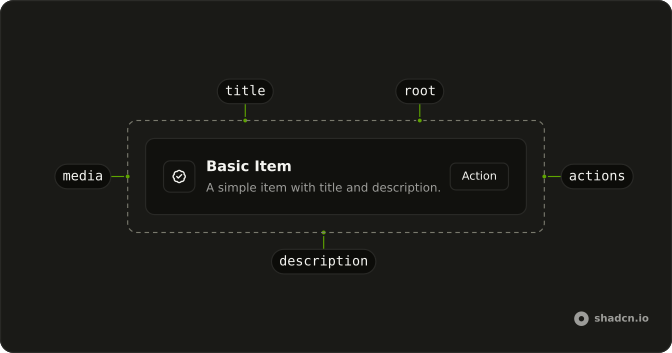
Anatomy
Usage
<div className="flex w-full max-w-md flex-col gap-4">
  <Item render={<a href="#" />}>
    <ItemContent>
      <ItemTitle>Visit our documentation</ItemTitle>
      <ItemDescription>
        Learn how to get started with our components.
      </ItemDescription>
    </ItemContent>
    <ItemActions>
      <ChevronRightIcon aria-hidden="true" className="size-4" />
    </ItemActions>
  </Item>
  <Item
    className="bg-background"
    render={<a href="#" rel="noopener noreferrer" target="_blank" />}
    variant="outline"
  >
    <ItemContent>
      <ItemTitle>External resource</ItemTitle>
      <ItemDescription>
        Opens in a new tab with security attributes.
      </ItemDescription>
    </ItemContent>
    <ItemActions>
      <ExternalLinkIcon aria-hidden="true" className="size-4" />
    </ItemActions>
  </Item>
</div>
FAQ
When should an Item be a link and when a button?
A link when the row navigates: to a page, a route or an external resource. A button when it does something in place, such as opening a dialog or saving. If a row needs both, keep it a plain Item with a link in the title and a Button in ItemActions, since a button can't sit inside a link.
How do I render an Item as a link in React?
Pass the anchor to render, such as render={<a href="/docs" />}: the Item's props are merged onto it.
Either way you get one real anchor, so right-click, middle-click and the browser's link handling keep working. Use your router's link component in place of the anchor for internal routes.
Why add rel noopener noreferrer to the external link?
target="_blank" opens a new tab, and noopener stops that page from reaching back to yours through window.opener. noreferrer also leaves out the Referer header. Modern browsers imply noopener for new tabs, but setting both is still the safe default.
How do the icons tell internal and external links apart?
A chevron in ItemActions reads as go to the next page, and the external-link icon as leaves the site. Both are decorative here, marked aria-hidden="true", because the title says where the link goes. If the new tab matters, say so in text, as the second row's description does.
Should a link Item have a description?
Yes when it helps people decide whether to follow it: the first row says what the docs cover, the second warns that it opens a new tab. The description is clamped to two lines. Skip it when the title is the whole story.
Are Item links accessible with a keyboard and a screen reader?
Yes: the row is a real anchor, so Tab reaches it, Enter follows it and it's announced as a link named by its text. Item adds a visible focus ring with focus-visible styles. Avoid putting other interactive elements inside the anchor, since nested controls inside a link are invalid.
API Reference
Item
No extra props in this demo. The rest is on the Item page.