shadcn.io is an independent project built on shadcn/ui
Three outline rows that are links. Each has album art, a title with the album name, the artist and a duration. The first title is Midnight City Lights, at 3:45.
Use image rows for a media list people open, such as songs. A Table fits once artist, album and duration should be separate columns. In React, Base UI does not play the track.
Installation
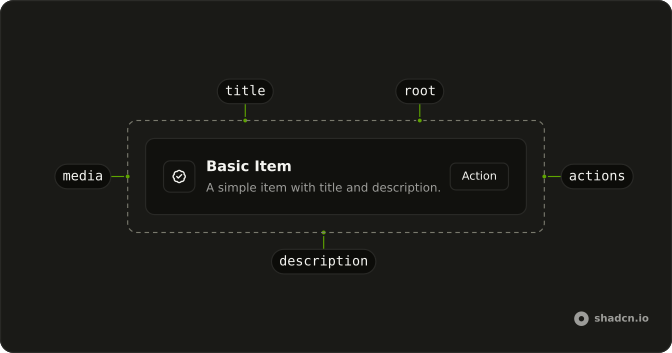
Anatomy
Usage
<div className="flex w-full max-w-md flex-col gap-6">
  <ItemGroup className="gap-4">
    {SONGS.map((song) => (
      <Item
        className="bg-background"
        key={song.title}
        render={<a href="#" />}
        variant="outline"
      >
        <ItemMedia variant="image">
          <img
            alt=""
            className="object-cover grayscale"
            height={32}
            src={`https://avatar.vercel.sh/${song.album}`}
            width={32}
          />
        </ItemMedia>
        <ItemContent>
          <ItemTitle className="line-clamp-1">
            {song.title} -{" "}
            <span className="text-muted-foreground">{song.album}</span>
          </ItemTitle>
          <ItemDescription>{song.artist}</ItemDescription>
        </ItemContent>
        <ItemContent className="flex-none text-center">
          <ItemDescription>{song.duration}</ItemDescription>
        </ItemContent>
      </Item>
    ))}
  </ItemGroup>
</div>
FAQ
What does variant image do for ItemMedia?
It turns ItemMedia into a small square that clips its picture: the image fills it with object-cover, corners follow your style, and the square shrinks at the sm and xs sizes. You only supply the image and its width and height.
What is ItemGroup and when should I use it?
ItemGroup stacks related Items in a column and gives the block the list role. This list sets gap-4 on the group. Add grid classes on ItemGroup when the rows should sit in columns.
How do link rows differ from rows with a button?
Here the whole row is the link, so the title, art and duration are one target, and it gets a muted hover background and a focus ring. When a row needs a separate action, keep it a plain Item and put a Button in ItemActions instead.
How do I show several pieces of metadata in a row?
Put the main line in ItemTitle, the album here in a muted span, the secondary line in ItemDescription, and a short value like the duration in a second ItemContent with flex-none so it stays at its width at the inline end. The title clamps to one line, so long names don't push the duration out.
API Reference
Item
Sets variant="image". The rest is on the Item page.