shadcn.io is an independent project built on shadcn/ui
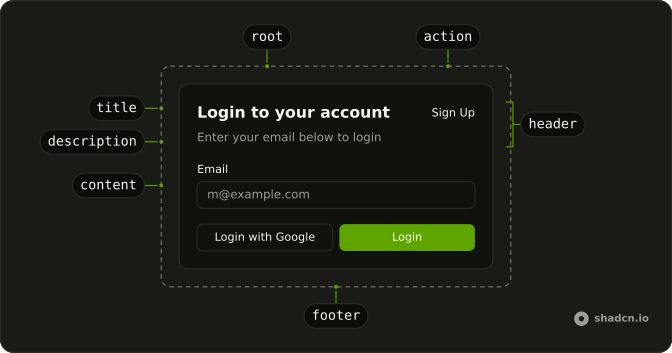
The title is Login to your account. Email shows the placeholder m@example.com. Password has Forgot your password? beside the label. The buttons are Login and Login with Google, and the footer links to Sign up.
Use a login card on a sign-in page. Put the same form in a Dialog if signing in should not leave the page. On React, Base UI does not check the password.
Installation
Anatomy
Usage
<Card className="w-full max-w-md">
  <CardHeader>
    <CardTitle>Login to your account</CardTitle>
    <CardDescription>
      Enter your email below to login to your account
    </CardDescription>
  </CardHeader>
  <CardContent className="flex flex-col gap-4">
    <Field className="gap-2">
      <FieldLabel htmlFor="login-card-email">Email</FieldLabel>
      <Input id="login-card-email" placeholder="m@example.com" type="email" />
    </Field>
    <Field className="gap-2">
      <div className="flex items-center justify-between">
        <FieldLabel htmlFor="login-card-password">Password</FieldLabel>
        <a className="text-sm hover:underline" href="#">
          Forgot your password?
        </a>
      </div>
      <Input id="login-card-password" type="password" />
    </Field>
    <Button className="w-full">Login</Button>
    <Button className="w-full" variant="outline">
      Login with Google
    </Button>
  </CardContent>
  <CardFooter className="justify-center">
    <p className="text-muted-foreground text-sm">
      Don't have an account?{" "}
      <a className="underline" href="#">
        Sign up
{/* The rest of the file is under Installation. */}
FAQ
How are the labels tied to the fields?
Each label and input sit in a Field. FieldLabel points at its input with htmlFor, and the input has the matching id. Clicking a label focuses its field.
How do I submit the form?
Wrap the content in a form, make Login type="submit", and give the inputs a name and required. The demo has no form or handler, so the buttons do nothing yet.
API Reference
Card
No extra props in this demo. The rest is on the Card page.
Field
Sets htmlFor="login-card-email" and htmlFor="login-card-password". The rest is on the Field page.
Input
Sets id="login-card-email", placeholder="m@example.com", type="email", id="login-card-password" and type="password". The rest is on the Input page.
Button
Sets variant="outline". The rest is on the Button page.




